pstack, Part 2: Understand the Code, Then Design, Before You Change It
Get AI to understand code and compare designs before changing it: when to use pstack's /how, /why, /architect, /interrogate, and /arena, and how to prompt them.
Ask an AI coding assistant to “change this feature,” and it often starts editing at the first place that looks reasonable, using the first approach it thinks of. This post shows you how to flip that order with five pstack skills: first have the AI explain how the code works now and why it is shaped that way, then have it compare a few designs, and after the change, have other models look for problems. For each skill I cover when to use it, how to write the command (with an example you can copy and adapt), what it does step by step, what you get back, and where to go next. At the end, a made-up example strings all five together, followed by a “which one when” table.
pstack Series Part 2
- Series guide: What pstack is and how to read the four parts (not yet published)
- Previous (Part 1): Install, pick models, start with /poteto-mode
- Next (Part 3): After the code is written, prove it works before merging
Version note: This post is based on pstack version
0.15.30, atcursor/pluginscommiteb4db2b(14:08 on 2026-10-22, Taipei time), with Claude Code 2.1.309. Later versions may behave differently. The two posts were checked against different versions, listed below (Part 1 itself doesn’t state a Claude Code version):
Part 1 This post pstack 0.15.29(88d4751)0.15.30(eb4db2b)Skills 56 57 Claude Code 2.1.306 2.1.309 The only change from
0.15.29to0.15.30is a new skill,statechart. None of the parts this post uses changed: how, why, architect, interrogate, arena, poteto-mode, and the Claude Code adapter notes. When I checked at 10:31 on 2026-10-24 (Taipei time),mainincursor/pluginswas at0.15.32(6dbc3ff). None of the pstack changes aftereb4db2btouch the five skills in this post, thepoteto-modeskill file, or the guide sections cited here.
Before You Start
pstack is a set of skills in Cursor’s official plugin repository. A skill is a set of instructions that tells the AI how to do one kind of job. Installing pstack and picking models are covered in Part 1; this post assumes it is already installed.
Commands take a prefix. pstack’s docs use Cursor’s form, such as /how. In Claude Code (an AI coding assistant you use in a terminal), plugin commands carry the plugin name in front, so you type /pstack:how. The examples below use the Claude Code form; in Cursor, just drop the pstack:.
None of these five skills start on their own. Each one is set so the AI can’t invoke it by itself, so you have to type the command. The other option is to hand the task to /pstack:poteto-mode and let it sequence the work. For example, if your prompt says “don’t change any code yet,” it runs a read-only investigation, which starts with /how and adds /why for questions about motivation.
You’ll see the word “subagent” a lot below. When a skill runs, it sends out other AI instances to work on parts of the job in parallel; each one is a subagent. The more subagents a skill sends out, the more of your usage quota it usually takes.
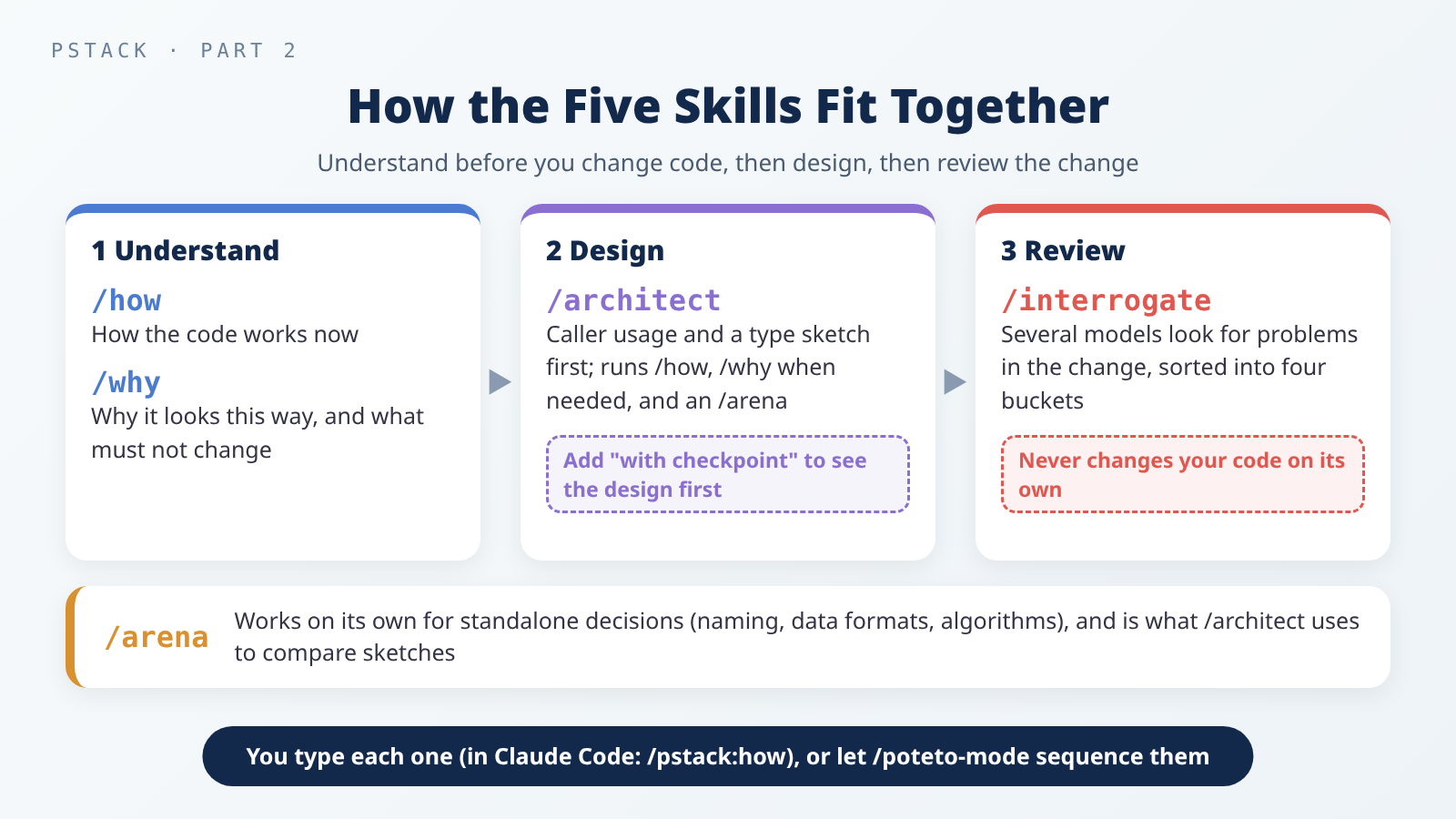 Understand first, then design, then review the change.
/arena works on its own, and it is also the tool /architect uses inside to compare sketches.
/how: Learn How the Code Works Now
When to use it: before you change code you don’t know well, or when you want to ask “where should this live, which module owns it, is this the right layer.” It answers how things work now, not why they were written that way. That is /why’s job.
How to write the command: ask the question you actually have. Add an entry point and the part you care about most:
1
/pstack:how how does <feature or module> work? start from <an entry point, such as an API or a command> and explain how data flows and what each file is responsible for. i most want to know <the part you care about>.
For example:
1
/pstack:how where is the session created after a user logs in, and how does it expire? what happens on the frontend once it expires?
What it does:
- It sizes up the question first. If the scope is unclear, it states its interpretation and starts exploring; you can redirect it if it’s off.
- For a simple question (one module, a small utility, or a narrow question like “how does this function work”), it sends a single subagent that reads and explains in one pass. When in doubt, it takes the simple path.
- For a complex question (a subsystem that spans several files or services, or a full architectural overview), it splits the question into 2 to 4 angles and sends a read-only subagent to explore each one at the same time.
- When they are all done, it sends one more subagent to merge their findings into a single explanation.
- It hands you that explanation, with light edits at most. It doesn’t substantially rewrite it.
What you get: an architectural explanation written for a senior engineer, enough to build a working mental model without reading like annotated source code. Sections that don’t apply are dropped:
- Overview: what it is, what it does, and why it exists.
- Key Concepts: the types (the kinds and shapes of data, such as which fields an order has), services, or abstractions you need to follow the rest.
- How It Works: the longest section. What triggers it, what happens step by step, and where data goes. It names specific files and functions, and includes a diagram when several components are involved.
- Where Things Live: the files and folders you need to start working.
- Gotchas: the non-obvious parts that tend to trip people up.
What’s next: if you then want to know why it looks this way, run /why. The pstack guide’s suggested order is how first, then why: mechanics before history. If you already understand it and are ready to make a change, go to /architect.
/why: Find Out Why the Code Looks This Way
When to use it: when you want to know why a piece of code was written this way, why an approach was chosen, where a threshold number came from, or how a regression (something that used to work and then broke) came about. It is especially useful before you change something, so you know which parts exist for a reason and shouldn’t be touched lightly.
How to write the command: name the target and ask your question. If you’re asking because you plan to change it, say so:
1
/pstack:why why does <a piece of code or a decision> work this way? does the reason still hold? i plan to <the change you want to make>.
For example:
1
/pstack:why why is the API retry limit set to five? does the reason still hold? i plan to make it configurable.
If you suspect the history explains the mess, you can ask for both at once: “do why first, then how.”
What it does:
- Pins down the target and the question. If you’re vague, it guesses which code you mean from the conversation, states its reading briefly, and carries on; you can correct it if it guessed wrong.
- Gathers the code-level clues first. That includes file paths and line ranges, the key functions and constants, the recent commits that touched the code (a commit is one recorded change in git), and the PRs (pull requests) and discussions behind those commits. It uses commands like
git blame(which shows the commit that last changed each line) andgit log. - Searches for evidence in parallel. It checks which MCP servers you have connected (an MCP server is a connector that lets the AI use an outside tool, such as an issue tracker, Slack, or Notion) and maps them to seven kinds of evidence: source control, issues or tickets, long-form docs, team chat, infrastructure monitoring, error tracking, and product analytics. For each kind with a matching tool, it sends one subagent, all at the same time. Source control is always searched. If it skips a kind, it has to write down why.
- Merges the results. One more subagent sorts everything by how strong the evidence is: what someone wrote down explicitly, what several clues point to together, what is only an inference, and what couldn’t be found.
- Hands it to you. It may lightly edit the report, but it won’t rewrite the confidence wording; “appears to” won’t become “is.”
What you get: a report where every point cites its source, with these sections: The Question, The Code in Question, What We Found, What We Can Reasonably Infer, Competing Hypotheses, What We Don’t Know, Sources Consulted, and Confidence Summary. Sources Consulted has one line per kind of evidence, including the ones that found nothing or were skipped, with the reason. “Nobody wrote down why” is an answer too.
If you said you’re asking because you plan to change the code, the report ends with a list of constraints: what to Preserve, what you can Change, what to Avoid, and what the Risks are.
What’s next: take that Preserve / Change / Avoid / Risk list to /architect as constraints for the design.
/whyuses the MCP servers you’ve connected to read issues, docs, and chat history, and it usesgh(GitHub’s command-line tool) to read PR discussions. Before you start, decide what you’re willing to let the AI read. For how to tighten permissions, see Third-Party Skills and MCP Servers: The New Attack Surface in Your Coding Agent.
/architect: Sketch the Design Before Writing Code
When to use it: for work that isn’t a small fix, where jumping straight into code could lock in the wrong structure. The pstack guide’s rule of thumb: if the change crosses function boundaries or moves which code owns what, it earns /architect.
How to write the command: say what you want built and what you care about most. If you want to see the design before it starts implementing, you must say with checkpoint:
1
/pstack:architect with checkpoint. design <the feature>, then stop and show me before implementing. i care most about <how callers use it / performance / room to grow>. constraints: <the Preserve / Avoid list from /why>.
For example:
1
/pstack:architect with checkpoint. design the import pipeline, then stop and show me before implementing. i care most about how callers use it.
What it does: it opens a to-do list with five phases.
- Ground: it runs
/howover every part of the system the new code touches. If the design changes which code owns what, or which layer something lives in, it also runs/why, so the original reasoning becomes a constraint instead of a guess. It skips this phase only for brand-new work with no existing system to fit into. - Sketch: it uses
/arenato have several subagents each draw a sketch, and it requires at least two structurally different designs, not small tweaks to one design. A sketch has only types, function signatures (a function’s name, parameters, and return value), and how modules divide the work; function bodies are marked “not implemented” or written as pseudocode (plain-language steps that look like code but don’t run). Every sketch is checked against a list of design red flags, such as a large public interface that hides very little, or several modules writing the same state. It prefers the design with a small public interface that hides more complexity inside. - Agree: by default it does not stop. Once the sketch is done, it goes straight to implementation. Only when you ask explicitly (for example,
with checkpointor “stop and show me before implementing”) does it show you the design and wait for your go-ahead. If you push back on the design, it goes back to phase 1, grounds again, and redraws the sketches before writing more code. - Implement: it replaces the “not implemented” parts with real code, following the sketch. The sketch is the contract; if implementation turns up a need the sketch didn’t anticipate, it raises it instead of quietly working around it.
- Scrap: if implementation keeps hitting friction, such as the same workaround showing up in unrelated places, or types that only compile with forced casts, it throws the sketch out. It reruns
/how, redesigns as if the new constraints had been known from day one, cuts before it adds, and goes back to phase 2.
What you get: the caller’s usage, written first, with the type sketch derived from it. A small change gets one file with the new types and function signatures; larger work gets a module map plus type definitions. Alongside it comes a one-page rationale: the problem, the caller’s usage, the recommended shape, which sketch became the base and why, the tradeoffs accepted, the alternatives considered, the open questions and risks for you to weigh in on, and the first thing to implement.
What’s next: when it stops at the checkpoint, answer the open questions in the rationale, then let it go on to implement. If the design matters and a mistake would be expensive, you can run /interrogate on the sketch before implementation (the sketch already has concrete types and signatures, so it isn’t an abstract plan); otherwise, run /interrogate on the change once it’s built.
/interrogate: Have Several Models Look for Problems
When to use it: after the code is changed and before you merge, to find problems neither you nor the AI noticed. It reviews actual code changes, not an abstract plan: point it at a plan with no code behind it, and the reviewers tend to invent risks that will never happen.
How to write the command: say what to review. That can be a few files, a diff (the lines that changed between two versions), or a whole branch (a line of development in git). Adding “don’t change anything yet” and “no nitpicks” makes the result more useful:
1
/pstack:interrogate the whole branch, but skeptically. don't change anything yet. no nitpicks unless it's an actual bug or regression in behavior.
To review just a few files:
1
/pstack:interrogate review <files or folder>. the goal of this change is <what you want to achieve>.
What it does:
- Sets the scope. If you named files or a diff, it uses those. If you’re on a feature branch, it runs
git diff main...HEADto get the whole branch’s changes. If you mention recent work, it gathers the relevant files. - Writes one paragraph on what the change is meant to do. It draws on your message, the commit messages, the PR description, and the code. If it isn’t sure, it asks you before going on.
- Sends out reviewers. It sends one reviewer per model you’ve configured, labeled Reviewer A, B, and so on. They all get the same template, the same changes, and the same rubric (a fixed checklist of what to look for and how to judge it). It relies on different models having different blind spots, not on giving each reviewer a persona.
- Merges the results. It combines findings that describe the same issue in different words and notes which models raised each one. Findings that two or more models raised independently are the strongest signal; a finding from just one model is still read, but weighted lower.
- Makes the lead call. Acting as a pragmatic senior engineer, it puts every finding into one of four buckets, each with a one-line reason.
What you get: a verdict that lists, in order, the intent of the change, the model behind each reviewer and how many findings it raised, the four buckets, and an Agreement Map (where the models agreed and where they differed). The four buckets are:
- Act on: real problems affecting correctness, security, or maintainability that would block a real PR.
- Consider: legitimate, but maybe not worth fixing right now; worth your attention.
- Noted: technically valid but not something to act on now.
- Dismissed: wrong, nitpicky, or missing context, with a brief reason.
It doesn’t change your code automatically. Whether to fix anything, and what, is up to you.
What’s next: handle Act on first, then look at Consider. Read the Dismissed items too: the lead is a pragmatic senior engineer, not an oracle, and you can override it.
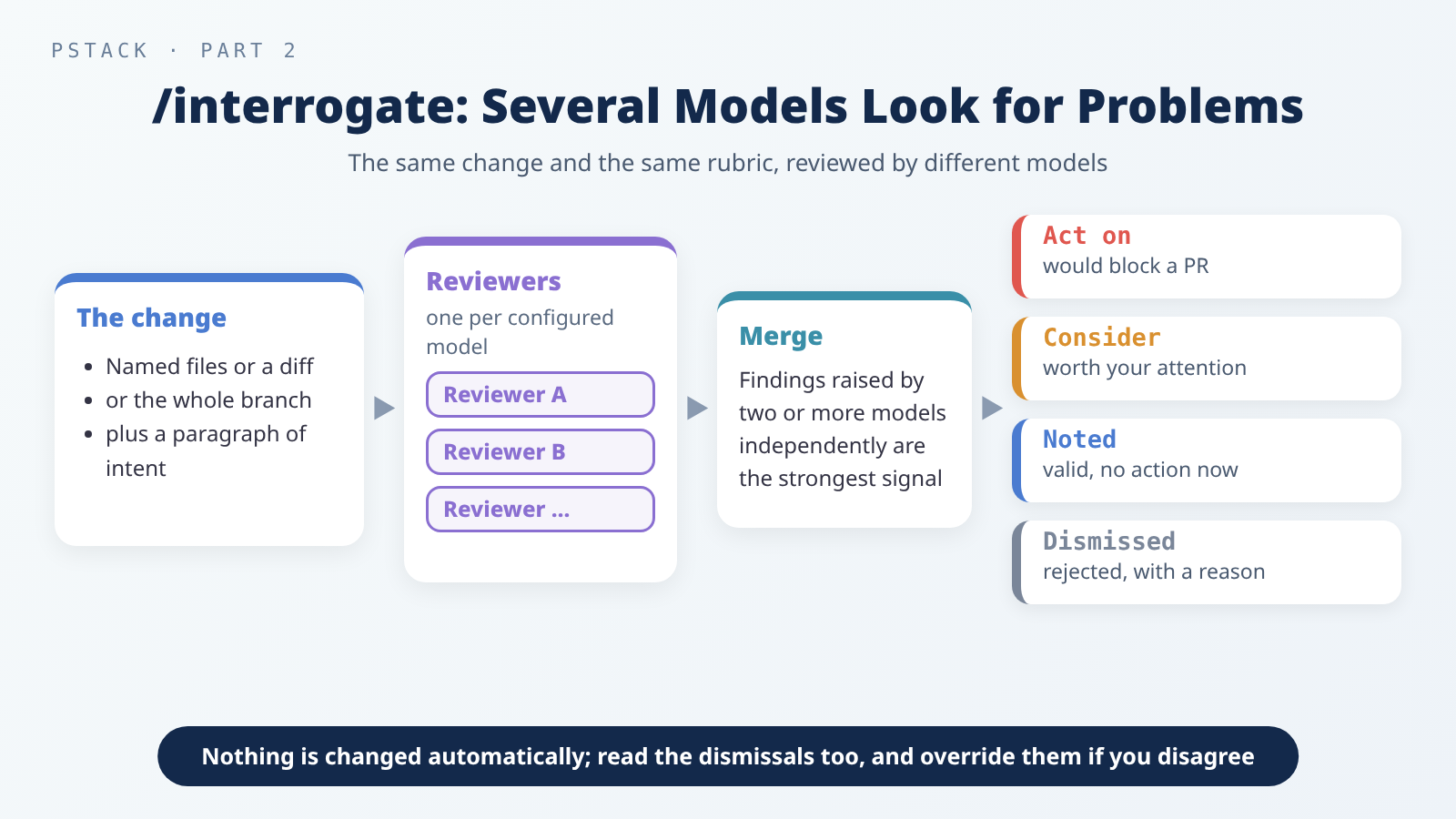 Several models review the same change independently, then the lead sorts the findings into four buckets. Nothing is changed automatically.
/arena: Let Several AIs Each Try, Then Keep the Best
When to use it: for anything where a single attempt would likely lock in the wrong approach. The pstack guide’s examples are standalone decisions like naming, data formats, and algorithms. You can also use it for a second opinion: your current design becomes one candidate, and you see whether the others found something better. It is also the tool /architect uses in its sketch phase.
How to write the command: state the task, why it matters, and how many attempts you want. Ask for more when the decision matters and fewer when it doesn’t:
1
/pstack:arena <the task>. this matters because <it's hard to change later / it affects many places>. <N> candidates, own worktree per attempt.
For example:
1
/pstack:arena pick the cache key format, 3 candidates. the format is expensive to change later.
1
/pstack:arena give me a second opinion on our current approach.
What it does: it opens a to-do list with six phases.
- Frame: every candidate gets exactly the same prompt, so the prompt is the contract. It states what each candidate should produce, then writes 3 to 6 concrete criteria that can be scored. The judge scores against these criteria, and it uses them itself to pick the base in step 4; the candidates see only the task. Each candidate gets its own place to work (a git worktree where possible, meaning a separate working copy of the same project) so they don’t overwrite each other.
- Fan out: it sends N subagents at the same time. Each does the task and adds a short note on the alternatives it considered and why it rejected them. If one produces nothing, it carries on with the remaining N-1 and notes the dropout.
- Cross-judge: once every candidate is done, it sends one read-only judge, preferably from a different model family than the main conversation (for example, Claude and Grok are different families). The judge scores each candidate against each criterion and recommends one as the base.
- Pick: it reads every candidate end to end itself, scores each one criterion by criterion, and compares the result with the judge’s. If they agree, the pick is confirmed. If not, one of them is biased or the criteria were unclear, so it reads both rationales before deciding. It picks the version a future maintainer can extend most easily without breaking its rules.
- Graft: it goes over the losing candidates once more, usually taking one or two things worth porting from each, and folds them into the base by hand instead of pasting. If the candidates converge on the same approach, it ships that shared approach with no grafting. If they differ wildly, the task in phase 1 wasn’t clear enough, so it reframes and runs again instead of averaging the differences.
- Verify: it checks the merged result like any other output. If it finds a problem, it works out whether phase 1 was wrong (start over) or a candidate had caught it and the graft was missed (back to phase 5).
What you get: one merged result, with a short note naming the base and why, the judge’s verdict, each graft and the candidate it came from, what was rejected and why, any convergence or dropouts, and the verification result.
What’s next: if the result is code, you can run /interrogate before merging. If what you actually need is coverage, such as checking every package once, rather than comparing approaches, that’s the job of another skill, /swarm. Don’t use /arena for it.
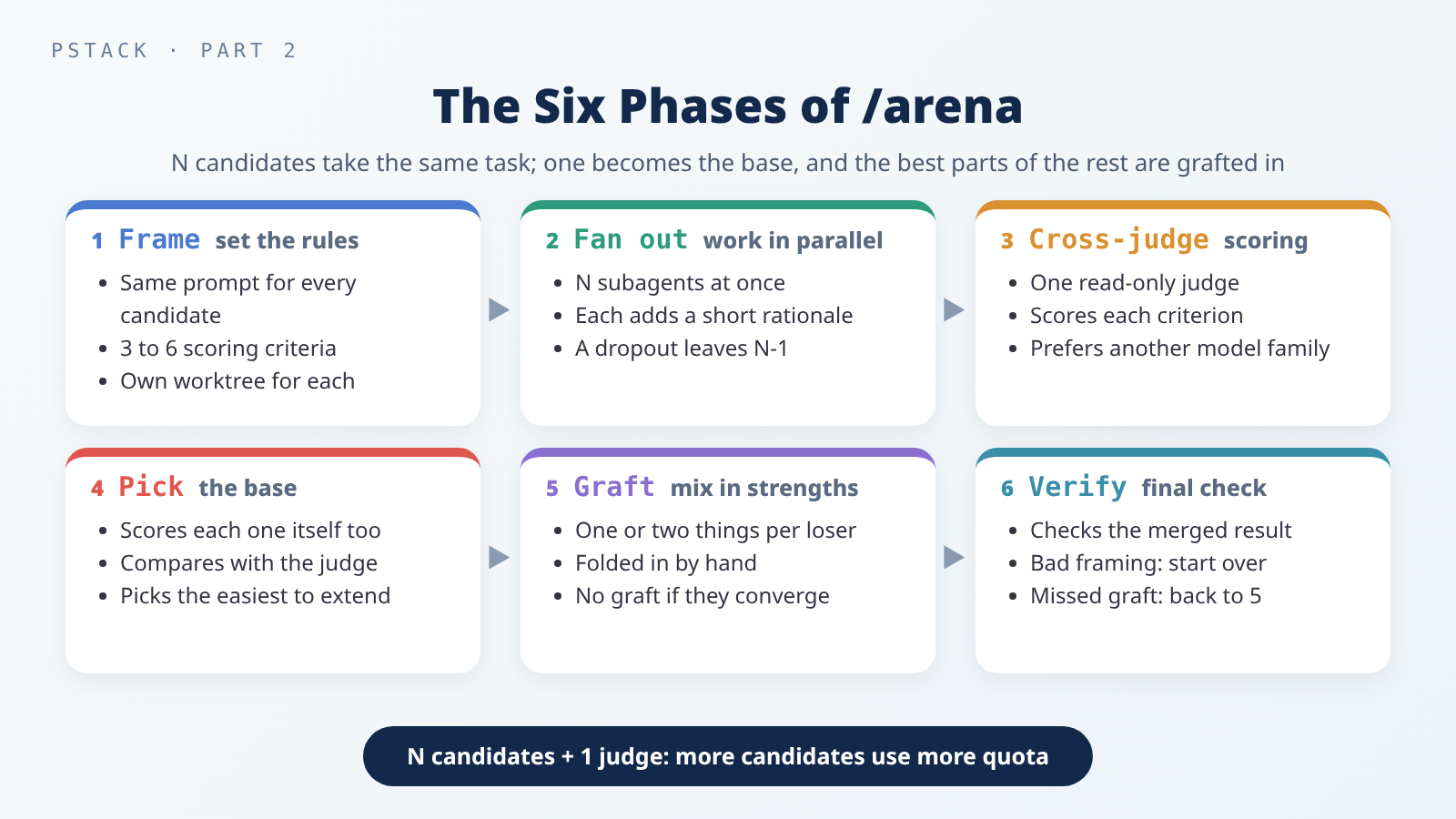 More candidates means more subagents: N candidates plus one judge.
A Complete Example (Made Up)
This scenario is made up. It only shows how the five skills fit together. It isn’t a record of a real run, and no output is shown.
Say you maintain a website that sends an email for every notification (a new comment, a new like). You want to add an option so users can get one daily digest email instead.
1. Understand how notifications are sent today.
1
/pstack:how where are notifications triggered, how do they get queued, and what finally sends the email? i most want to know how the sending step connects to user preferences.
Read its How It Works and Gotchas sections, and make sure you know where the sending code lives and what the traps are.
2. Find out why it’s one email per notification.
1
/pstack:why why is each notification emailed right away instead of in batches? does the reason still hold? i plan to add a daily digest option.
Because you said you plan to change it, the report ends with a Preserve / Change / Avoid / Risk list. It might, for example, point out that some kinds of notification were made instant on purpose and should stay that way.
3. Sketch the design and have it stop for you.
1
/pstack:architect with checkpoint. design a daily digest email option, then stop and show me before implementing. i care most about not affecting the existing instant notifications. constraints: <paste the Preserve / Avoid list from step 2>.
/architect’s first phase already runs /how on its own, and /why when needed. This example runs the first two steps by hand so you understand the code yourself first and can check whether the AI’s understanding is off. If you don’t need to see it yourself, you can start at this step. When it stops, read the open questions in the rationale, answer them, and then let it implement.
4. Hand a standalone decision to /arena.
Suppose the rationale raises a question: should the digest list notifications by time, or group them by type? A standalone decision like this can go to /arena on its own:
1
/pstack:arena design the content layout for the daily digest email, 3 candidates. the point is to let users see the most important notifications at a glance.
5. Review after the change, before merging.
1
/pstack:interrogate the whole branch, but skeptically. don't change anything yet. no nitpicks unless it's an actual bug or regression in behavior.
Handle Act on first, then Consider. Read Dismissed too, and override it if you disagree.
This example calls each skill by hand, so you stay in control of every step. Normally you can give the goal and constraints to
/pstack:poteto-modeand let it decide which skills to use and in what order. When you do, don’t list the skills in your prompt; that reorders steps it already sequences. Name a skill only when you want to override a default.
Which One When
The pstack guide starts with an important point: most changes need none of these. Here is its rough ladder, plus /how and /why:
| Situation | Use |
|---|---|
| You’re about to change unfamiliar code and need to know how it works now | /how |
| You want to know why it’s written this way and what must not change | /why (say you plan to change it) |
| A small, finished change you’re unsure about | /interrogate alone |
| A change that crosses function boundaries or moves which code owns what | /architect (it brings /arena with it) |
| A standalone decision, such as naming, a data format, or an algorithm | /arena directly |
| A contested design that’s expensive to reverse | /architect, then /interrogate before merging |
| Coverage, such as checking every package once | Not one of these five; use /swarm |
| You want the AI to decide | /poteto-mode, which already applies this ladder |
Cautions
- Quota: the more subagents a skill sends out, the more quota it usually uses.
/howsends one for a simple question, and 2 to 4 explorers plus one to merge for a complex one./whysends one per kind of evidence with a matching tool, plus one to merge./interrogatesends one reviewer per model./arenasends N candidates plus a judge./architectincludes/how, possibly/why, and a whole/arena, so it usually sends out the most subagents of the five. A small change isn’t worth/architector/arena. /architectdoesn’t stop by default: if you want to see the design before implementation, saywith checkpoint.- Don’t take the first design: the first attempt is usually just the first shape the model thought of. For designs that matter, use
/architector/arenato see a few. - Don’t review an abstract plan: use
/interrogateon actual code changes. - Don’t accept every review comment:
/interrogatesorts findings with reasons, but you decide, and you can override it either way. - Don’t let parallel AIs share one working directory: they overwrite each other, and nobody can tell who changed what. With
/arena, you can ask for its own worktree per attempt. - Versions: everything here follows the pstack
0.15.30skill files; later versions may work differently.
Conclusion
Before you change code with pstack, the order is: use /how to learn how the code runs now, and /why when you need the reasons that make some parts off-limits. Then use /architect to write the caller’s usage and a type sketch, adding with checkpoint so you see it first. For a standalone decision, let /arena compare a few candidates. Once the code is changed, use /interrogate to have several models look for problems independently, and decide for yourself what to fix. You don’t need all five every time: for a small change, just make it, and review it afterward if you’re unsure.
Further Reading
- Guide: Understand the code: when to use
/how,/why,/teach, and/recall. - Guide: Design:
/architect,/arena,/swarm,/interrogate, and prototypes. - Guide: Recipes and pitfalls: prompts worth copying and common mistakes.
- The five skill files: how, why, architect, interrogate, and arena.
- pstack, Part 1: Install, Pick Models, Start With /poteto-mode: how to install, and how
/poteto-modesequences a task. - Write Your Own Agent Skill: From SKILL.md to Testing and Upkeep: SKILL.md structure and testing from the skill author’s side.
- Third-Party Skills and MCP Servers: The New Attack Surface in Your Coding Agent: what files an agent can read, and how to tighten permissions.
- Another skill set’s approach: mattpocock/skills Series Guide, From Vague Requirements to Shared Terms, Spec, Tickets, or More Questions?, Structure, Code Review, and Merge Conflicts, and Skills for Research, Handoffs, and Learning.