Third-Party Skills and MCP Servers: The New Attack Surface in Your Coding Agent
Five real cases show how third-party skills and MCP servers widen a coding agent's attack surface—prompt injection, supply chain, permissions—plus a checklist.
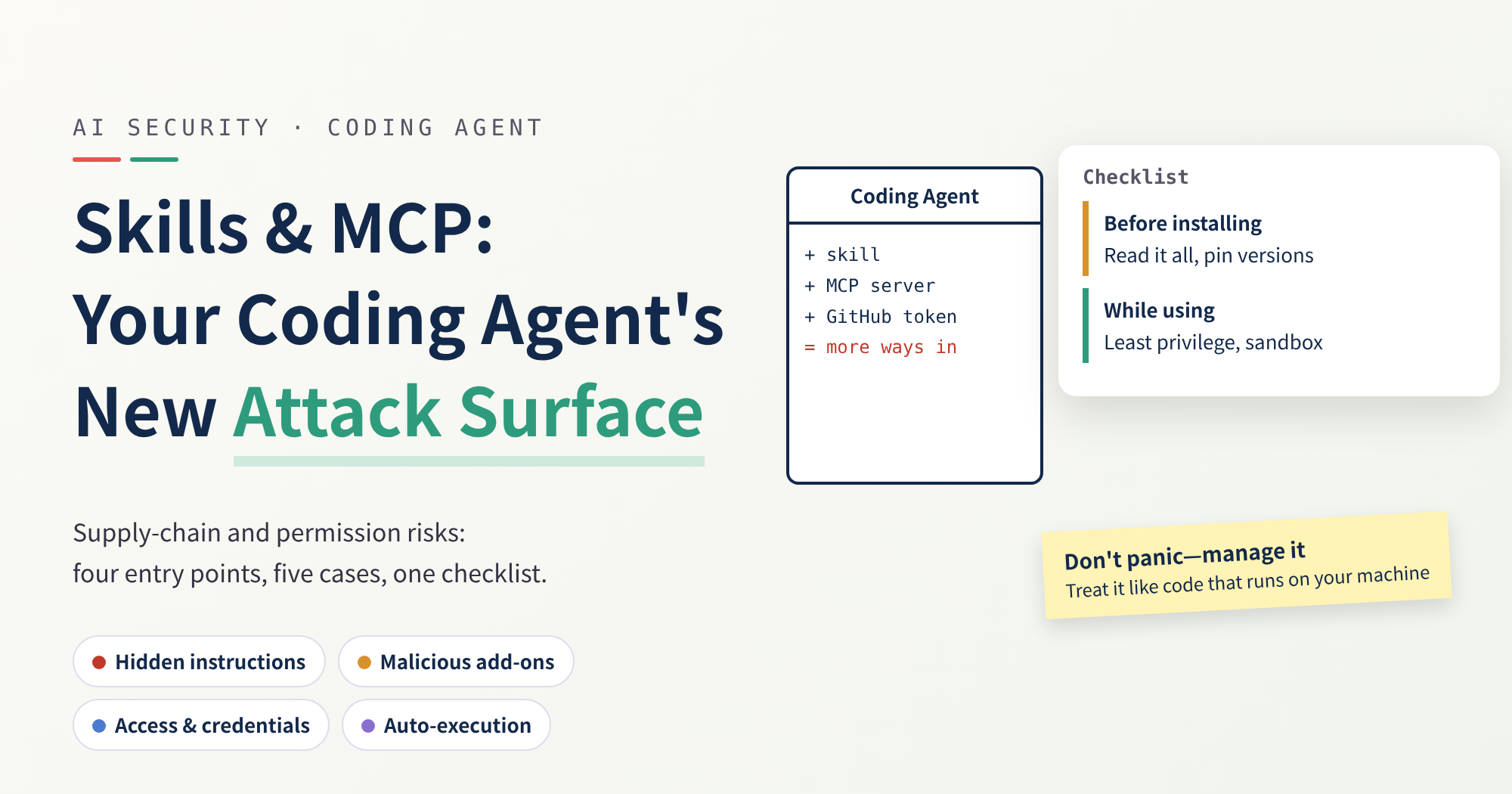
Monday morning. You install a skill a teammate recommended in Claude Code, then add an MCP server in Cursor that can read GitHub issues. Your config grows by a dozen lines. Harmless enough.
From that moment, your coding agent reads instructions you never wrote, runs code you never looked at, and holds your GitHub token. This post answers two questions: what new exposure did that create, and which risks are worth fixing versus merely scary-sounding?
I label three kinds of statements: Fact (stated by a linked public source), Inference (my conclusion from the facts), and Opinion (my judgment—feel free to disagree). All sources were rechecked on October 16, 2026.
The short version: no need to panic, but treat skills and MCP servers as code that runs on your machine, not as a bit of config.
Five terms first
| Term | In one sentence |
|---|---|
| Skill | A folder with an instruction file for the AI (SKILL.md), optionally with scripts; when the AI decides it’s relevant, it reads the file and follows it. |
| MCP server | A small program that connects the AI to outside tools, like GitHub or a database; it tells the AI “here are my tools and how to use them.” |
| Prompt injection | Hiding instructions in content the AI will read (web pages, issues, docs, tool output) so the AI mistakes them for commands it should follow. |
| Token | A string that stands in for your username and password; whoever holds it can act as you within what it allows. |
| Sandbox | A fence around a program that limits which files it can read or write and whether it can reach the network. |
For a walkthrough of how skills are installed and invoked, see mattpocock/skills Series (1).
The setup: you just hired two contractors
Picture your coding agent as a very capable assistant who believes whatever they’re told. Installing a skill hands them a work manual someone else wrote. Connecting an MCP server introduces them to an outside vendor who describes what it can do.
The assistant follows the manual and trusts the vendor’s self-description. The catch: you wrote neither, and the assistant is holding your keys.
Fact: Anthropic’s Agent Skills docs say to use only skills you wrote or got from Anthropic, and that a malicious skill can direct Claude to invoke tools or execute code in ways that don’t match its stated purpose. The same page says that in Claude Code, skills have the same network access as any other program on your computer.
Fact: The Claude Code security docs say Anthropic does not security-audit or manage any MCP server; it only reviews connectors against its listing criteria before adding them to the Anthropic Directory.
In other words, the vendors themselves put the responsibility on you.
The attack surface: four entry points
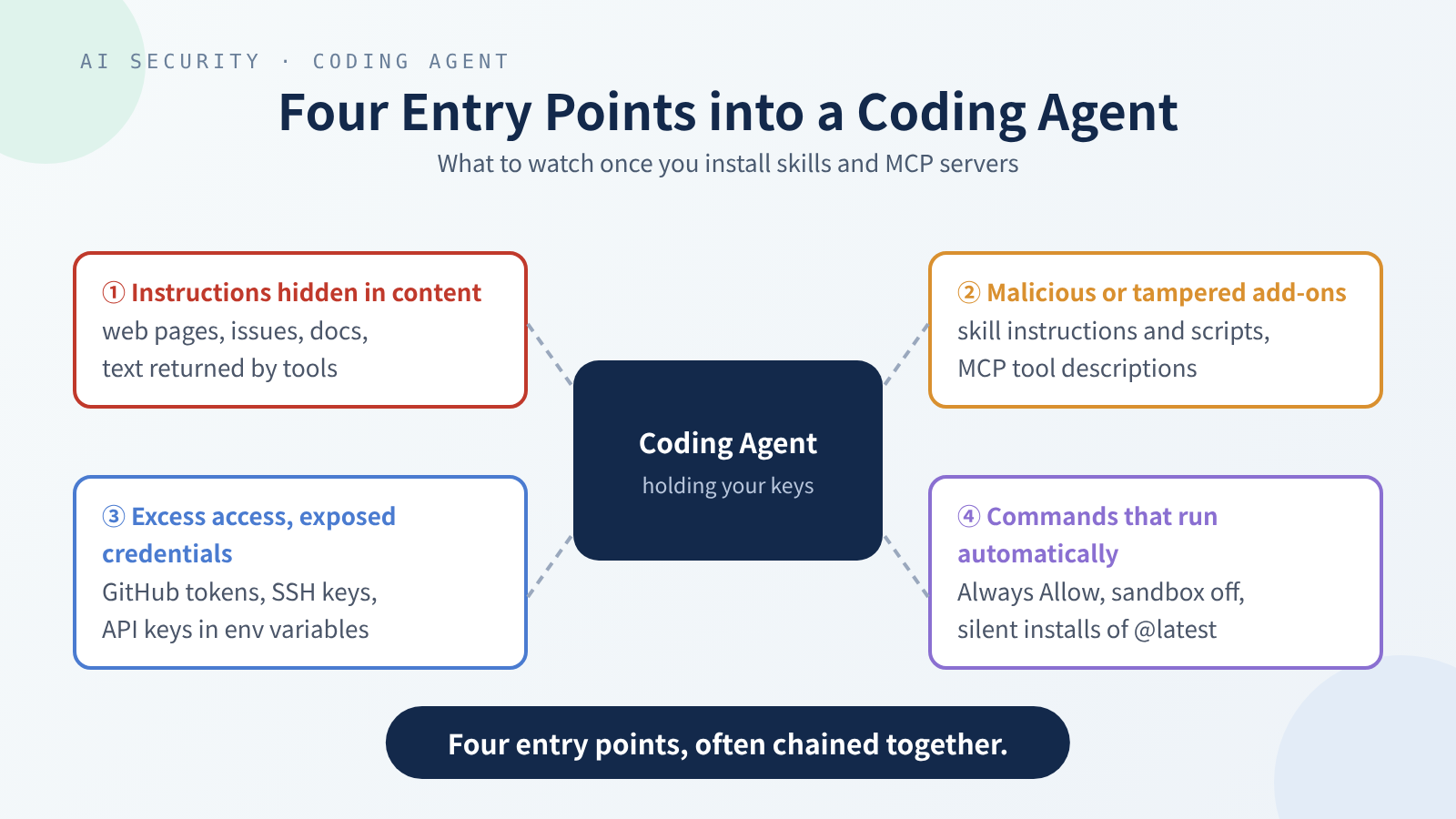 The four entry points rarely show up alone; real attacks usually chain two or three.
Entry 1: instructions hidden in content
The AI isn’t good at telling who said what. Your instructions, web pages, issue text, and MCP tool descriptions all end up glued into one stream of text for the model.
Opinion (quoted): Simon Willison puts it bluntly in The lethal trifecta: models can’t reliably weigh instructions by where they came from. He offers a handy test. When an agent has all three, an attacker can easily trick it into leaking your data:
- Access to your private data
- Exposure to content someone else controls
- A way to send things out (a network request, loading an image, even just giving you a link)
It isn’t a formal standard, but it’s an excellent way to check your own setup. The defenses below keep coming back to these three.
Entry 2: malicious or tampered skills and MCP servers
Both boil down to someone else’s code plus someone else’s text. The risk comes in two flavors:
- Bad from the start: instructions hidden in the description, or scripts that quietly do something else.
- Fine at first, changed later: a stolen maintainer account, a swapped package version, or a server that silently rewrites its tool descriptions.
The second is sneakier, because you already reviewed and approved it.
Entry 3: excessive permissions and exposed credentials
What an agent can do is the sum of the permissions it holds. Your ~/.ssh, API keys in environment variables, the token from your gh login, passwords in MCP config files: if the user running the agent can read them, so can the agent.
Fact: The official MCP security best practices state that local MCP servers run with the same privileges as the MCP client, and list requesting a huge bundle of scopes up front as a common mistake, since a leaked token then reaches much further.
Entry 4: auto-executed commands
To stop being asked “may I run this?”, many people turn on auto-approve or switch off the sandbox entirely. It saves a lot of time, and removes the last human checkpoint. There’s a quieter kind of automation too: some tools silently install the latest version of a package in the background (as in Case 5).
Fact: The Codex docs label --dangerously-bypass-approvals-and-sandbox (alias --yolo) as no sandbox, no approvals, not recommended. The Claude Code docs warn that in Manual mode a Bash command you approve can still write anywhere your user account can; the folder boundary is a prompt, not a wall.
Five cases with primary sources
Each comes with the original advisory or research report. I’ve separated research demos from real-world incidents because they carry different weight.
Case 1: poisoned MCP tool descriptions (research demo, April 2025)
Fact: In MCP Security Notification: Tool Poisoning Attacks, Invariant Labs showed an MCP tool that appears to just add two numbers, but whose description hides instructions telling the AI to read ~/.cursor/mcp.json and ~/.ssh/id_rsa, stuff the contents into an innocuous parameter, and not mention it to the user. It worked in Cursor, and they noted the confirmation dialog didn’t show the full arguments.
The same post covers two extensions:
- Rug pull: a server can change a tool’s description after you’ve approved it.
- Shadowing: a malicious server’s description can rewrite how the AI uses a different, trusted server’s tool, for example making the email tool send every message to the attacker.
Inference: “I’ll only use the trusted tool” doesn’t protect you. Once a malicious server sits in the same agent as the trusted tool, its description is already in front of the AI.
Case 2: one GitHub issue leaks a private repo (research demo, May 2025)
Fact: In GitHub MCP Exploited, Invariant Labs planted an issue containing instructions in a public repo. The user only asked the agent to look at the public repo’s open issues; after reading that issue, the agent pulled information from private repos and published it in a PR on the public repo. They used Claude Desktop with the official GitHub MCP server, and noted many users choose “Always Allow” and stop checking each call.
Fact: The report stresses this isn’t a bug in the GitHub MCP server’s code but a system-level design problem that happens even when every tool is trustworthy.
Inference: This is a textbook case of the lethal trifecta: one token that can read private repos (private data), read public issues (outside content), and open a PR on a public repo (a way out). Here the PR plays the role of Willison’s “way to send things out,” just in a different form.
Case 3: Cursor’s CVE-2025-54135 (patched)
Fact: Per Cursor’s advisory GHSA-4cxx-hrm3-49rm and the CVE record: before 1.3.9 (the CVE record’s wording; the advisory’s affected-versions field says up to 1.2.1), Cursor let the agent create new files in the workspace without approval. Editing an existing hidden config file (a dotfile, a name starting with a dot, like .cursor/mcp.json) required approval, but creating one didn’t. So if .cursor/mcp.json didn’t exist yet, an attacker could chain an indirect prompt injection to have the agent write it, add a new MCP server, and execute arbitrary code. The fix is in 1.3.9. The advisory rates it CVSS 3.1 8.5 (CVSS is the industry’s standard vulnerability severity score, out of 10); the CVE record says 8.6, though both list the same vector.
Inference: Running that vector through the CVSS 3.1 formula myself gives 8.5, so this post uses the advisory’s 8.5.
Inference: This chains Entry 1 (hidden instructions) with Entry 4 (auto-execution). A config file is itself a place that can run code; whether the agent may write it deserves the same strictness as whether it may run shell commands.
Case 4: mcp-remote’s CVE-2025-6514 (patched)
Fact: CVE-2025-6514 records that mcp-remote (an npm package that connects local clients to remote MCP servers) was open to OS command injection when connecting to an untrusted MCP server, via a crafted URL in the authorization_endpoint response. (authorization_endpoint is the “go here to sign in” address in an OAuth flow; OAuth is the common “sign in by authorizing through another service” mechanism.) Affected versions are 0.0.5 through 0.1.15; GitHub advisory GHSA-6xpm-ggf7-wc3p lists 0.1.16 as the first patched version. The CVE record, the GitHub advisory, and JFrog’s research all give CVSS 3.1 9.6 (Critical). The fix is in this commit.
Fact: JFrog also spells out platform differences. On Windows they proved arbitrary OS command execution with full control of the arguments; on macOS and Linux it leads to running arbitrary executables with limited argument control (they note full command execution there may be possible with more research). Their two attack scenarios: connecting to a malicious or hijacked MCP server, or connecting over plain http:// while someone on the same local network intercepts and tampers with the traffic.
Fact: The MCP best practices have a matching rule: clients must not open authorization URLs with shell commands and must reject dangerous URL schemes.
Inference: “Just connecting to an MCP server” is an execution risk, not only a data risk. Choosing which server to connect to is the same kind of decision as choosing which package to install.
Case 5: malicious Nx releases enlist local AI tools (real incident, August 2025)
Fact: According to Nx’s advisory GHSA-cxm3-wv7p-598c, attackers used an injection bug in GitHub Actions (GitHub’s built-in automation) to get the npm publish token (the credential for pushing new versions to the npm registry) and, on the evening of August 26, 2025 (US Eastern time), published malicious versions of nx and related packages. They carried a postinstall script (a script that runs automatically right after a package is installed) that scanned the file system, collected credentials, and uploaded them to a repo whose name contains s1ngularity-repository under the victim’s own GitHub account. The script in the advisory’s appendix includes a prompt addressed to a “file-search agent,” asking it to list paths of config and environment files.
Fact: Nx’s postmortem says the malicious packages attempted to use local AI tools (like Claude and Gemini). The advisory also notes that npm packages get installed through more than your own npm install: transitive dependencies, editor extensions, and AI agents. Their own Nx Console extension (VS Code versions 18.6.30 through 18.65.1) auto-installed the latest nx, so people with that extension who opened their editor during the few hours the malicious versions were tagged latest (6:37 PM to 10:44 PM US Eastern on August 26) may have been hit, even if their projects didn’t use Nx.
Inference: This flips the usual script. The point isn’t that someone attacked your agent; it’s that malware tried to enlist the AI tools on your machine as helpers. If your agent is already logged in, highly privileged, and needs no confirmation, that kind of hijacking is easy; if it asks you at every step, it’s much harder.
Neither the advisory nor the postmortem says how many victims’ local AI tools actually ran, or what they did. I can’t confirm that part, so please don’t read this as “AI tools were exploited at scale.”
Defenses: four layers and what each one stops
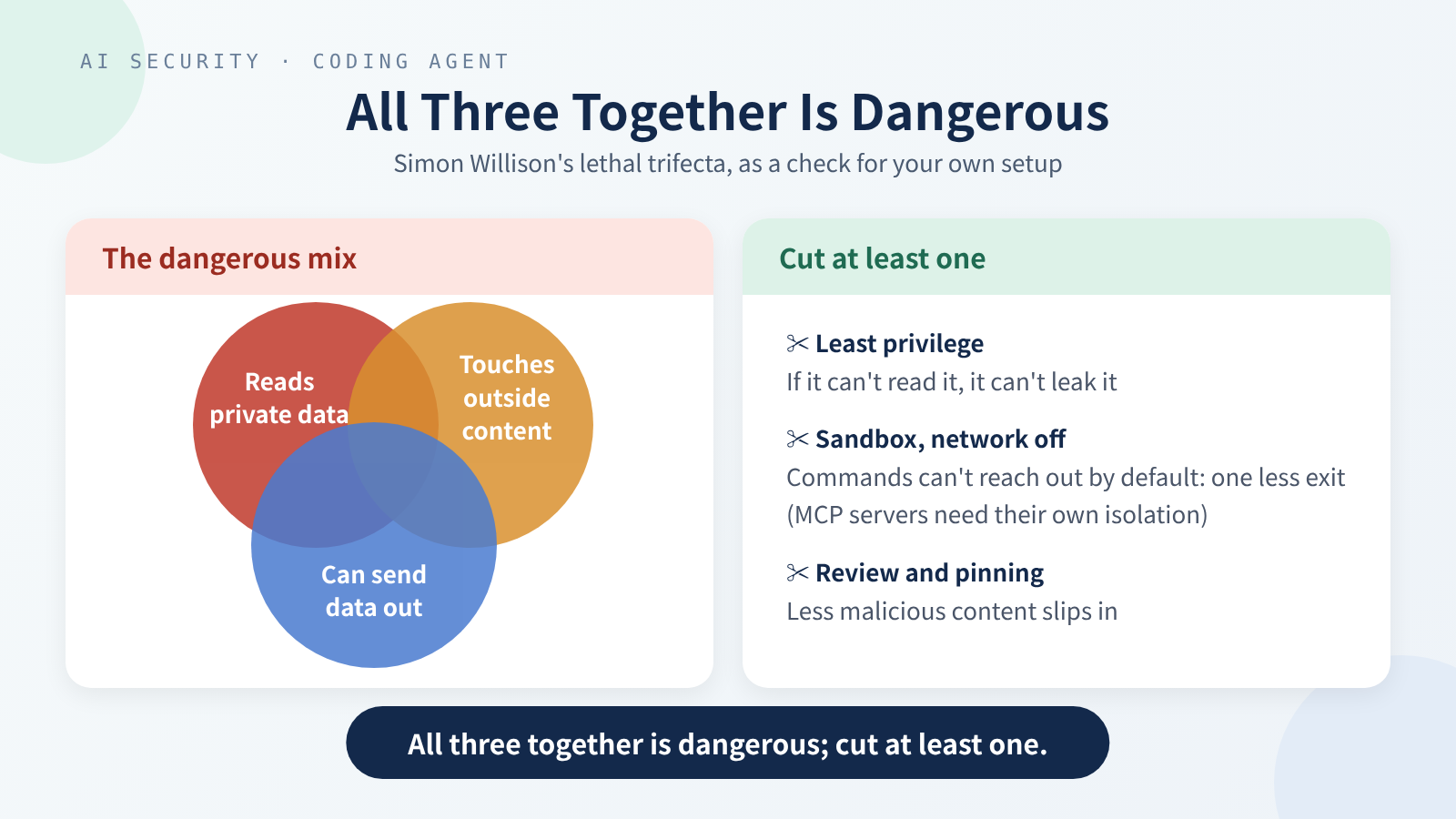 The goal isn’t a smarter AI; it’s an AI that can’t do much damage even when fooled.
Opinion: No single trick solves prompt injection. The practical approach today is to assume your agent will read malicious content someday, and make sure that when it does, it can’t do much harm.
1. Least privilege: just enough keys
- Use fine-grained GitHub tokens (tokens limited to specific repos and permissions, created under Settings → Developer settings → Personal access tokens → Fine-grained tokens); don’t hand the agent your full
ghlogin. - One project per session. One of Invariant’s recommendations in Case 2 is limiting the agent to one repo per session (they demonstrate it with their own Guardrails product; the idea can be implemented other ways).
- Start MCP authorization with minimal scopes and add more when needed, per the MCP best practices on scope minimization.
- Get credentials out of plaintext files. Nx’s postmortem recommends the same.
2. Sandboxing: keep it inside a fence
Fact:
- Codex CLI uses an OS-level sandbox, with no network and writes limited to the current workspace by default; inside writable roots,
.git,.codex, and.agentsstay read-only. - Claude Code offers a sandboxed Bash tool with filesystem and network isolation, and recommends VMs or dev containers (a whole development environment inside an isolated container) when dealing with untrusted content.
Fact: Sandboxes have edges. The Codex docs state that the command network proxy doesn’t filter MCP server connections, web search, or connector calls, and that running full-access mode in a dev container still lets a malicious project exfiltrate everything inside, including Codex credentials.
Inference: A sandbox fences in “commands the agent runs,” not necessarily “what an MCP server does on its own.” A local MCP server is a separate program and needs its own isolation.
3. Review: read before installing, watch for changes after
- For skills, review the whole folder, not just
SKILL.md. Anthropic’s docs say to check scripts, images, and other resources, and watch for unexpected network calls, file access, and skills that fetch external URLs. - For MCP servers, look at exactly how they’re launched: the full command and arguments. The MCP spec requires one-click setups to show the exact command, untruncated.
- Review
.mcp.json,.cursor/mcp.json,.claude/, and skill folders in PRs like code. The Claude Code docs note that reviewing.mcp.jsondoesn’t show every server a session can load; plugins and other scopes add servers too.
4. Version pinning: don’t let it change behind your back
- Install skills from a fixed commit, not a moving main.
- MCP servers are often launched with
npxoruvx(commands that download a package and run it directly). Pin the version; avoid@latest(always fetch the newest) or leaving the version out. In the Nx incident, auto-installing the latest version is exactly what hit people who didn’t even use Nx.
Concretely (replace <commit> with the commit you reviewed):
1
2
3
4
5
6
# MCP: pin a version you have audited (at least 0.1.16, which includes the CVE-2025-6514 fix); not plain npx mcp-remote or @latest
npx -y mcp-remote@<audited-version> https://mcp.example.com/mcp

# Skill: clone, then check out the reviewed commit
git clone https://github.com/someone/some-skill.git
git -C some-skill checkout <commit>
- Invariant also recommends pinning MCP servers and tool descriptions and checking them with a hash, which targets Case 1’s rug pull.
Opinion: Pinning matters more for agents than for ordinary projects. Swap out a normal package and your tests might break. Swap out a skill’s instructions and nothing breaks; the AI just starts doing something else.
Checklist
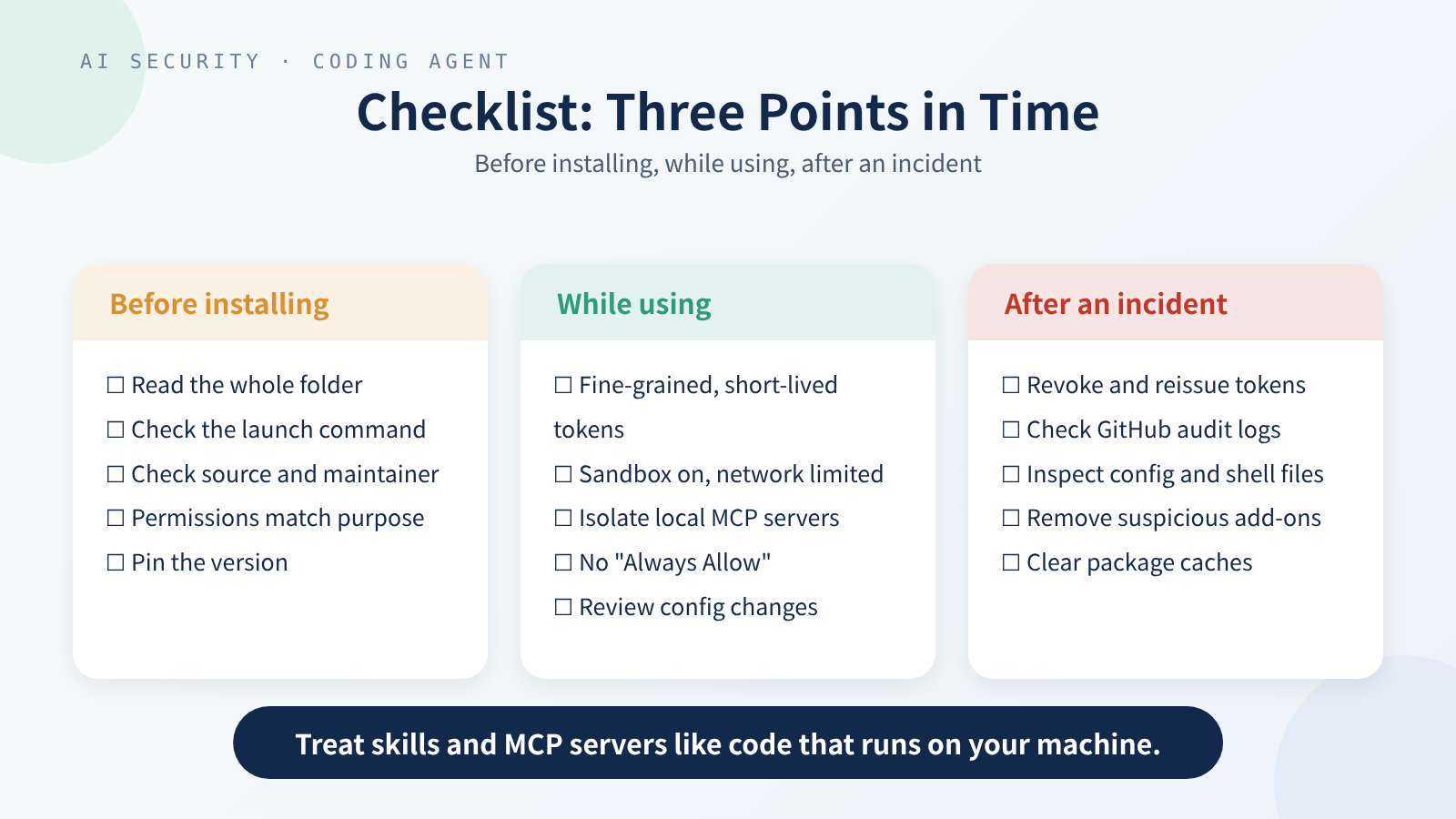 Three stages: before, during, and after.
Before installing
- Who’s the source: you, your company, or a maintained project with a public issue channel?
- Skill: have you read the whole folder? Any scripts, outbound network calls, home-directory reads?
- MCP: what’s the full launch command and arguments? Which environment variables will it get?
- Do the permissions it asks for match what it claims to do?
- Is the version pinned to a commit or version number?
- After adding it, does your setup now satisfy all three parts of the lethal trifecta?
While using
- Is the agent’s token fine-grained, short-lived, and scoped to what’s needed?
- Is the sandbox on? Is network off by default, or limited to specific domains?
- Are local MCP servers isolated separately (container, separate user)?
- Do actions like writing config files, opening PRs, and pushing still need a human?
- Is work that reads untrusted content (strangers’ issues, outside web pages) kept apart from work that holds private data?
- Do changes to the project’s agent config go through code review?
After an incident (or a suspected one)
- Revoke and reissue every token the agent could reach: GitHub, npm, cloud, MCP credentials.
- Check GitHub audit logs for unfamiliar repos, PRs, or pushes. The Nx advisory asked users to check their security log for newly created repos.
- Inspect
.mcp.json,.cursor/mcp.json, skill folders,~/.bashrc, and~/.zshrc(config files that run automatically every time you open a terminal) for additions. - Remove suspicious skills and MCP servers, and clear package caches such as
npx’s.
Conclusion
Installing third-party skills and MCP servers puts someone else’s code and someone else’s words next to your agent. The code brings ordinary supply-chain risk; the words bring AI-specific prompt-injection risk. The agent’s permissions decide how much damage either can do.
Opinion: The first thing worth doing isn’t buying a guardrail product that claims to catch 95% of attacks (Willison is skeptical of those claims too: in web application security, he says, 95% is very much a failing grade). It’s two boring things: shrink the agent’s tokens to the minimum, and pin the version of every skill and MCP server you install. The first limits what a fooled agent can do; the second limits what can change without you knowing.
It’s the same lesson as my earlier post on the HEIF image and SSO attack chain: how much damage a small entry point does depends on how much trust sits behind it.
Sources
Official documentation
- Anthropic, Agent Skills overview: Security considerations
- Anthropic, Claude Code Security
- OpenAI, Codex: Agent approvals & security
- Model Context Protocol, Security Best Practices (2025-06-18)
Advisories and CVEs
- GitHub, GHSA-6xpm-ggf7-wc3p (mcp-remote, patched in 0.1.16)
- Cursor, GHSA-4cxx-hrm3-49rm; CVE-2025-54135
- CVE-2025-6514 (mcp-remote); JFrog, research; fix commit
- Nx, GHSA-cxm3-wv7p-598c; S1ngularity postmortem
Research and opinion
- Invariant Labs, MCP Security Notification: Tool Poisoning Attacks (2025-04-01)
- Invariant Labs, GitHub MCP Exploited: Accessing private repositories via MCP (2025-05-26)
- Simon Willison, The lethal trifecta for AI agents (2025-06-16)