mattpocock/skills Series (5): After the Code Is Written, Who Checks the Structure, Reviews the Change, and Resolves Conflicts?
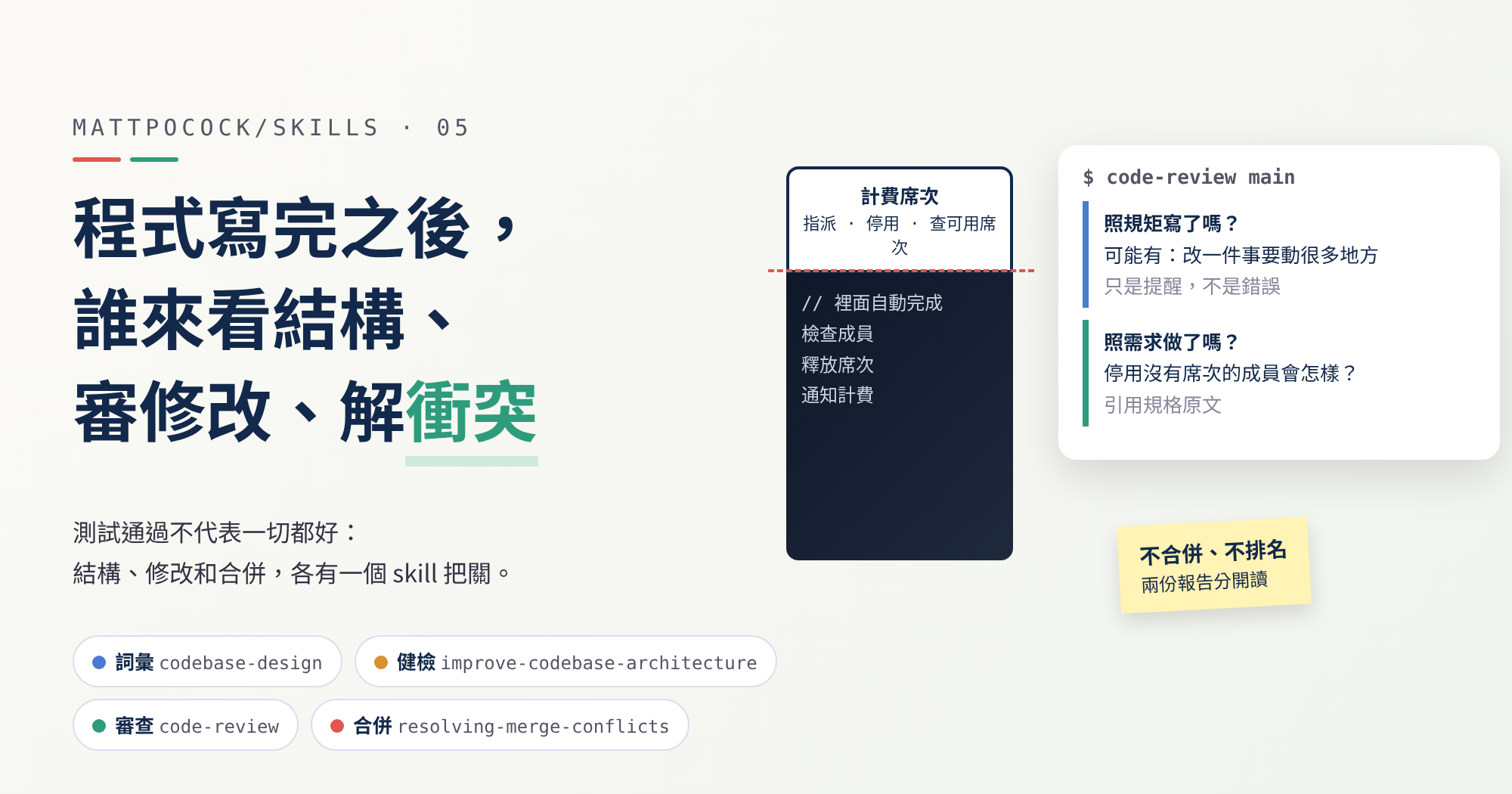
Passing tests don't mean everything is fine. This post introduces four skills: codebase-design, improve-codebase-architecture, code-review, and resolving-merge-conflicts, and produces a real merge conflict using the per-seat billing example.
In the previous post, implement finished “Deactivate a member and release the seat.” The test went from red (failing) to green (passing), and at the end the AI ran code-review as instructed. You now have three finished tickets and a branch ready to merge back into the main line (a branch is a copy of the main line where you can make changes safely).
Passing tests only mean the code behaves the way the tests say. Three things remain that tests can’t see:
- Is the structure of the code getting messier with every change?
- Did this change do more, or less, than what was asked?
- When two people edit the same piece of code, whose version wins?
mattpocock/skills handles these with four skills. codebase-design and improve-codebase-architecture look after structure, code-review looks at this change, and resolving-merge-conflicts handles conflicts during a merge.
mattpocock/skills Series Part 5
- Previous (Part 4): Before AI Starts Coding, Decide Which Signal to Trust
This post is based on version
1.2.3. The skill invocations in the per-seat billing example are inferred from the original instructions; the merge conflict and the post-merge test failure are real execution results.
Since this series started,
mattpocock/skillshas moved on to1.3.x.v1.3.0removedresolving-merge-conflicts, and the official note says nothing replaces it. The same release also renamed the glossary fileCONTEXT.mdtoGLOSSARY.md. To stay consistent with the first four parts, this post still uses1.2.3.
Three Words First
You only need three words for this post:
| Term | In one sentence |
|---|---|
| module | A named chunk of code you can use on its own, anything from a single function to a whole package |
| interface | What someone needs to know to use the module, like the buttons and the manual on an appliance |
| seam | A spot in the code where a part can be swapped out, like a power socket. The “test seam” from the previous post is one of these |
What Each Skill Does
| skill | What it does | When to use it | Can the AI start it on its own? |
|---|---|---|---|
codebase-design | A shared vocabulary for talking about code structure | When you want to discuss how a piece of code should be split or wrapped | Yes |
improve-codebase-architecture | A regular health check that finds parts worth tidying up | When you have time, or when fixing a bug shows the code is hard to test | No, you start it yourself |
code-review | A review before merging | When a branch is done and about to be merged | Yes |
resolving-merge-conflicts | Helps you resolve merge conflicts | When you are already stuck in one | Yes |
Each one sits in a different place on the ask-matt roadmap: codebase-design is vocabulary underneath everything, improve-codebase-architecture is routine upkeep, code-review is the last step of the main flow, and resolving-merge-conflicts is outside every flow, used only when you’re stuck.
improve-codebase-architecture is the only one set so the AI can’t start it on its own, and the Codex config turns that off too. It scans the whole project, which takes quite a while, so you decide when it runs.
codebase-design: Agree on the Words First
codebase-design has no steps; it’s just a vocabulary. The point is that when you and the AI talk about code structure, the same word means the same thing. It even asks that the words not be swapped for others, such as calling a “module” a “component” or a “service.”
This is a lot like domain-modeling from part 2. ask-matt lists them side by side: domain-modeling keeps business words consistent, such as “billable seat”; codebase-design keeps code-structure words consistent. When tdd from the previous post runs into “what should this interface look like?”, this is what it looks up.
A Good Module: Few Buttons, Lots Going On Inside
The whole vocabulary rests on one idea: a good module is “deep”.
Think of a coffee machine. A good one has a single button, and grinding, heating, and brewing all happen inside. That’s “deep.” If you had to press a separate button for every step, with almost as many buttons as there are steps inside, that’s “shallow.”
The original definition of “deep” is exactly this: how much you get for each extra button you have to learn. The more you get, the deeper the module.
A deep module pays off twice: the people using it have it easy, because they only remember a few buttons; the people changing it have it easy, because everything they need to change is in one place.
When designing an interface, it has the AI ask itself three questions:
- Can there be fewer buttons?
- Can each button ask for less?
- Can more of the hassle be hidden inside?
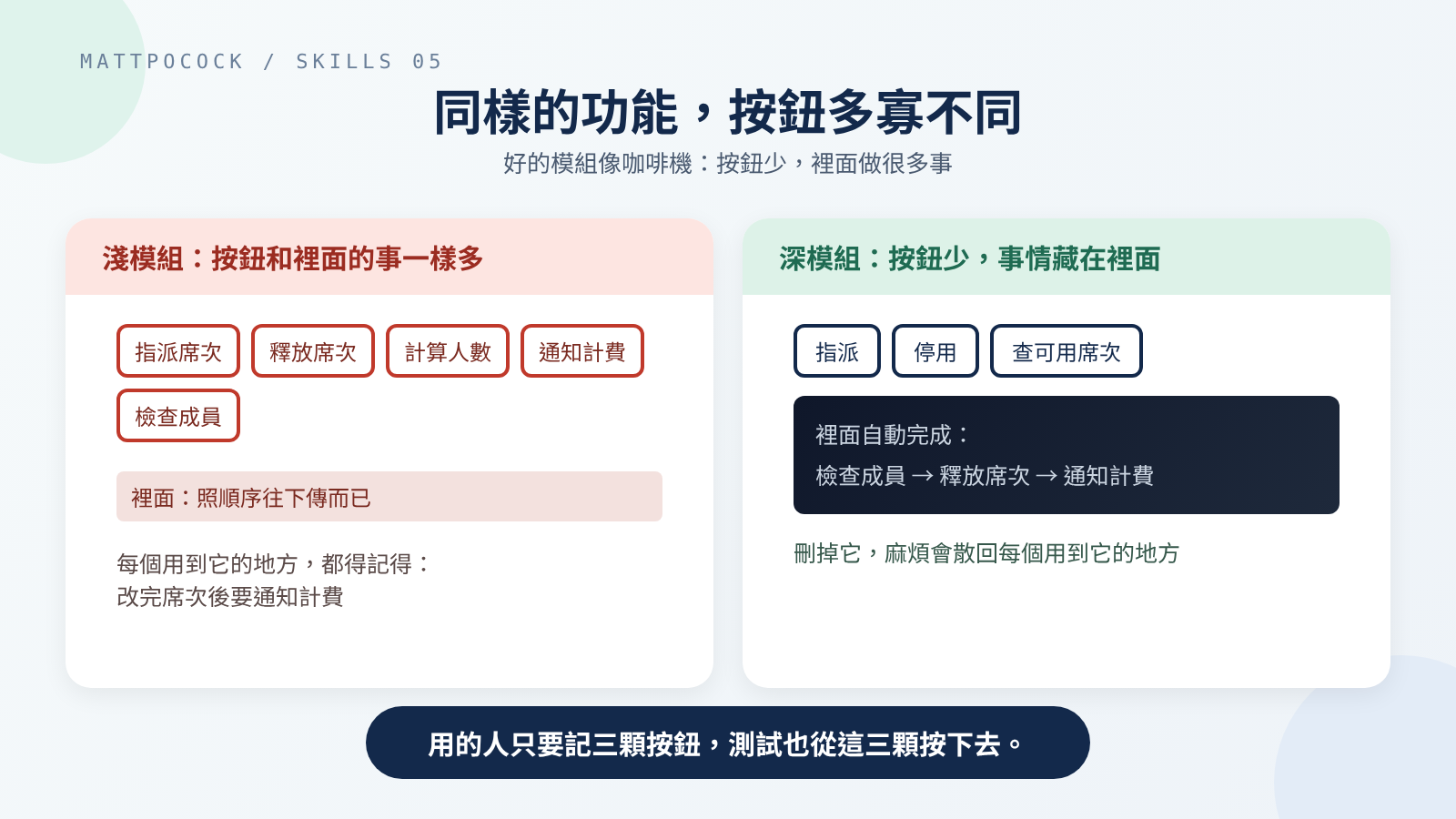 The same seat feature: five buttons to remember on the left, three on the right.
Four Rules of Thumb
- Depth is about the buttons, not the insides. The inside can be split into many small parts, as long as users never see them.
- Try deleting it. Imagine deleting the module. If the hassle disappears with it, it was just a go-between; if the hassle spills back into every place that uses it, it was earning its keep.
- Tests press the same buttons as users. If you want to reach past the buttons to test the insides, the module is cut the wrong way.
- A socket only one plug ever fits isn’t really a socket. “We might swap it someday” isn’t a reason. Only leave a seam when at least two things actually plug in, such as the real version and a fake one for tests.
Rule 4 comes up a lot. People often add an extra layer “in case we change databases later,” and the project only ever uses one. By this rule, that layer just makes the code take a detour.
Two Appendices
codebase-design comes with two more documents for after you’ve decided to tidy up a module:
DEEPENING.mdexplains how to decide how to test based on what the module depends on; for example, if it depends on an outside payment service, tests swap in a fake one. It also reminds you that once the module is tidied up and new tests are written against its new buttons, the old tests should be deleted rather than keeping both sets.DESIGN-IT-TWICE.mdexplains how to “sketch several designs before picking one.” The AI sends out three or more helpers at once, each designing in a different direction, such as “as few buttons as possible” or “make the most common case simplest,” then compares them and gives a clear recommendation instead of handing you a menu.
improve-codebase-architecture: A Regular Health Check for the Project
If codebase-design is the toolbox you tidy with, improve-codebase-architecture is walking the site first to find what’s worth tidying. Its goal is to turn shallow modules into deep ones, so the code is easier to test and easier for AI to understand.
It works in three steps.
Step 1: decide where to look. Tidying pays off by making future changes easier, so it looks first at the parts that change most often. If you name an area, it uses yours; if not, the AI goes through the change history to find files that keep getting edited.
It then reads the project’s glossary, CONTEXT.md, and sends a helper to read through the code, noting places that are awkward to follow. For example: having to jump between several small files to understand one thing, or code that’s hard to test.
If the project has decision records, documents that note why a design was chosen, it reads those first too. Suggestions that contradict an existing decision are only raised when the problem is serious enough to reopen the discussion.
Step 2: produce a web page report. The report is saved in the computer’s temporary folder, so it doesn’t mix into the project. Each suggestion is a card that lists the files involved, what’s wrong, how it would change, what that gains, and a before-and-after picture, labeled “Strong,” “Worth exploring,” or “Speculative.”
At this step it doesn’t propose a concrete design yet. Once the report is written, the AI just asks: which one do you want to look into?
Step 3: work out the details of the one you pick, together. Using grilling from part 2, the AI asks you one question at a time to pin down the limits, what it depends on, what it should look like afterward, and which tests survive. New words that come up go into CONTEXT.md. If you turn the suggestion down for an important reason, the AI offers to write it up as a decision record so the next health check doesn’t suggest the same thing.
What comes out of this step is an idea, not code. That idea goes back into the main flow, starting at grill-with-docs and following the route from parts 3 and 4.
In the README, the author suggests running it every few days, but is also blunt: it’s a health check, not emergency care. On a very messy old project, it can point out where the problems are, but it won’t clean everything up for you in one go.
code-review: Checking From Two Sides Before Merging
code-review checks all the changes made after a given point. That point can be a branch, such as main, or a particular commit (a commit is a batch of changes saved as one version, with a short note explaining it).
It splits the check into two sides, each asking one question:
- Written by the rules? (called Standards in the original) Does the code follow the project’s own coding guidelines?
- Built what was asked? (called Spec in the original) Does the code do what the ticket or spec asked for?
Each side goes to its own helper, working at the same time without getting in each other’s way, and the two reports are then shown to you together.
How It Works
- Confirm where to compare from. If you didn’t say, it asks. Before starting, it checks that the starting point exists and that there really are changes, so neither helper works for nothing.
- Find the requirements. It first looks for ticket numbers in commit messages, then a path you gave it, then folders like
docs/. If nothing turns up, it asks you; if you say there isn’t one, the “built what was asked?” side is skipped. - Find the project’s guidelines. Documents like
CONTRIBUTING.mdthat say how code in this project should be written. - Both helpers start at once. Each report is capped at 400 words. Every finding must point to its source: which rule in which guideline, or which line of the spec.
- The two reports are shown separately. They aren’t merged, and there’s no single “worst problem” picked across both.
Step 2 needs to know where tickets live, which was set up in part 1. If that config file is missing, the AI asks you to run setup first.
No Written Guidelines? There’s Still a Basic Checklist
Plenty of projects have no written guidelines at all. So the “written by the rules?” side always brings a basic checklist: the 12 “code smells” from chapter 3 of Martin Fowler’s Refactoring. A code smell is a way of writing that isn’t necessarily wrong, but makes a reader frown. Three examples:
| Smell | What it looks like | Suggested fix |
|---|---|---|
| Confusing name | You can’t tell what it does from its name | Rename it; if no good name comes to mind, the design itself is usually unclear |
| One change, many places | A small change means editing a bit here and a bit there across several files | Gather the things that change together into one place |
| Room for needs that don’t exist | Extra options or settings added “in case we need them later” | Delete them, and add them back when there’s a real need |
The checklist comes with two conditions: the project’s own guidelines come first, so anything the project explicitly allows isn’t a smell; and every item is only a heads-up, so the report says “may have this problem,” never a hard violation.
The third example is the same idea as codebase-design’s “a socket only one plug ever fits isn’t really a socket”: one warns you while designing, the other catches it during review.
Why Two Sides
The reason is simple: a change can pass one check and fail the other.
- Beautifully written, but built the wrong thing: passes the rules, fails the requirements.
- Built exactly what was asked, but breaks the project’s habits: passes the requirements, fails the rules.
Reporting them separately keeps a good grade on one side from hiding a problem on the other.
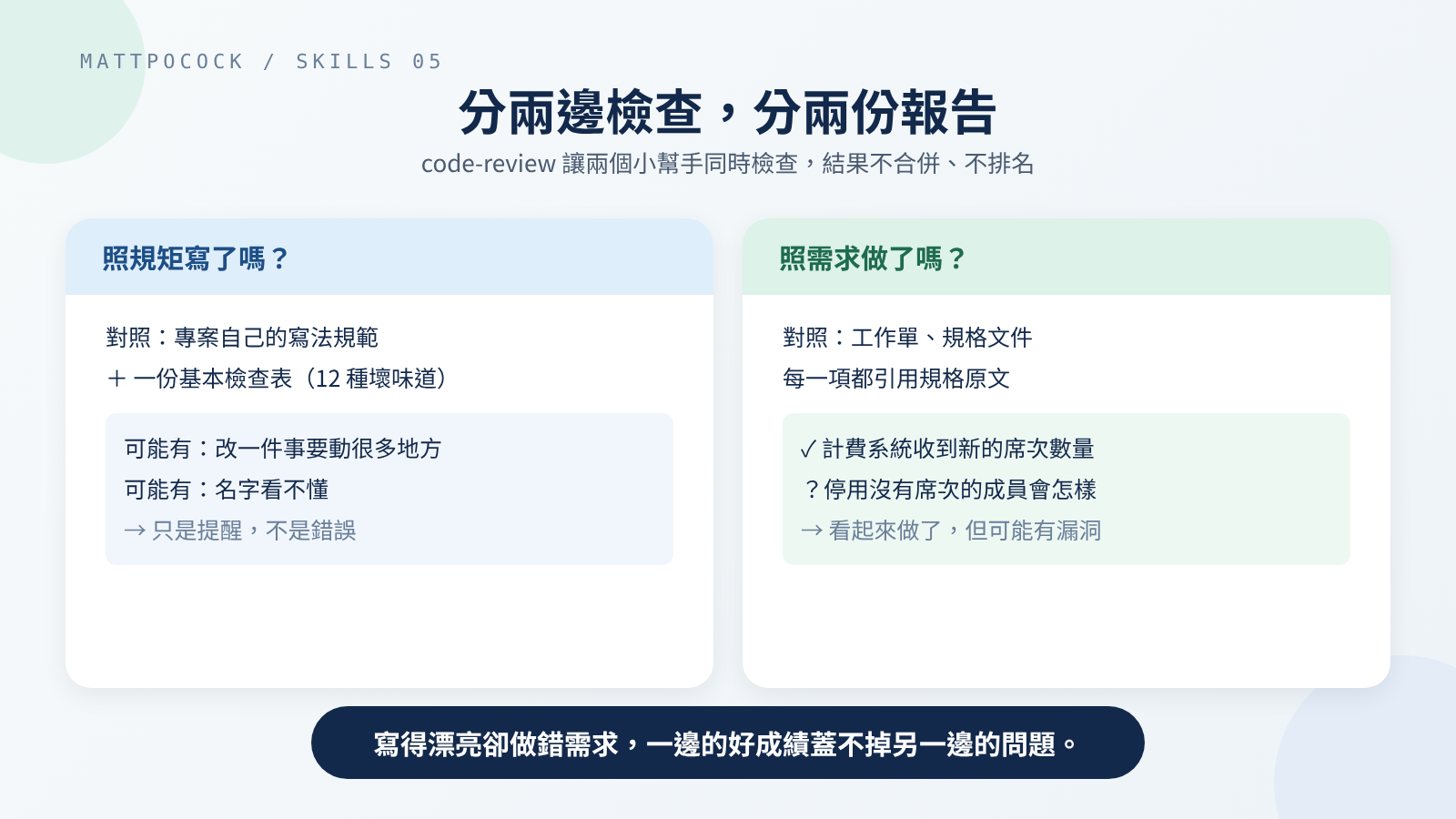 The two reports stay separate and are never merged into one ranking.
As the previous post mentioned, tdd leaves tidying up the code to the review stage. The “written by the rules?” side is that moment after the tests pass when you go back and tidy up.
resolving-merge-conflicts: Understand What Each Side Wanted, Then Merge
First, what a merge conflict is. Two people start from the same code and each make changes. When they happen to change the same lines, git, the tool that tracks versions, can’t tell which version to keep, so it stops, marks both versions, and lets a person decide.
The skill is just five steps:
- See where things are stuck and which files have conflicts.
- Trace each conflict to its source: read the commit messages, PRs (requests asking others to review and merge changes), and original tickets to understand why each side made its change.
- Resolve them one at a time. Keep both sides wherever possible; when you truly can only keep one, keep the one that fits the goal of this merge and write down why. Don’t invent new features, and never just abandon the merge.
- Run the project’s automatic checks, usually type checking (making sure each piece of data is the right kind), tests, and formatting, and fix whatever the merge broke.
- Finish the merge and commit.
Step 2 is the heart of it. Conflict markers only tell you “the text differs on each side,” not what each side was trying to do. If you just choose “keep mine” or “keep theirs,” the code may run, but it can quietly throw away a change someone made on purpose.
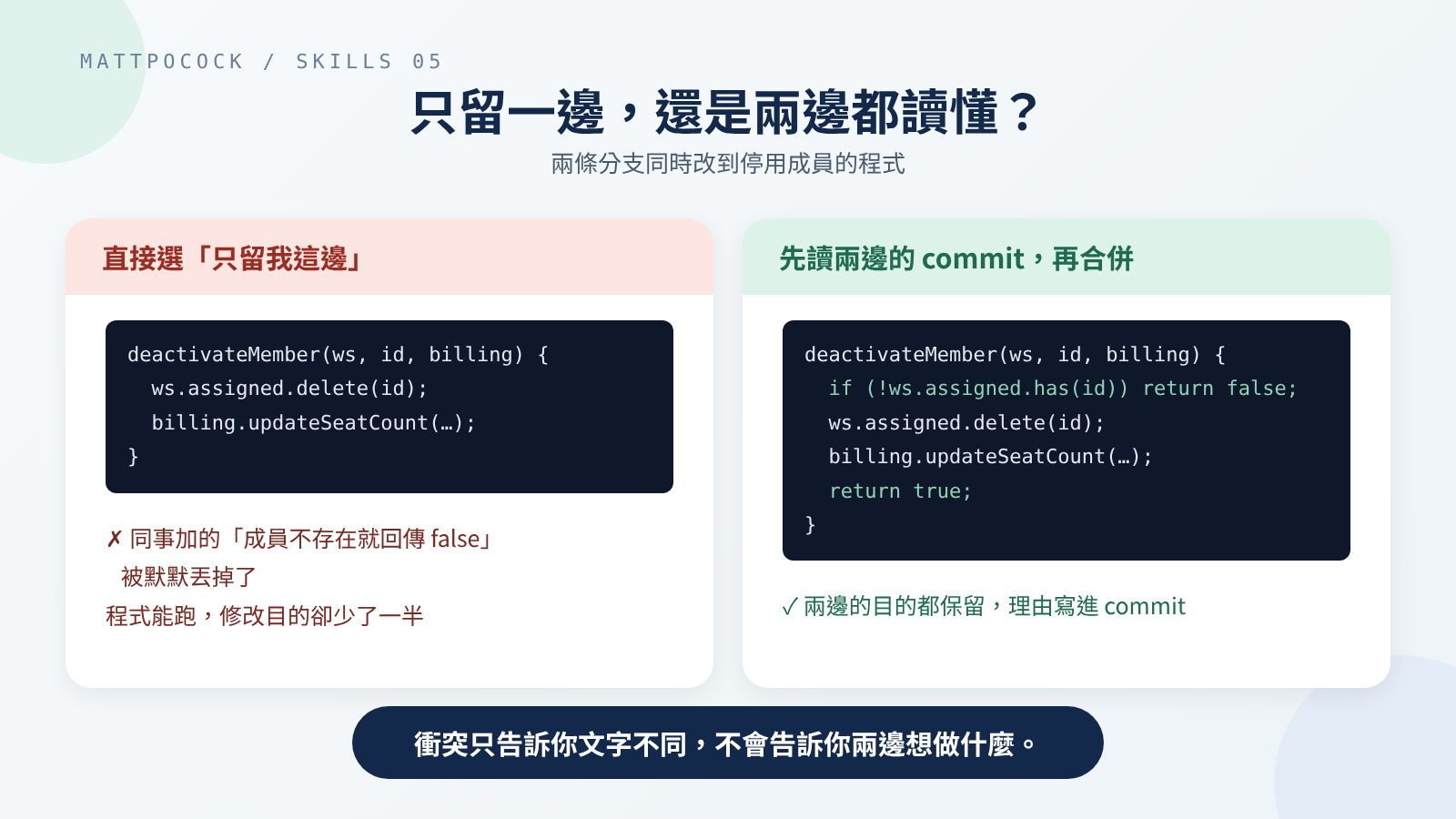 Picking a side may run, but can lose half of what the changes were for.
As noted above, this skill was removed in 1.3.0, and the archived docs page says nothing replaces it. Still, the five steps don’t need any tools, so you can follow them even without the skill installed.
Where Your Time Goes
| Stage | Who | What to do |
|---|---|---|
| Scope of the health check | You | Say which area to look at; otherwise the AI guesses from the change history |
| Reading the health check report | You | Pick one suggestion and judge whether its label makes sense |
| Talking through details | You | Answer questions about limits and trade-offs; decide whether a rejection becomes a decision record |
| Sketching several designs | The AI and you | The AI sends out several helpers at once; you read the designs and the recommendation, then decide |
| Where to review from, and the requirements | You | Tell it where to start comparing and where the requirements are |
| Reading the review | You | Read the two sides separately; smells are just heads-ups, and whether to act is up to you |
| Resolving conflicts | The AI, and you when needed | Trace what each side was for; when only one side can stay, check the AI’s choice and its reasons |
The most time-consuming are the health check and “sketching several designs,” since both read a lot of code. The good news is they’re also the least urgent: the code works, the structure just isn’t great, so do them when you have time.
Which One to Use When
| What you’re facing | Use | When it doesn’t fit |
|---|---|---|
| You want to discuss how to split some code and which buttons to keep | codebase-design | If you’re stuck on business words rather than code structure, use domain-modeling |
| You have time and want to find parts worth tidying | improve-codebase-architecture | When you’re rushing a feature. It produces an idea that still has to go through the main flow |
| You fixed a bug but can’t find a place to write a test that stops it coming back | improve-codebase-architecture | If you can find a place, just add the test |
| A branch is done and about to be merged | code-review | Without requirements, it only checks “written by the rules?” |
| A merge is stuck on a conflict | resolving-merge-conflicts (1.2.x) | If odd problems only show up after the merge, use diagnosing-bugs from the previous post |
Walkthrough: Reviewing and Merging Per-Seat Billing
The skill invocations below were not actually run; the flow is inferred from the 1.2.3 instructions. The merge conflict was produced for real with git 2.47.3, and the post-merge test was run on Node.js v20.19.2; the code is a minimal example written for this post, not taken from mattpocock/skills.
Reviewing “Deactivate a member and release the seat”
After the third ticket is done, implement calls code-review automatically. You can also run it yourself in a new conversation:
1
$code-review main
This means “check every change since branching off main.” The AI finds the ticket number in the commit message, and since the project has no written guidelines, the “written by the rules?” side uses only the basic checklist.
The two reports might look like this (inferred):
- Written by the rules?: the billing notification code is spread across “assign seat” and “deactivate member,” so there “may be a ‘one change, many places’ problem.” This is a heads-up, not an error.
- Built what was asked?: the ticket’s “billing system receives the new seat count” is done. But the ticket doesn’t say what happens when you deactivate a member who never had a seat, and the code doesn’t handle it, so it’s listed as “looks done, but may have a gap.”
You can deal with the requirements item first by going back to clarify the rule, and leave the rules item for the next health check.
Handing the Structural Problem to the Health Check
A few days later you run $improve-codebase-architecture with the area “per-seat billing.” The report might include a card like this (inferred):
- Title: Tidy per-seat billing into one module
- Files:
seats.js,billing-sync.js - Problem: assigning, deactivating, and notifying billing are spread over two files, and every place that uses them has to remember to notify billing after changing seats.
- Change: per-seat billing keeps just three buttons, “assign,” “deactivate,” and “check available seats,” with billing notification happening automatically inside.
- Label: Worth exploring
Check it with “try deleting it”: delete billing-sync.js, and “notify billing after changing seats” spills back into every place that uses it. So the hassle is real; it’s just in the wrong place.
You pick this card, the AI starts asking about the details one question at a time, and once you’re done the idea goes back to grill-with-docs and follows the route from parts 3 and 4 again.
Two Branches Editing deactivateMember() at Once
Meanwhile, a colleague changed deactivation on another branch, guard-unknown: deactivating a member who doesn’t exist now returns false. Your branch, notify-billing, notifies billing after deactivation. Both started from the same seats.js:
1
2
3
export function deactivateMember(workspace, memberId) {
  workspace.assigned.delete(memberId);
}
Merge your colleague’s branch into yours:
1
git merge guard-unknown
git stops and reports a conflict:
1
2
3
Auto-merging seats.js
CONFLICT (content): Merge conflict in seats.js
Automatic merge failed; fix conflicts and then commit the result.
Open seats.js, and git has marked both versions. From <<<<<<< HEAD to ======= is your side; from ======= to >>>>>>> is your colleague’s:
1
2
3
4
5
6
7
8
9
10
11
<<<<<<< HEAD
export function deactivateMember(workspace, memberId, billing) {
  workspace.assigned.delete(memberId);
  billing.updateSeatCount(workspace.assigned.size);
=======
export function deactivateMember(workspace, memberId) {
  if (!workspace.assigned.has(memberId)) return false;
  workspace.assigned.delete(memberId);
  return true;
>>>>>>> guard-unknown
}
Now call $resolving-merge-conflicts. Following step 2, the AI first reads both commit messages: yours says “notify the billing system of the new seat count after deactivation,” your colleague’s says “return false when deactivating an unknown member.” The two goals don’t clash, so both are kept:
1
2
3
4
5
6
export function deactivateMember(workspace, memberId, billing) {
  if (!workspace.assigned.has(memberId)) return false;
  workspace.assigned.delete(memberId);
  billing.updateSeatCount(workspace.assigned.size);
  return true;
}
The order matters too: check whether the member exists first, and stop right there if not, so billing never gets a notification for a count that didn’t change. Neither commit says this; it’s a call the AI made while merging, so it belongs in the merge commit message where you’ll see it during review.
Then, per step 4, run the tests. The node --test seats.test.js from the previous post calls deactivateMember() without passing in a billing system. I put the merged code back under that test and actually ran it on Node.js v20.19.2: the result was fail 1 (one test failed), with a TypeError, meaning the code received something it couldn’t use: here, the billing system was never passed in.
This is exactly the “fix whatever the merge broke” case: add a fake billing system to the test, rather than deleting the line that notifies billing. Only after everything passes does the AI commit.
My Take: Read the Two Reports Separately, and Don’t Fix Every Smell on the Spot
This section is my own view; the source material doesn’t say it directly.
code-review deliberately doesn’t rank the two reports, so which one you read first is up to you. I read “built what was asked?” first. A problem there means the feature may be wrong and must be handled before merging. The smells on the “written by the rules?” side are, by the skill’s own account, just heads-ups, and most can wait for the next tidy-up.
I also wouldn’t have code-review fix every smell on the spot. The “one change, many places” in the walkthrough isn’t something a rename solves. It needs the full health-check treatment: walk through, discuss, then go back into the main flow. Forcing it during review means reshaping the code without any requirements document, skipping exactly the checkpoints that parts 3 and 4 set up.
That said, this assumes the project really does run health checks regularly. If the team never makes time to tidy up, leftover smells just pile up. In that case, you’re better off fixing the most obvious ones during review.
Wrapping Up
Most of what needs judging after the code is written isn’t something tests can answer.
- For this change, let
code-reviewcheck from two sides: written by the rules, and built what was asked. - For structure, run
improve-codebase-architectureas a regular health check, and usecodebase-design’s vocabulary to discuss changes. - When two branches collide, read both sides’ commits and tickets, understand what each wanted, then decide how to merge.
Back to per-seat billing: the next step is to run $code-review main on the third ticket’s branch. Deal with the “built what was asked?” item first, then decide whether the rules item goes into the next health check.
Further Reading
codebase-design: the full vocabulary, the four rules, and the framings it deliberately rejects.codebase-design/DEEPENING.md: deciding how to test based on what a module depends on.codebase-design/DESIGN-IT-TWICE.md: the full method for sketching several designs before picking one.improve-codebase-architecture: the three steps of the health check.code-review: the full instructions for both sides, and the complete list of 12 smells.resolving-merge-conflicts: the five steps in1.2.3; after its removal, the archived docs page also explains why you shouldn’t just pick a side.