mattpocock/skills Series Guide: What It Is and How to Read It
Wondering whether mattpocock/skills is worth it, or stuck on one problem? A map of the six-part series: what each part answers and where to start.
Maybe someone mentioned mattpocock/skills, and when you opened the repo, you found a long list of skill names. Or maybe you landed on one part of this series from a search and want to see what comes before and after it. The series has six parts, and each covers one stretch of the development process. This guide skips the details and answers three questions: what this set of skills is, how the six parts fit together, and which part you should start with.
mattpocock/skills Series Guide
- Start here (Part 1): Get Started Without Memorizing 25 Skills
The series is based on version
1.2.3. Parts 5 and 6 also note changes in later versions.
What Is mattpocock/skills?
mattpocock/skills is a complete set of skills published by Matt Pocock. A skill is a set of instructions that tells an AI coding assistant how to do a specific job, such as interviewing you about requirements or breaking a spec into tickets. An AI coding assistant is a tool such as Claude Code or Codex that can read and write the files in your project and write code for you.
In the README, the author says the skills are designed to be small, easy to adapt, and composable. The official plugin’s plugin.json includes 25 skills, and the six parts of this series cover all 25 between them. The repo also has items that are still experimental or not currently promoted; those are outside the series.
Two things make the rest easier to follow:
- Most work starts only when you call for it. Many skills are set up so that only a person can start them; the AI won’t run them on its own.
ask-mattis a help desk, not a manager. You describe where you’re stuck, and it suggests the next skill to use. It doesn’t run the whole process for you.
Installation and first-time setup are covered in Part 1, so they aren’t repeated here.
Who It’s For, and Who It Isn’t
Going by the six parts, these skills fit best when:
- Several people maintain the project, or a feature takes more than one conversation to finish.
- Your team tracks and hands off work in an issue tracker, such as GitHub Issues.
- You want the AI to follow fixed steps, with a person signing off at each key point.
On the other hand, you may not need the full process when:
- The feature fits in one conversation. Once the requirements are clear, go straight to implementation and skip
to-specandto-tickets(Part 3). - You’re talking through an idea that hasn’t taken shape yet. One interview with
grill-meis enough; there’s no need to document every term (Part 2). - The task is a one-off outside any project folder. There’s no need to set up a whole project just to use one skill (Part 1).
It’s also worth being clear about what they can’t do. Part 1 points out that the process doesn’t guarantee faster development; the direct benefit is that your project’s conventions get written down, and you get a suggestion when you’re unsure what to do next. Part 4 adds that these rules are only instructions in Markdown files, with no program enforcing them. If you approve the AI’s list of places to test without reading it, that check does nothing.
How the Six Parts Fit Together
The six parts follow the order a feature moves through, from requirements to merge. Parts 1–5 form one main path, and Part 6 handles work that isn’t coding but often holds things up.
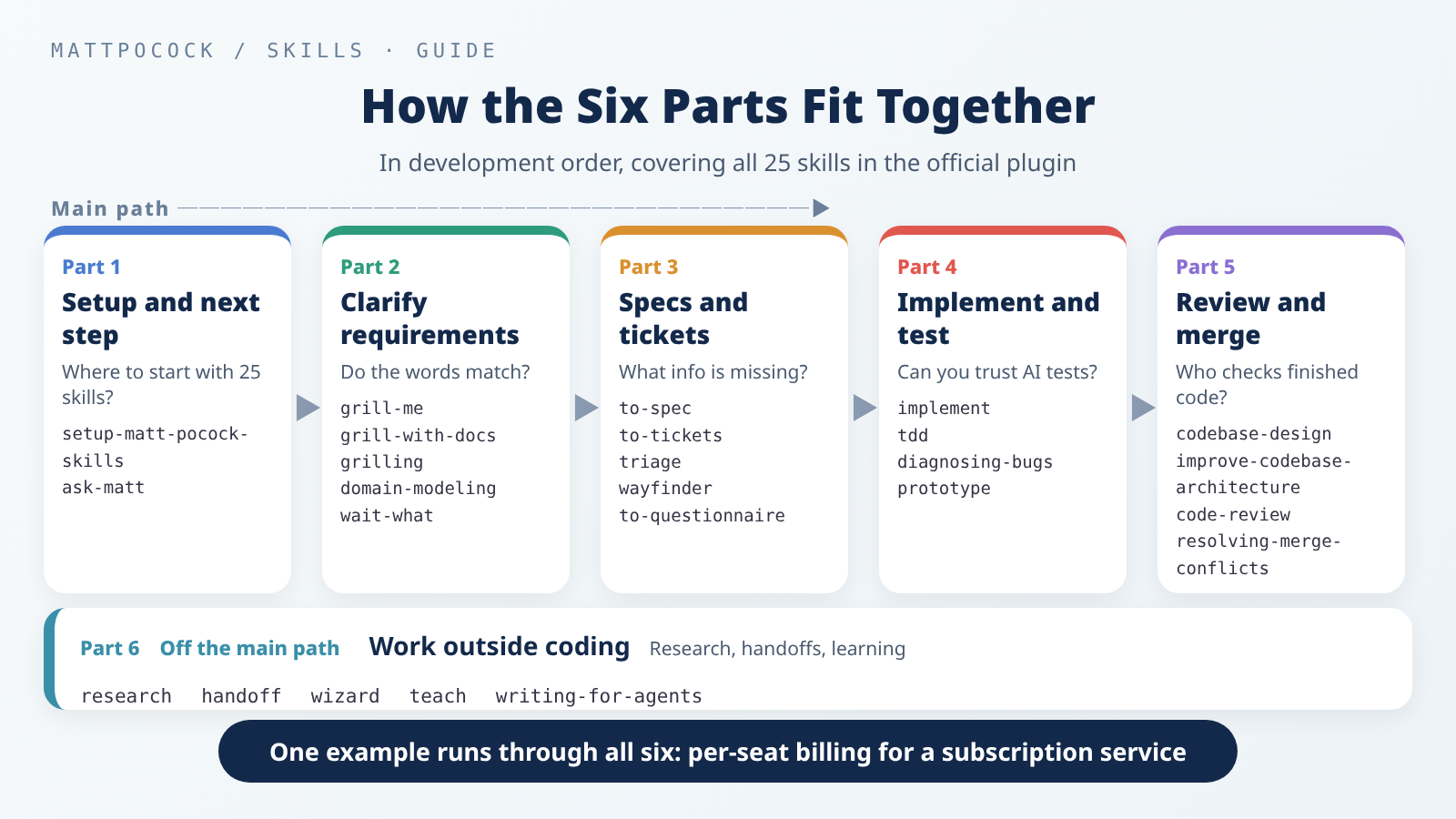 The six parts follow the order of development, one stretch each, with Part 6 covering the work outside coding.
The main path goes roughly like this. First, grill-with-docs clarifies the requirements. If the feature is big enough to need several conversations, to-spec writes up a spec and to-tickets splits it into tickets. Then each ticket gets its own fresh conversation, where implement builds it, using tdd along the way and running code-review at the end. Most other skills are side roads: reports sent in by other people go to triage, work too big to list all its decisions goes to wayfinder, and when something breaks, you use diagnosing-bugs.
All six parts use the same example: adding per-seat billing to a subscription service. It starts with the simulated scenario in Part 1 and carries through to Part 6, so if you read in order, you can watch one feature move forward step by step.
What Each Part Covers
Part 1: Get Started Without Memorizing 25 Skills
Faced with 25 skills, where do you begin? This part explains how to choose between the two installation methods, what setup-matt-pocock-skills adds to your project, and how to use ask-matt to find your next step. You’ll see that you can start without understanding every skill first.
→ Part 1: Get Started Without Memorizing 25 Skills
Part 2: From Vague Requirements to Shared Terms
The meeting notes use “member,” “user,” and “seat” interchangeably. How do you pin them down? This part covers grill-me, grill-with-docs, grilling, domain-modeling, and wait-what. The AI asks questions round by round in the order they depend on each other. With grill-with-docs, agreed terms go into the project glossary, CONTEXT.md, and a few important decisions are written up as decision records.
→ Part 2: From Vague Requirements to Shared Terms
Part 3: Spec, Tickets, or More Questions?
Once the requirements are talked through, do you write a spec, break the work into tickets, or go ask the person who has the answer? This part explains which gap each of to-spec, to-tickets, triage, wayfinder, and to-questionnaire fills. The point is to figure out what information is missing first, not to run all five.
→ Part 3: Spec, Tickets, or More Questions?
Part 4: Trusting Code When the AI Writes the Tests
When the AI writes both the code and the tests, how do you know it got things right? This part covers implement, tdd, diagnosing-bugs, and prototype. The answer is to look at what the AI can’t change: the test locations you approved, expected values taken from the spec, and a command that has failed on the bug. The red-to-green test run in the post was actually executed.
→ Part 4: Trusting Code When the AI Writes the Tests
Part 5: Structure, Code Review, and Merge Conflicts
Passing tests don’t mean the structure isn’t getting messier, or that the change does what was asked. This part covers codebase-design, improve-codebase-architecture, code-review, and resolving-merge-conflicts: regular health checks, a review that asks “written by the rules?” and “built what was asked?” separately, and merge conflicts resolved by first understanding what each side wanted. The post walks through a real merge conflict.
→ Part 5: Structure, Code Review, and Merge Conflicts
Part 6: Skills for Research, Handoffs, and Learning
Work outside coding can stall a project too: looking up official docs, handing work to the next person, setup steps that need your own login, and learning a new topic. This part covers research, handoff, wizard, teach, and writing-for-agents, each with its own repeatable process.
→ Part 6: Skills for Research, Handoffs, and Learning
Pick a Starting Point for Your Situation
You don’t have to read from start to finish. Think about where you’re stuck right now:
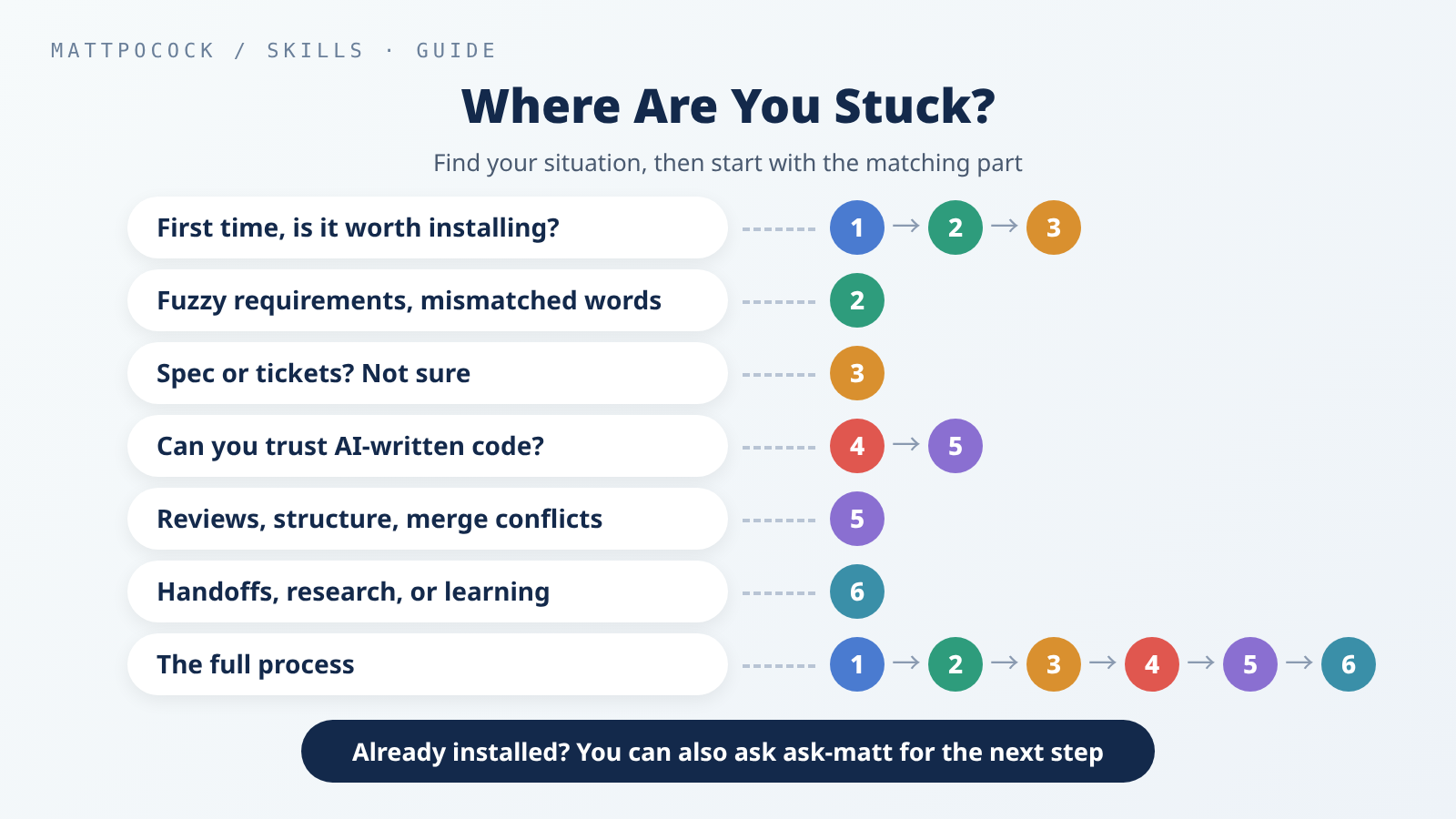 Find where you’re stuck, then start with the matching part.
| Your situation | Read |
|---|---|
| First time, wondering if it’s worth installing | Parts 1 → 2 → 3 |
| Requirements stay fuzzy and people use words differently | Part 2 |
| Requirements are settled, but spec or tickets? | Part 3 |
| Can you trust the code and tests the AI writes? | Parts 4 → 5 |
| Reviewing changes, tidying structure, or fixing merge conflicts | Part 5 |
| Handing off work, researching, or learning a new topic | Part 6 |
| Seeing one feature go from start to finish | Parts 1 through 6, in order |
If you already have the skills installed, you can also just ask ask-matt. Describe the step you’re stuck on, and it will suggest the next skill; then come back and read the part that covers it.
About Versions
The six parts were published between September 21 and October 14, 2026, and all of them are based on version 1.2.3. The repo kept changing while the series was being written, and the info boxes at the top of Part 5 and Part 6 note changes in later versions. Before you rely on any detail, check it against the repo’s current version.
Further Reading
mattpocock/skills: the official repo.README.md: the author’s overview and installation instructions (version1.2.3).plugin.json: the list of 25 skills in the official plugin.ask-matt/SKILL.md: the full route mapask-mattuses to suggest your next step.