Write Your Own Agent Skill: From SKILL.md to Testing and Upkeep
Writing your own Agent Skill? Covers SKILL.md rules, descriptions that trigger correctly, references and scripts, trigger and output tests, and upkeep.
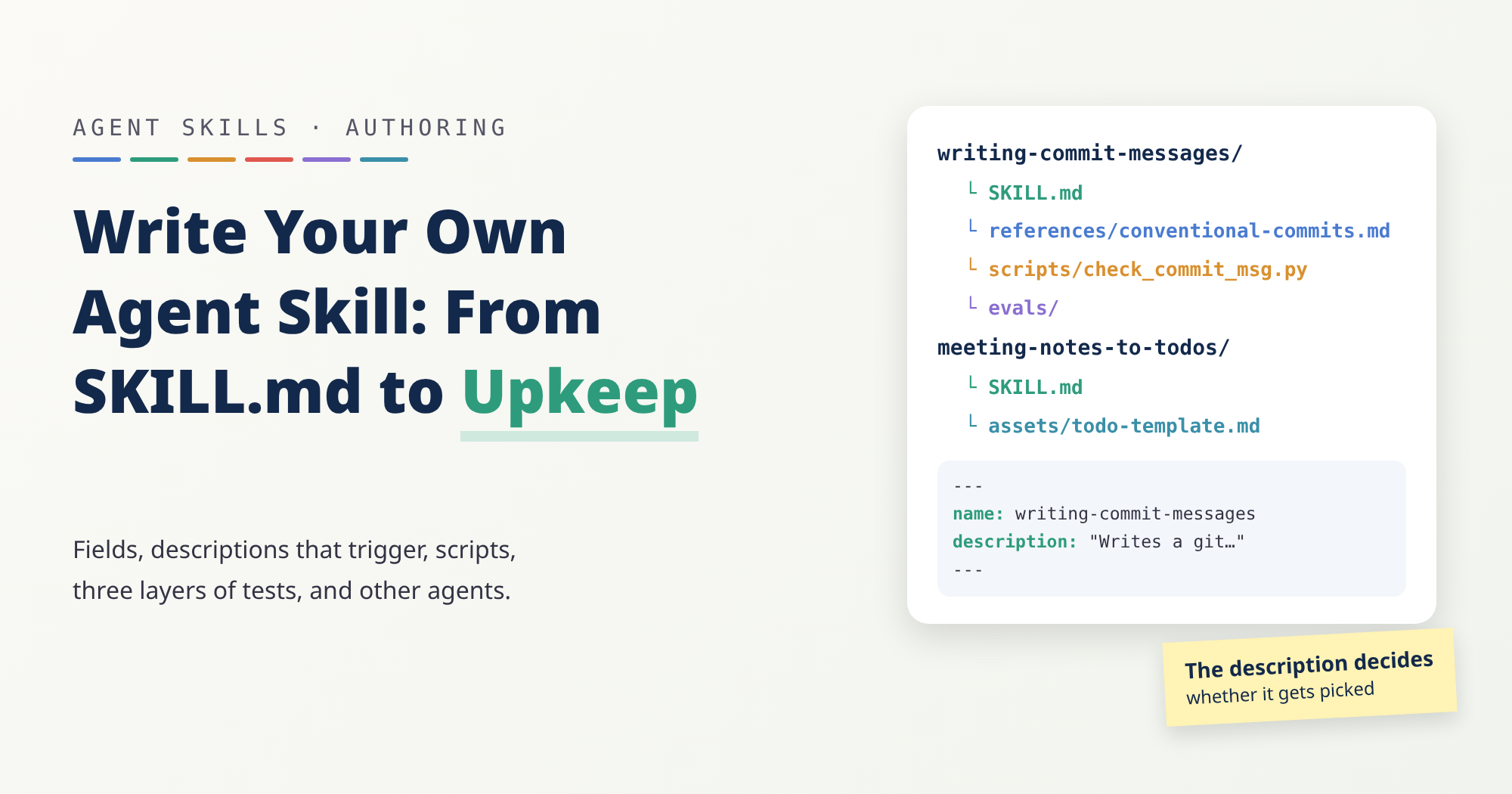
Every time I ask an AI to write a commit message, I repeat the same rules: start with a type like fix: or feat:, keep the first line short, no period at the end, and only describe what’s actually staged. Around the fifth time, you start wondering whether it could just remember.
That’s what an Agent Skill is for. This post looks at skills from the author’s side: when one is worth writing, how to lay out the files, how to write a description that gets the skill picked at the right moment, how to test it, whether it still works in another agent, and how to keep it working. Along the way I build two skills:
- A:
writing-commit-messages. It reads the changes staged in git, writes a commit message in the Conventional Commits format, and checks the format with a small script. This is the main example, used to show building a skill, writing a script, and testing in three layers. - B:
meeting-notes-to-todos. It turns meeting notes into a to-do list with owners and due dates. It’s just an instruction file and one output template, with no code at all, and it’s there for contrast: what a skill without code looks like, and how to write a description that doesn’t get picked by mistake.
This post doesn’t cover installing skills other people wrote. If you’d rather start with ready-made ones, the mattpocock/skills series guide is a good place to begin.
Everything the spec and each tool’s docs say here is based on the official documentation as I read it on October 17, 2026; the Conventional Commits, commitlint, and git pages were read on October 18, 2026. None of those pages carry a version number, and they change, so check them again before you rely on a detail.
The examples’ checks were run on October 18, 2026, with skills-ref 0.1.0 (agentskills/agentskills commit
69ef37e), git 2.47.3, and Python 3.13.5. Every command and output in this post comes from those runs. Trigger-rate tests and output-quality evals were not run, and neither skill has been run in any agent; the “Test in Three Layers” section explains why.
A Few Terms First
| Term | In one sentence |
|---|---|
| Skill | A folder built around SKILL.md, an instruction file for the AI, plus optional scripts and reference files. |
| Front matter | The settings block between the two --- lines at the top of a file; SKILL.md uses it for the skill’s name and description. |
| YAML | A format for writing settings one name: value line at a time; front matter is written in it. |
| Staging area | Where git add collects the changes that go into the next commit; git’s docs also call it the index. |
| Conventional Commits | A convention for commit messages whose first line reads “type(scope): summary”, as in fix(login): reject empty passwords. |
| Context window | The most text an AI can see at once. The more that’s always loaded, the less room is left for the actual work. |
| Token | The unit an AI uses to measure text length. More words means more tokens. |
When a Skill Is Worth Writing
The Claude Code docs give a practical test: write a skill when you keep pasting the same instructions, checklist, or multi-step procedure into chat, or when a section of CLAUDE.md has grown from a fact into a procedure.
The difference is when things load. CLAUDE.md is read into every conversation; a skill’s body loads only when it’s used, so, as the same page puts it, long reference material costs almost nothing until you need it. AGENTS.md is always loaded too, and every line of it has a cost, which Part 6 of the series covers.
There are also times you shouldn’t bother. agentskills.io’s best practices are blunt about it: if the agent already handles the whole task well without the skill, the skill may not be adding value. Anthropic’s authoring guide suggests building evaluations first: run the AI on a few representative tasks with no skill, write down exactly where it goes wrong, then write just enough instruction to close those gaps.
Take A. The AI can already write a commit message and knows git. What it doesn’t know is which types your team uses, how long the first line may be, or that you never want it to git add things you didn’t stage. B is the same: the AI can read meeting notes, but the format comes out different every time, and sometimes it guesses an owner for a task nobody took. That’s exactly the kind of gap a skill should fill.
General advice on writing documents for AI, such as how to phrase pointer sentences, putting common cases first, and cutting sentences that change nothing, is already covered in the writing-for-agents section of Part 6. I won’t repeat it here; this post sticks to the mechanics that are specific to skills.
The Smallest Working Skill
Under the Agent Skills specification, the smallest skill is a folder with one SKILL.md in it. Everything else is optional: scripts/ for code the agent can run, references/ for documents it reads when needed, and assets/ for templates, images, and similar resources.
SKILL.md opens with YAML front matter, followed by a Markdown body. The minimum looks like this:
1
2
3
4
---
name: skill-name
description: A description of what this skill does and when to use it.
---
The spec defines just six fields:
| Field | Required | Rules |
|---|---|---|
name | Yes | 1–64 characters; lowercase letters, digits, and - only; can’t start or end with -; no consecutive --; must match the parent folder’s name |
description | Yes | 1–1024 characters; says what the skill does and when to use it |
license | No | A license name, or the name of a license file bundled with the skill |
compatibility | No | 1–500 characters; environment requirements, such as system packages. The spec says most skills don’t need it |
metadata | No | A map from string keys to string values, for anything the spec doesn’t define |
allowed-tools | No | A space-separated list of pre-approved tools; experimental, and support varies by tool |
Individual tools add their own rules on top:
- Anthropic’s platform:
namecan’t contain XML tags or the reserved wordsanthropicandclaude;descriptioncan’t contain XML tags. - Claude Code: every field is optional, and a missing
namefalls back to the folder name. A misspelled or unknown field is ignored without any error. If the YAML doesn’t parse, the skill still loads, just with every field empty. - claude.ai uploads and the Skills API: the same page says these paths accept only the spec’s six fields, and one extra field is a hard error:
1
Unexpected key(s) in SKILL.md frontmatter: argument-hint. Allowed properties are: allowed-tools, compatibility, description, license, metadata, name
Put those three together and the trap is clear: a mistake in Claude Code goes unreported, and you only find out when you try to upload the same skill somewhere else. The safest habit is to use only the spec’s six fields, which is also the basis for the cross-agent section later on.
The Description Decides When It Runs
An agent doesn’t read every skill when it starts. Under the spec’s progressive disclosure, it first loads only each skill’s name and description, and reads the full SKILL.md once a task looks like a match. agentskills.io’s guide to optimizing descriptions puts it plainly: the description carries the entire burden of triggering.
The same guide points out something easy to miss: agents usually reach for a skill only when a task is beyond what they can do on their own. A simple one-step request like “read this PDF” may not trigger a PDF skill even when the description matches perfectly, because the agent can handle it with basic tools.
Two Docs, Two Styles
The two official guides disagree on phrasing, so here they are side by side:
- agentskills.io (optimization guide): use imperative phrasing, written as an instruction to the agent (“Use this skill when…” rather than “This skill does…”); describe what the user is trying to achieve, not how the skill works inside; explicitly list the situations it applies to, including ones where the user never names the domain; keep it concise.
- Anthropic (authoring guide): always write in the third person, as in “Processes Excel files and generates reports”, and avoid “I can help you…” or “You can use this to…”. The reason given is that the description goes into the system prompt, and an inconsistent point of view can cause discovery problems.
The two actually pull in opposite directions: agentskills.io asks for “Use this skill when…” rather than “This skill does…”, while Anthropic’s own example is exactly that kind of third-person sentence (“Processes Excel files…”). Both of my examples use a compromise, my own choice rather than either doc’s advice: the first sentence says what it does in the third person, the second lists situations with “Use this skill when…”, and the last says when not to use it. Here’s A:
1
description: "Writes a git commit message for the currently staged changes, in Conventional Commits format (type(scope): summary, optional body and footers). Use this skill when the user asks for a commit message, asks you to commit what they staged, or asks how to describe their changes, even if they don't say 'Conventional Commits'. Do not use it to explain git commands, to edit commits that were already pushed, or to write changelogs or release notes."
The double quotes around the whole value aren’t a style choice; you’ll see why under “Format Checks”. That last “Do not use it to…” sentence has a source too: when queries that shouldn’t trigger keep triggering, the optimization guide suggests spelling out what the skill does not do, to draw the line between it and nearby capabilities.
Using B to Avoid False Triggers
Meeting notes sit close to a lot of other requests. “Summarize this meeting”, “prioritize my to-dos”, and “set up a meeting” all sound related, but each wants something different. Here’s B’s description:
1
description: Turns meeting notes or a meeting transcript into a to-do list of tasks with owners and due dates, in a fixed Markdown format. Use this skill when the user shares notes, minutes or a transcript of a meeting or call and asks what needs to be done, who is doing what, or for the follow-ups, even if they don't say "action items". Do not use it for a plain meeting summary with no tasks, for editing or prioritizing an existing to-do list, or for scheduling a meeting.
It does three things. The first sentence says the output is a list of tasks with owners and due dates, not a summary. The second lists how people actually ask (notes, minutes, transcripts, who is doing what, follow-ups), including when they never say “action items”. The last rules out the three closest requests. A few queries to compare:
| Query | Should it trigger? | Why |
|---|---|---|
| “Here are my notes from yesterday’s standup. Who’s doing what?” | Yes | Never says “to-do”, but asks who owns what |
| “Summarize this meeting in three bullet points” | No | Wants a summary, not tasks |
| “Sort my to-do list by priority” | No | Already a to-do list; nothing to pull out of notes |
| “Set up a meeting for Wednesday afternoon” | No | Scheduling a meeting, not processing one |
This table is a starting point for test queries that I wrote; none of it has been run in an agent. For how to turn it into a real test, see “Trigger Tests” below.
Budget for Length
A description can be up to 1024 characters, but the usable space is usually smaller, because the list of every installed skill has to fit in the context window:
| Tool | List budget | When it overflows |
|---|---|---|
| Claude Code | The whole listing gets 1% of the context window; each skill’s description plus when_to_use is cut at 1,536 characters (docs) | Descriptions are dropped, starting with the skills you invoke least |
| Codex | The initial list uses at most 2% of the context window, or 8,000 characters when the window size is unknown (docs) | Descriptions are shortened first; with many skills, some may be left out with a warning |
Both say to put the key use case first, so the most important words survive a cut. A’s description is 444 characters and B’s is 464, and in both the three parts are ordered with that in mind.
One Skill, One Job
agentskills.io compares a skill to a function: it should be one coherent unit of work. Scope it too narrowly and a single task has to load several skills whose instructions may conflict; scope it too broadly and it gets hard to trigger precisely. The Codex docs say it in one line: Keep each skill focused on one job.
A writes commit messages and nothing else: look at what’s staged, pick a type, write the summary, check the format. PR descriptions, release notes, and editing commits that are already pushed are out of scope. B turns meeting notes into to-dos; it doesn’t summarize meetings or manage the list afterward.
On naming, Anthropic recommends the gerund form, like processing-pdfs, accepts noun phrases like pdf-processing and action-oriented names like process-pdfs, and says to avoid vague names like helper or utils. A, writing-commit-messages, is a gerund. B, meeting-notes-to-todos, reads as input-to-output, which isn’t one of those three patterns. The same guide also says to keep naming consistent within a collection of skills, so if you keep both in one project, pick one pattern, for example gerunds for both.
Who Can Start It
Some skills shouldn’t run whenever the AI decides they fit. Each tool has its own switch:
| Tool | Setting | Effect |
|---|---|---|
| Claude Code | disable-model-invocation: true | Claude won’t start it on its own; you run it by typing /name (docs) |
| Claude Code | user-invocable: false | You can’t run it with /name; only Claude can start it |
| Cursor | disable-model-invocation: true | Loaded only when you explicitly type /skill-name (docs) |
| Codex | policy.allow_implicit_invocation: false in agents/openai.yaml | Not started implicitly from your prompt; explicit $skill still works (docs) |
The Claude Code docs suggest manual-only for workflows with side effects or timing you want to control, such as /commit or /deploy: you don’t want Claude deciding to deploy because your code looks ready. For a real example, see implement in Part 4 of the series, which sets both the Claude Code and the Codex switch.
A sits right on that line, since a commit is a side effect. My approach is to have A only write and check the message, and run git commit only when the user asked for a commit in the conversation (step 5). Note that this is an agreement written into the instructions, not a technical guard. If what you want is “invoke it and it commits”, make it manual-only.
There’s one more trade-off. disable-model-invocation and user-invocable aren’t among the spec’s six fields. Put them in SKILL.md and they work in Claude Code and Cursor, but claude.ai uploads and the Skills API reject them, and the skills-ref check later in this post flags them too. Codex keeps the same setting in a separate file, agents/openai.yaml, so SKILL.md itself can stay spec-only. Neither example sets either switch.
Move Details Into References and Scripts
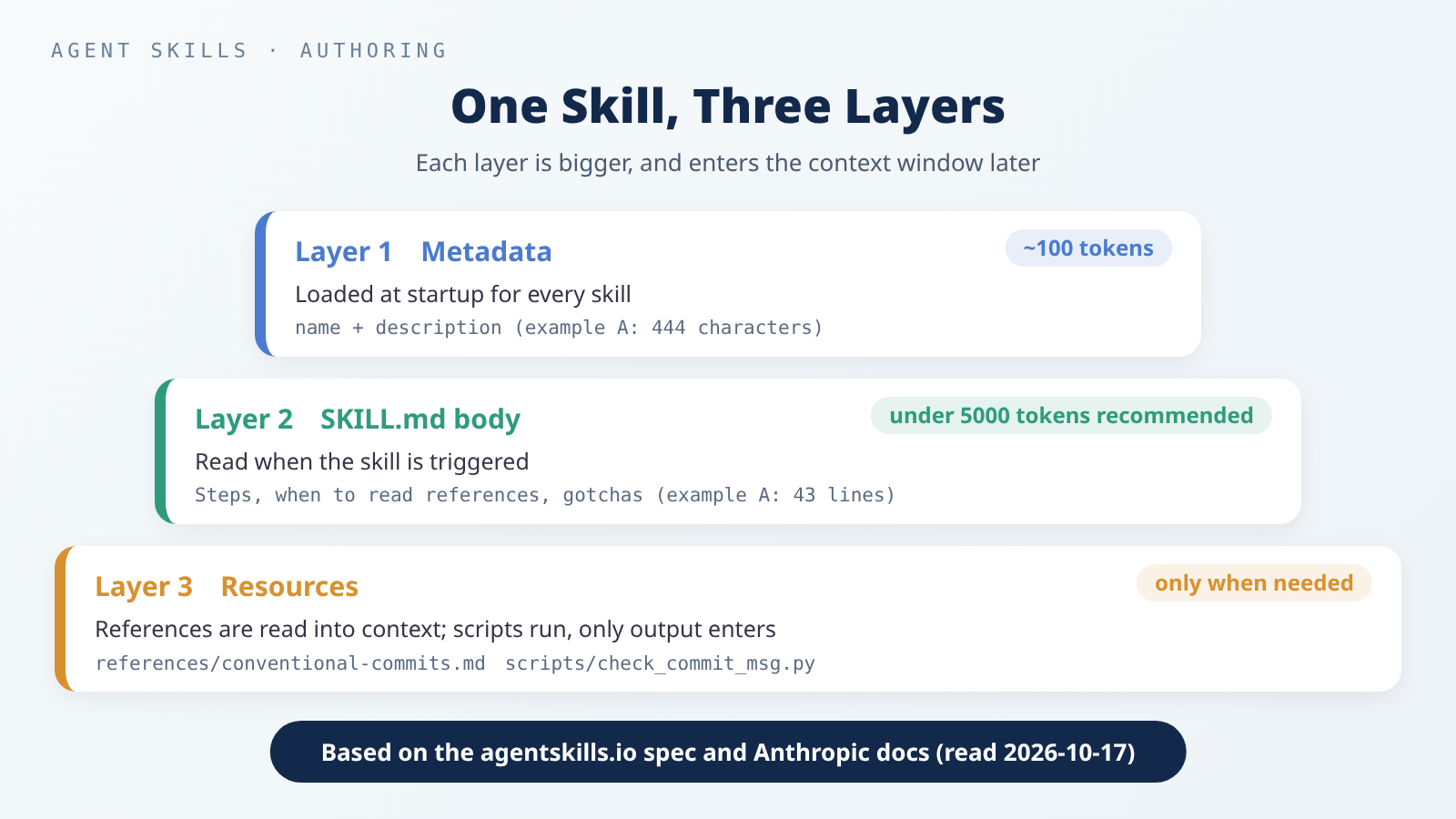 One skill loads in three layers: each layer is bigger than the one above it, and enters the context window later.
The spec splits a skill into three layers:
- Metadata (about 100 tokens):
nameanddescription, loaded at startup for every skill. - Instructions (under 5000 tokens recommended): the full
SKILL.mdbody, read when the skill is activated. - Resources: files in
scripts/,references/, andassets/, loaded only when needed.
The spec also recommends keeping the main SKILL.md under 500 lines and file references one level deep. Anthropic’s authoring guide explains why: when Claude meets a reference inside a referenced file, it may preview it with something like head -100 instead of reading the whole thing, and end up with incomplete information. So link every reference file straight from SKILL.md, and give any reference file over 100 lines a table of contents at the top.
Splitting files isn’t enough on its own; you also have to say when to read each one. agentskills.io’s example is “Read references/api-errors.md if the API returns a non-200 status code”, which is far more useful than “see references/ for details”. Here’s how A does it; the type list and rules live in the reference file and normally aren’t read at all:
1
2
Read `references/conventional-commits.md` when you are not sure which type
fits, or when the change removes or renames something other code depends on.
Scripts Are Meant to Be Run
The big difference between scripts and reference files: according to Anthropic’s overview, scripts run through bash, the code never enters the context, and only the output costs tokens. The authoring guide adds that your instructions should make clear whether to run a script or read it as reference.
If a rule can be checked by code, don’t ask the AI to judge it from prose. A puts the format rules (type, length, trailing period, blank line, uppercase BREAKING CHANGE) in scripts/check_commit_msg.py. What the script can’t tell is whether a change is a fix or a feat; the AI still has to read the diff (the before-and-after of the change) and decide, and the Gotchas say so. The script follows agentskills.io’s guide to scripts:
| What the guide asks for | What A’s script does |
|---|---|
| No interactive prompts (agents run in non-interactive shells, and a script waiting for input hangs) | The message comes from a file, or from standard input with -; it never stops to ask |
A --help option | --help lists both modes, the options, output format, exit codes, and examples |
| Error messages that say what went wrong and what to try | For example, write the type in lowercase: 'fix' |
| Data on stdout, diagnostics on stderr | The result is always one JSON object; notes like “nothing is staged” and errors go to stderr |
Meaningful exit codes, documented in --help | 0 valid (or something is staged), 1 problems (or nothing is staged), 2 usage error |
| Predictable output size | Returns only the first line and the list of problems, never the whole diff |
The full --help text is the docstring at the top of the script in the appendix.
The --repo option is there for a reason. The scripts guide says command paths in SKILL.md should be relative to the skill’s root, because that’s where the agent runs them. But git has to run inside the user’s repo, so the script takes the repo through --repo, and the top of SKILL.md says that commands run from the skill’s directory and that <repo> is the user’s repo.
State Your Dependencies
The scripts guide also says to state prerequisites in SKILL.md instead of assuming the agent’s environment has them, and to use the compatibility field for runtime-level requirements. Pin versions in one-off commands, for example npx [email protected]. Anthropic’s authoring guide has a whole section titled “Avoid assuming tools are installed”.
A’s script uses only the Python standard library and needs git, and both are written into compatibility. B has no script and needs nothing installed, so it has no compatibility field, which fits the spec’s note that most skills don’t need one. If a script needs third-party packages, declare them inside the script with PEP 723 and say in SKILL.md how to run it.
Not Every Skill Needs a Script
B’s rules, like “if the notes don’t name an owner, don’t guess” and “turn ‘next Friday’ into a date only when you know the meeting date”, require understanding sentences, and code would handle them worse. Anthropic’s authoring guide calls this degrees of freedom: use text instructions (high freedom) when decisions depend on context, and a fixed script (low freedom) when an operation is fragile and consistency is critical. A’s format check is the second kind; B’s sorting-out is the first.
B’s only resource is assets/todo-template.md, a fixed output template. The template makes every result look the same, so you, or the next tool, can pick it up from there. The authoring guide’s template pattern describes exactly this, and says to match how strict the template is to what you need.
Build A: A Commit Message Skill
A’s full layout:
1
2
3
4
5
6
7
8
$ find writing-commit-messages -type f | sort
writing-commit-messages/SKILL.md
writing-commit-messages/evals/evals.json
writing-commit-messages/evals/files/empty-password.diff
writing-commit-messages/evals/files/mixed-changes.diff
writing-commit-messages/evals/trigger-queries.json
writing-commit-messages/references/conventional-commits.md
writing-commit-messages/scripts/check_commit_msg.py
evals/ holds the test files used in “Test in Three Layers” below. The reference file, the script, and both test files are in full in the appendix at the end; here we only look at SKILL.md.
SKILL.md
1
2
3
4
5
6
7
8
9
10
11
12
13
14
15
16
17
18
19
20
21
22
23
24
25
26
27
28
29
30
31
32
33
34
35
36
37
38
39
40
41
42
43
---
name: writing-commit-messages
description: "Writes a git commit message for the currently staged changes, in Conventional Commits format (type(scope): summary, optional body and footers). Use this skill when the user asks for a commit message, asks you to commit what they staged, or asks how to describe their changes, even if they don't say 'Conventional Commits'. Do not use it to explain git commands, to edit commits that were already pushed, or to write changelogs or release notes."
compatibility: Requires git and python3 (tested with git 2.47 and Python 3.13). Standard library only.
metadata:
  version: "1.0"
---

# Writing Commit Messages

## Steps

Run the commands below from this skill's directory. `<repo>` is the path
of the user's git repository.

1. See what is staged: `python3 scripts/check_commit_msg.py --staged --repo <repo>`.
   Exit code 1 means nothing is staged: stop and tell the user. Do not run
   `git add` yourself.
2. Read the staged changes with `git -C <repo> diff --cached`. For a long
   diff, read one file at a time: `git -C <repo> diff --cached -- <path>`.
3. Write the message to a temporary file: a header `type(scope): summary`,
   then a blank line and a short body that says why, if the header alone
   does not make the reason clear.
4. Check it: `python3 scripts/check_commit_msg.py <file>`. Fix every
   problem and check again until it exits 0.
5. Show the message to the user. Run `git -C <repo> commit -F <file>` only
   if the user asked you to commit in this conversation.

Read `references/conventional-commits.md` when you are not sure which type
fits, or when the change removes or renames something other code depends on.

## Gotchas

- The checker only looks at the message. It cannot tell whether `fix` or
  `feat` matches the diff; that call is yours.
- If the staged changes do two unrelated things, suggest splitting them
  into two commits instead of writing one vague message.
- Do not invent issue numbers, `Closes #...` or `Co-authored-by` lines.
  Add footers only when the user gave you the information.
- Never use `git commit -a` or `git add .`: they would include changes the
  user did not stage.
- `BREAKING CHANGE:` must be uppercase. `!` before the colon also marks a
  breaking change.
There are only five steps, and step 4 is what agentskills.io calls a validation loop: write, check, fix what’s wrong, and check again until it passes.
The gotchas are what agentskills.io calls the most valuable part of many skills: not general advice, but concrete facts the AI will likely get wrong unless told. Take git commit -a: the git docs say it automatically stages modified and deleted files, which means committing changes the user never picked.
The reference file references/conventional-commits.md lists 11 types and 7 rules. The spec itself defines only feat and fix; the other nine come from commitlint’s config-conventional. The 72-character limit on the first line is my own choice: the git docs suggest a title of no more than 50 characters, commitlint allows 100 by default, and I picked something in between. Every rule in the reference file names its source, so you can see at a glance what’s the spec and what’s my choice.
A Test Run
I set up a temporary git repo to try it. Two lines went into app/login.py (“if the password is empty, return False”) and were staged; README.md was also edited but not staged:
1
2
3
$ git status --short
 M README.md
M  app/login.py
The two columns are the staging area and the working directory: M means changed and staged, ` M` means changed but not staged. Following step 1, see what’s staged:
1
2
3
4
5
6
7
8
9
10
11
12
$ python3 scripts/check_commit_msg.py --staged --repo /tmp/cc-demo
{
  "staged": 1,
  "files": [
    {
      "status": "M",
      "path": "app/login.py",
      "added": 2,
      "deleted": 0
    }
  ]
}
Only app/login.py is listed; the unstaged README.md doesn’t appear, and the exit code is 0. Next, a valid message, which exits with 0:
1
2
3
4
5
6
7
8
9
10
11
$ cat good.txt
fix(login): reject empty passwords

Return False before hashing when the password is empty,
instead of passing an empty string to hash_password().
$ python3 scripts/check_commit_msg.py /tmp/cc-msgs/good.txt
{
  "ok": true,
  "header": "fix(login): reject empty passwords",
  "problems": []
}
Then a common way of writing it, with an uppercase type, a trailing period, and no blank second line. The exit code is 1:
1
2
3
4
5
6
7
8
9
10
11
12
13
14
15
16
17
18
19
20
21
22
$ cat bad.txt
Fix(login): Handle empty password.
Users saw an error page when the password field was empty.
$ python3 scripts/check_commit_msg.py /tmp/cc-msgs/bad.txt
{
  "ok": false,
  "header": "Fix(login): Handle empty password.",
  "problems": [
    {
      "rule": "type",
      "message": "write the type in lowercase: 'fix'"
    },
    {
      "rule": "full-stop",
      "message": "do not end the summary with '.'"
    },
    {
      "rule": "blank-line",
      "message": "line 2 must be empty; put the body after a blank line"
    }
  ]
}
Each problem comes with what to change, so the agent can fix them and run the check again. Finally, I made a real commit with the valid message. The unstaged README.md stays where it was, and the staging area is now empty, so the exit code is 1 and the note goes to stderr:
1
2
3
4
5
6
7
8
9
10
$ git commit -q -F /tmp/cc-msgs/good.txt && git log --format="%h %s" -2 && git status --short
891c9d5 fix(login): reject empty passwords
5c0fd3d chore: initial commit
 M README.md
$ python3 scripts/check_commit_msg.py --staged --repo /tmp/cc-demo
nothing is staged; ask the user what to stage
{
  "staged": 0,
  "files": []
}
Build B: A Meeting To-Do Skill
B has just two files:
1
2
3
$ find meeting-notes-to-todos -type f | sort
meeting-notes-to-todos/SKILL.md
meeting-notes-to-todos/assets/todo-template.md
SKILL.md
1
2
3
4
5
6
7
8
9
10
11
12
13
14
15
16
17
18
19
20
21
22
23
24
25
26
27
28
29
30
31
---
name: meeting-notes-to-todos
description: Turns meeting notes or a meeting transcript into a to-do list of tasks with owners and due dates, in a fixed Markdown format. Use this skill when the user shares notes, minutes or a transcript of a meeting or call and asks what needs to be done, who is doing what, or for the follow-ups, even if they don't say "action items". Do not use it for a plain meeting summary with no tasks, for editing or prioritizing an existing to-do list, or for scheduling a meeting.
metadata:
  version: "1.0"
---

# Meeting Notes to To-dos

## Steps

1. Find every action item in the notes: something a person agreed to do,
   was asked to do, or said they would do. Decisions and opinions are not
   action items unless someone has to act on them.
2. For each item, take the owner and the due date only from the notes.
3. Fill in `assets/todo-template.md` and output only the filled template.
   Write it in the language the notes are written in.

## Rules

- Never guess an owner or a date. If the notes don't say, write
  `(not stated)` in the notes' language and list the item under
  "Needs an owner or date".
- Turn a relative date ("next Friday") into a calendar date only when the
  meeting date is in the notes and the words point to one day. Otherwise
  keep the words as written and list the item under "Needs an owner or date".
- Quote a few words from the notes in the Source column, so the user can
  check where each item came from.
- One task per row. If one sentence holds two tasks, split it.
- If there are no action items, say so in one sentence instead of
  filling the template.
It’s all text rules, and the core of them is “don’t guess”: a missing owner is marked as not stated, a vague date is kept as written, and those items are gathered at the end so the user sees at a glance what to fill in.
assets/todo-template.md
1
2
3
4
5
6
7
8
9
10
11
## To-dos: {meeting title} ({meeting date, or "date not stated"})

| # | Task | Owner | Due | Source |
| --- | --- | --- | --- | --- |
| 1 | {start with a verb} | {name from the notes} | {YYYY-MM-DD} | "{a few words quoted from the notes}" |

### Needs an owner or date

- #{row number}: {what is missing, e.g. "no owner named", "due date only says 'soon'"}

{Leave out this section when every row has an owner and a due date.}
Trying It on Sample Notes
The meeting notes below are sample data I made up, not a real meeting. The table after them is an expected result I wrote by hand from the template to show how it’s used. It was not produced by an agent; B hasn’t been run in any agent.
1
2
3
4
5
Weekly sync, 2026-10-12 (Monday)
- Lin: website redesign mockups, will share with everyone before Friday
- The login page error message needs changing, Zhe says he'll take it
- Budget sheet is due next month, nobody has picked it up yet
- Decision: no test environment upgrade this week
Following B’s rules, the expected result looks like this:
1
2
3
4
5
6
7
8
9
10
11
12
## To-dos: Weekly sync (2026-10-12)

| # | Task | Owner | Due | Source |
| --- | --- | --- | --- | --- |
| 1 | Share the website redesign mockups | Lin | 2026-10-16 | "will share with everyone before Friday" |
| 2 | Change the login page error message | Zhe | (not stated) | "Zhe says he'll take it" |
| 3 | Submit the budget sheet | (not stated) | next month | "nobody has picked it up yet" |

### Needs an owner or date

- #2: no due date
- #3: no owner named; due date only says "next month"
A few spots map to the rules: the meeting was on a Monday, so “before Friday” becomes 2026-10-16; “next month” doesn’t point to one day, so it stays as written; and “no test environment upgrade” is a decision that nobody has to act on, so it isn’t a to-do.
Test in Three Layers
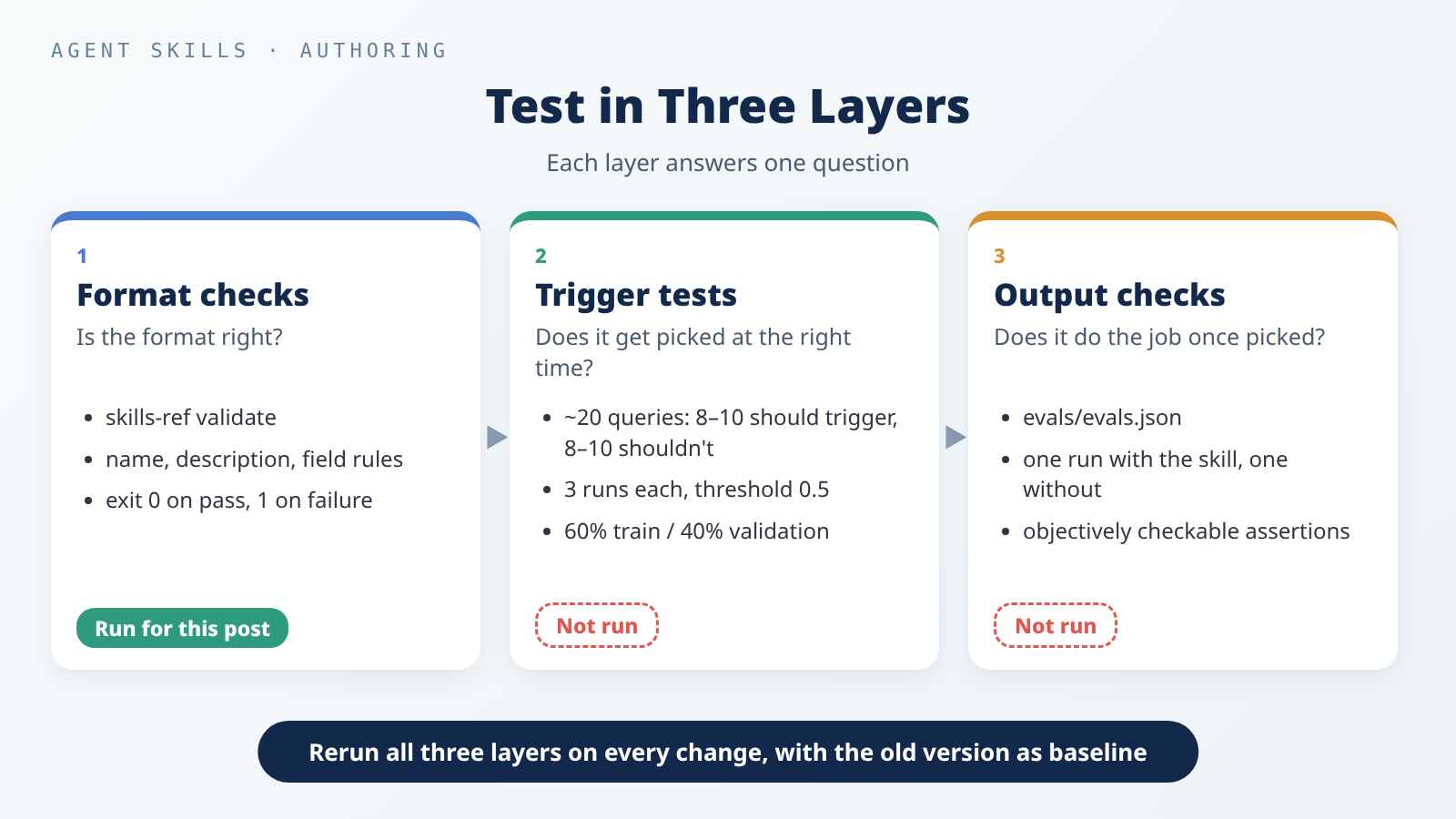 Each layer tests one thing: is the format right, does it get picked, and does it do the job once picked.
Format Checks
The spec points to skills-ref for validating frontmatter. One caveat up front: its README says it is intended for demonstration purposes only and not meant to be used in production. It’s a reference implementation, not a finished product.
I installed it from a fixed commit:
1
2
3
4
$ git clone -q https://github.com/agentskills/agentskills.git && cd agentskills && git checkout -q 69ef37e9424c0a7ea9dd2293b559e43ec8176379 && git log -1 --format='%h %cs'
69ef37e 2026-08-09
$ python3 -m venv .venv && .venv/bin/pip install -q -e skills-ref && .venv/bin/skills-ref --version
skills-ref, version 0.1.0
The first time I validated A, it failed. The description wasn’t quoted yet:
1
2
3
4
5
6
$ skills-ref validate writing-commit-messages
Validation failed for writing-commit-messages:
  - Invalid YAML in frontmatter: mapping values are not allowed here
  in "<unicode string>", line 3, column 119:
     ... onal Commits format (type(scope): summary, optional body and foo ...
                                         ^ (line: 3)
The culprit is type(scope): summary inside the description. YAML reads “colon plus space” as the separator between a name and its value, so a second one on the same line makes the whole front matter fail to parse. The fix is to wrap the entire value in double quotes and switch the quotes inside the sentence to single quotes. B’s description has no “colon plus space”, so it passes without quotes.
Claude Code wouldn’t warn you about this one: as mentioned earlier, when the YAML doesn’t parse, it still loads the skill with every field empty. My inference is that with an empty description, the skill would rarely get picked automatically; I haven’t tested that.
With the quotes in place, both pass with a single line each and exit with 0:
1
2
3
4
$ skills-ref validate writing-commit-messages
Valid skill: writing-commit-messages
$ skills-ref validate meeting-notes-to-todos
Valid skill: meeting-notes-to-todos
Then I made three broken copies of A: a name with consecutive --, a folder name that doesn’t match name, and an added Claude Code–only field, when_to_use. I ran each one, and all three exit with 1:
1
2
3
4
5
6
7
8
9
$ skills-ref validate bad--name
Validation failed for bad--name:
  - Skill name cannot contain consecutive hyphens
$ skills-ref validate commit-messages
Validation failed for commit-messages:
  - Directory name 'commit-messages' must match skill name 'writing-commit-messages'
$ skills-ref validate writing-commit-messages
Validation failed for writing-commit-messages:
  - Unexpected fields in frontmatter: when_to_use. Only ['allowed-tools', 'compatibility', 'description', 'license', 'metadata', 'name'] are allowed.
The last one is the one to remember: a field that’s perfectly valid in Claude Code is an error in skills-ref. That’s why I said earlier to stick to the six fields.
Claude Code also has claude plugin validate <skills directory>, which finds SKILL.md files whose frontmatter doesn’t parse. It requires v2.1.233 or later. Claude Code isn’t installed on my machine, so I didn’t run it.
Trigger Tests
A valid format doesn’t mean the skill gets picked at the right moment. agentskills.io’s optimization guide suggests testing it like this:
- Write about 20 queries: 8–10 that should trigger and 8–10 that shouldn’t.
- Make the “shouldn’t” queries near-misses that share words with the skill but need something else. Something obviously unrelated, like “write a fibonacci function”, tests nothing.
- Run each query 3 times and compute a trigger rate, with 0.5 as a reasonable default threshold.
- Split the queries into a train set (about 60%) and a validation set (about 40%). Change the description based only on train-set failures, and use the validation set only to check whether the change generalizes, so the description doesn’t overfit those exact phrasings.
- Five rounds is usually enough. If nothing improves, the problem may be the queries themselves.
The Claude Code docs use the same idea: run the same prompts in fresh sessions with the skill on and with it off, and compare. Fresh sessions matter, because leftover context from writing the skill hides gaps in the written instructions.
I wrote 20 queries for A: 10 should trigger and 10 shouldn’t, 12 in the train set and 8 in validation, with each set split evenly between the two kinds. split is a field I added to keep the split fixed; the guide’s example format has only query and should_trigger. The full JSON is in the appendix (many queries are in Chinese; the set mixes both languages on purpose). A few of them:
| Query | Should it trigger? | Why it’s in the set |
|---|---|---|
| 「這次改動要怎麼描述比較好?我要提交了」 (“How should I describe this change? I’m about to commit”) | Yes | Never says “commit message” |
| “fix the typo in the last commit message, it’s already pushed to main” | No | Also about a commit message, but one that’s already pushed |
| 「幫我把這個月的 commit 整理成 release notes」 (“Turn this month’s commits into release notes”) | No | Also about commits, but wants release notes |
| 「幫我寫一個 commit-msg hook,用 Node 檢查訊息格式」 (“Write a commit-msg hook that checks the message format in Node”) | No | Even says “check the message format”, but wants code written |
Trigger rates were not run for this post. A trigger test has to run in a real agent, so you can see whether it read
SKILL.md. The machine I used has none of theclaude,codex,cursor-agent,gemini, orcopilotCLIs (I checked withcommand -v), so this section gives the queries and the method, but no trigger-rate numbers. You can take A’s JSON and B’s comparison table to your own agent and run them the way the guide describes.
Output Checks
Once picked, the skill still has to do the job right. agentskills.io’s guide to evaluating output suggests keeping test cases in evals/evals.json. Each case has a realistic prompt, an expected_output describing success, and any input files; objective assertions get added after you’ve seen a first round of results. The guide suggests starting with 2–3 cases. A’s three (in full in the appendix):
| Case | What it checks |
|---|---|
1. The staged change is empty-password.diff; write a message but don’t commit yet | The type is fix, the message passes the script, no made-up issue numbers, no git commit run |
2. The staged change is mixed-changes.diff, mixing README text and a new logout function | Suggests two commits, and both messages pass the check |
| 3. The user says “I think I staged everything”, but nothing is staged | Says nothing is staged and doesn’t run git add itself |
Both .diff files were exported from the temporary repo above with git show and git diff --cached; they aren’t hand-written.
Each case runs twice, once with the skill and once without it (or with the previous version when you’re revising), and every run starts from a clean context. Assertions should be objectively checkable: “the output file is valid JSON” beats “the output is good”. The guide also notes that mechanical checks are more reliable as scripts than as LLM judgment. For A, “the message passes the check” is decided by A’s own script, and “no git commit was run” by comparing git log -1 before and after, with no AI grading needed.
Anthropic’s authoring guide adds one more point: a skill’s effect depends on the model, so test it with all the models you plan to use it with.
Output evals were not run for this post. Same reason as the trigger tests: no agent was available, so there are no with-skill and without-skill results to compare. The
evals.jsonin the appendix is a set of written test cases only. B has noevals.json; the hand-written expected result above could serve as theexpected_outputof its first case.
Does It Work in Another Agent?
Agent Skills is an open standard. Tools with official docs on their support include Claude Code, Codex, Cursor, and GitHub Copilot, and agentskills.io’s Client Showcase lists more. Here’s where those four look for skills:
| Tool | Project | Personal |
|---|---|---|
| Claude Code (docs) | .claude/skills/<name>/SKILL.md | ~/.claude/skills/<name>/SKILL.md |
| Codex (docs) | .agents/skills in every directory from the current working directory up to the repo root | $HOME/.agents/skills; plus /etc/codex/skills at the admin level |
| Cursor (docs) | .agents/skills/, .cursor/skills/; for compatibility, also .claude/skills/ and .codex/skills/ | ~/.agents/skills/, ~/.cursor/skills/; for compatibility, also ~/.claude/skills/ and ~/.codex/skills/ |
| GitHub Copilot (docs) | .github/skills, .claude/skills, .agents/skills | ~/.copilot/skills, ~/.agents/skills |
One inference from this table (mine, not something any of the docs say): as of the October 17, 2026 docs, .agents/skills/ appears in the Codex, Cursor, and Copilot lists, but the Claude Code docs don’t list it. Going the other way, .claude/skills/ covers Claude Code, Cursor, and Copilot, but not Codex. In other words, no single path is read by all four.
What Static Checks the Examples Passed
I haven’t run either skill in any agent, so I can’t say they’ve been tested in any of them. What I could do is a static portability check, which looks only at the files without running an agent:
| Check | Result |
|---|---|
| Front matter uses only the spec’s six fields | Yes. A: name, description, compatibility, metadata; B: name, description, metadata. Both pass skills-ref validate |
name is present and matches the folder name | Yes. The Codex docs say SKILL.md must include name and description; Cursor also requires name to match the folder |
| No tool-specific body syntax | Yes. No Claude Code !`command` injection and no ${CLAUDE_SKILL_DIR}; A’s script paths are relative to the skill root, as the scripts guide recommends |
That last row needs a word of explanation. In Claude Code, !`command` runs a command before Claude sees the skill and puts the output into the body, and ${CLAUDE_SKILL_DIR} is replaced with the skill’s folder. The Claude Code docs say that Claude Code–only body features, with dynamic injection as the example, don’t work in claude.ai chat or through the API. I found no docs on how other tools handle them, so the honest statement is: don’t assume they work.
Versioning and Maintenance
On versions, the spec only lets you put something like version: "1.0" in metadata, and it doesn’t define what a version number means. Managing versions with git tags or a CHANGELOG is a convention, not part of the spec. My suggestion: whenever you change the description or what a script does, tag it and write a one-line note. If your team adds a type, for instance, both the table in the reference file and TYPES in the script have to change, and that’s a revision worth recording.
For the revision itself, the output guide has a practical routine: snapshot the old version before editing, use it as the baseline (saved under old_skill/), and rerun the same cases. That’s how you tell whether the new version is actually better or just wrong in a different way.
Three more maintenance habits:
- Don’t write things that will go stale. Anthropic’s authoring guide suggests moving retired approaches into an “old patterns” section instead of mixing them into the main steps.
- Every time you correct the AI, add a gotcha. agentskills.io calls this one of the most direct ways to improve a skill.
- Prune skills you don’t use. Every skill takes part of the list budget described earlier, whether it’s used or not. Claude Code’s
/skill-doctorshows what each skill costs and how often it’s used, and requires v2.1.252 or later.
Security Work the Author Owns
The risks of installing someone else’s skill, and how users should check one, are covered in the supply-chain security post. Here I’ll stick to what the person writing the skill can do up front:
- Don’t have the skill fetch instructions from external URLs. Anthropic’s docs say skills that fetch data from external URLs pose particular risk, since the fetched content may contain malicious instructions, and even a trustworthy skill can be compromised if its external dependencies change.
- Keep
allowed-toolsto the minimum. In Claude Code, this field lets the skill use the listed tools without asking during the turn it’s invoked. The docs specifically say workspace trust doesn’t gate this field: a skill in a repo can grant itself tools, even in a-prun in a folder you’ve never trusted. Neither example uses the field. - Keep secrets out of scripts. This is my own practice, not a rule from any doc: keys and tokens come from environment variables and never go into any file in the skill, because the whole folder gets shared and committed.
- Pin your dependencies. The scripts guide says to pin versions in one-off commands so the same command behaves the same way over time.
- Offer
--dry-runfor anything that changes things. The scripts guide suggests letting the agent preview what a destructive or stateful operation will do. A’s script only reads git’s state and never writes anything; the one step that changes things,git commit, isn’t in the script and waits until the user asks, so the script doesn’t need the option.
Users will review your skill the way they’d review any software. The best you can do is make that review easy: few files, scripts whose purpose is obvious at a glance, and nothing that reaches outside.
My Take
What follows is my opinion, not a conclusion from any of the docs.
The description and the gotchas deserve the most time. Folder layout and field rules you get right once by following the spec, and skills-ref catches the mistakes, like the unquoted description in A. What really decides whether a skill is useful is whether it gets picked at the right moment, and whether, once picked, it avoids the traps you already knew about.
Rules that code can check go in a script; judgment calls stay in text. A’s format rules live in a script, so the result is the same every run, while “is this a fix or a feat?” is left to the AI reading the diff. B is judgment from start to finish; a script would only make it less reliable, and a template is all it needs.
For cross-agent use, give up a few convenient fields. when_to_use and disable-model-invocation are handy in Claude Code, but put them in SKILL.md and the skill fails skills-ref and claude.ai uploads. For a skill only you use in Claude Code, that’s fine. For one your team uses across tools, I’d stick to the six fields.
A description that hasn’t been trigger-tested is a guess. That includes both examples here. I wrote the queries, but until they’re run, I don’t know whether A gets picked when someone asks “how should I describe this change?”
Further Reading
Spec and methods (agentskills.io):
- Specification: folder layout, the six fields, progressive disclosure
- Best practices for skill creators: scope, gotchas, validation loops
- Optimizing skill descriptions: writing descriptions and testing triggers
- Evaluating skill output quality:
evals.jsonand with/without-skill comparisons - Using scripts in skills: designing script interfaces
- Client Showcase: products that support Agent Skills
- skills-ref: the validator (for demonstration)
Tool docs:
- Anthropic: Agent Skills overview, Skill authoring best practices
- Claude Code: Extend Claude with skills
- Codex: Build skills
- Cursor: Agent Skills
- GitHub Copilot: About agent skills
Commit message rules used by example A:
- Conventional Commits 1.0.0: message structure,
feat/fix,BREAKING CHANGE - commitlint config-conventional: the 11 common types
- git commit docs: what
-adoes, and the title-length suggestion
Related posts on this site:
- mattpocock/skills series guide: if you’d rather start with ready-made skills
- Part 6 of the series: the
writing-for-agentswriting principles - Part 4 of the series: a real manual-only skill
- Third-Party Skills and MCP Servers: The New Attack Surface in Your Coding Agent: risks and a checklist from the user’s side
Appendix: Example A’s Full Files
references/conventional-commits.md
1
2
3
4
5
6
7
8
9
10
11
12
13
14
15
16
17
18
19
20
21
22
23
24
25
26
27
28
29
30
31
32
33
34
35
36
37
38
39
40
41
42
43
44
45
46
47
48
49
50
51
# Conventional Commits: Rules Used by This Skill

Based on Conventional Commits 1.0.0 (https://www.conventionalcommits.org/en/v1.0.0/).
Rows marked "skill choice" are this skill's own rules, not the spec's.

## Message shape

```
type(scope)!: summary

body (optional, after one blank line)

footers (optional, after one blank line), e.g. Refs: #123
```

## Types

| Type | Use it for |
| --- | --- |
| `feat` | A new feature for users (spec: MUST be used for new features) |
| `fix` | A bug fix (spec: MUST be used for bug fixes) |
| `docs` | Documentation only |
| `style` | Formatting, white space; no change in behavior |
| `refactor` | Code change that neither fixes a bug nor adds a feature |
| `perf` | Performance improvement |
| `test` | Adding or fixing tests |
| `build` | Build system or dependencies |
| `ci` | CI configuration and scripts |
| `chore` | Other changes that don't touch source or test files |
| `revert` | Reverts an earlier commit |

The spec only defines `feat` and `fix`; the other nine are the list used by
@commitlint/config-conventional.

## Rules the checker enforces

| rule | Requirement | Source |
| --- | --- | --- |
| `header` | First line is `type(scope)!: summary`; scope and `!` are optional; a colon and one space before the summary | spec |
| `type` | One of the types above, in lowercase | list: commitlint; lowercase: skill choice |
| `length` | Header is at most 72 characters | skill choice (git docs suggest 50 or fewer for the title; commitlint allows 100) |
| `full-stop` | Summary does not end with `.` | commitlint |
| `blank-line` | Line 2 is empty when there is a body | spec |
| `breaking` | A breaking-change footer is written `BREAKING CHANGE:` or `BREAKING-CHANGE:` in uppercase | spec |
| `empty` | The message is not empty | — |

## Breaking changes

Mark a change that breaks existing users with `!` before the colon
(`feat(api)!: drop the v1 endpoint`), or with a footer
`BREAKING CHANGE: <what breaks>`, or both.
scripts/check_commit_msg.py
1
2
3
4
5
6
7
8
9
10
11
12
13
14
15
16
17
18
19
20
21
22
23
24
25
26
27
28
29
30
31
32
33
34
35
36
37
38
39
40
41
42
43
44
45
46
47
48
49
50
51
52
53
54
55
56
57
58
59
60
61
62
63
64
65
66
67
68
69
70
71
72
73
74
75
76
77
78
79
80
81
82
83
84
85
86
87
88
89
90
91
92
93
94
95
96
97
98
99
100
101
102
103
104
105
106
107
108
109
110
111
112
113
114
115
116
117
118
119
120
121
122
123
124
125
126
127
128
129
130
131
132
133
134
135
136
137
138
139
#!/usr/bin/env python3
"""Check a commit message against Conventional Commits, or list staged files.

Usage:
  python3 scripts/check_commit_msg.py [--max-header N] FILE
  python3 scripts/check_commit_msg.py --staged [--repo PATH]

FILE is a text file holding the commit message; use - to read stdin.

Options:
  --staged          List the files staged in git instead of checking a message
  --repo PATH       Repository for --staged (default: current directory)
  --max-header N    Longest allowed header line (default: 72)
  -h, --help        Show this help and exit

Output: one JSON object on stdout; errors go to stderr.
Exit codes:
  0  message is valid / at least one file is staged
  1  message has problems / nothing is staged
  2  usage error (bad option, file not found, not a git repository)

Examples:
  python3 scripts/check_commit_msg.py /tmp/msg.txt
  python3 scripts/check_commit_msg.py --staged --repo ~/code/my-app
"""
import argparse
import json
import re
import subprocess
import sys
from pathlib import Path

TYPES = ("build", "chore", "ci", "docs", "feat", "fix", "perf",
         "refactor", "revert", "style", "test")
HEADER_RE = re.compile(r"^(?P<type>[A-Za-z]+)(?:\((?P<scope>[^()\s]+)\))?"
                       r"(?P<bang>!)?: (?P<summary>\S.*)$")
BREAKING_RE = re.compile(r"^breaking[ -]change:", re.IGNORECASE)


class UsageError(Exception):
    pass


def check_message(text, max_header):
    lines = text.rstrip().splitlines()
    if not lines or not lines[0].strip():
        return "", [("empty", "the message is empty or starts with a blank line")]
    header, probs = lines[0], []
    m = HEADER_RE.match(header)
    if not m:
        probs.append(("header", "first line must look like 'type(scope): summary', "
                      "e.g. 'fix(login): handle empty password'"))
    else:
        t = m["type"]
        if t.lower() not in TYPES:
            probs.append(("type", f"'{t}' is not an allowed type; use one of: "
                          + ", ".join(TYPES)))
        elif t != t.lower():
            probs.append(("type", f"write the type in lowercase: '{t.lower()}'"))
        if m["summary"].rstrip().endswith("."):
            probs.append(("full-stop", "do not end the summary with '.'"))
    if len(header) > max_header:
        probs.append(("length", f"header is {len(header)} characters, "
                      f"limit is {max_header}"))
    if len(lines) > 1 and lines[1].strip():
        probs.append(("blank-line", "line 2 must be empty; put the body after a blank line"))
    for n, line in enumerate(lines[1:], start=2):
        if BREAKING_RE.match(line) and not line.startswith(
                ("BREAKING CHANGE:", "BREAKING-CHANGE:")):
            probs.append(("breaking", f"line {n}: write 'BREAKING CHANGE:' in uppercase"))
    return header, probs


def git(repo, *args):
    try:
        out = subprocess.run(["git", "-C", repo, *args], capture_output=True,
                             text=True, check=True)
    except FileNotFoundError:
        raise UsageError("git is not installed or not on PATH")
    except subprocess.CalledProcessError as e:
        raise UsageError(f"git failed in {repo}: {e.stderr.strip()}")
    return out.stdout


def staged(repo):
    """Return the staged files with their status and line counts."""
    git(repo, "rev-parse", "--git-dir")  # fails with exit 2 outside a repo
    counts = {}
    for line in git(repo, "diff", "--cached", "--numstat", "--no-renames").splitlines():
        added, deleted, path = line.split("\t", 2)
        counts[path] = (added, deleted)
    files = []
    for line in git(repo, "diff", "--cached", "--name-status", "--no-renames").splitlines():
        status, path = line.split("\t", 1)
        added, deleted = counts.get(path, ("-", "-"))
        files.append({"status": status, "path": path,  # "-" = binary file
                      "added": int(added) if added.isdigit() else None,
                      "deleted": int(deleted) if deleted.isdigit() else None})
    return files


def main(argv):
    ap = argparse.ArgumentParser(add_help=False)  # bad options exit with 2
    ap.add_argument("-h", "--help", action="store_true")
    ap.add_argument("--staged", action="store_true")
    ap.add_argument("--repo", default=".")
    ap.add_argument("--max-header", type=int, default=72)
    ap.add_argument("file", nargs="?")
    args = ap.parse_args(argv)
    if args.help:
        print(__doc__.strip())
        return 0
    if args.staged:
        files = staged(args.repo)
        if not files:
            print("nothing is staged; ask the user what to stage", file=sys.stderr)
        print(json.dumps({"staged": len(files), "files": files}, ensure_ascii=False, indent=2))
        return 0 if files else 1
    if not args.file:
        raise UsageError("give a message file (or - for stdin), or use --staged")
    if args.file == "-":
        text = sys.stdin.read()
    elif Path(args.file).is_file():
        text = Path(args.file).read_text(encoding="utf-8")
    else:
        raise UsageError(f"file not found: {args.file}")
    header, probs = check_message(text, args.max_header)
    print(json.dumps({"ok": not probs, "header": header,
                      "problems": [{"rule": r, "message": m} for r, m in probs]},
                     ensure_ascii=False, indent=2))
    return 1 if probs else 0


if __name__ == "__main__":
    try:
        sys.exit(main(sys.argv[1:]))
    except UsageError as e:
        print(f"Error: {e}", file=sys.stderr)
        sys.exit(2)
evals/evals.json
1
2
3
4
5
6
7
8
9
10
11
12
13
14
15
16
17
18
19
20
21
22
23
24
25
26
27
28
29
30
31
32
33
34
35
36
37
38
39
{
  "skill_name": "writing-commit-messages",
  "evals": [
    {
      "id": 1,
      "prompt": "This is what I have staged right now (see evals/files/empty-password.diff). Write me a commit message for it, but don't commit yet.",
      "expected_output": "One Conventional Commits message, e.g. a fix(login) header about rejecting empty passwords, that the checker accepts, and no commit is made.",
      "files": ["evals/files/empty-password.diff"],
      "assertions": [
        "scripts/check_commit_msg.py exits 0 on the proposed message",
        "The type is fix",
        "The message does not mention issue numbers or Closes/Refs footers",
        "No git commit was run"
      ]
    },
    {
      "id": 2,
      "prompt": "幫我把暫存區的東西寫成 commit 訊息,內容在 evals/files/mixed-changes.diff",
      "expected_output": "指出暫存區混了兩件無關的事(README 文字、新增 logout),建議拆成兩個 commit,並各給一則符合格式的訊息。",
      "files": ["evals/files/mixed-changes.diff"],
      "assertions": [
        "The response suggests splitting the changes into two commits",
        "Each proposed message passes scripts/check_commit_msg.py",
        "No git add or git commit was run"
      ]
    },
    {
      "id": 3,
      "prompt": "commit message please, I think I staged everything",
      "expected_output": "The skill finds that nothing is staged, says so, and does not stage files itself.",
      "files": [],
      "assertions": [
        "The response says nothing is staged",
        "git add was not run",
        "No commit message is presented as ready to use"
      ]
    }
  ]
}
evals/trigger-queries.json
1
2
3
4
5
6
7
8
9
10
11
12
13
14
15
16
17
18
19
20
21
22
[
  { "query": "幫我寫這次的 commit 訊息,改動我已經 git add 了", "should_trigger": true, "split": "train" },
  { "query": "write a commit message for what I staged", "should_trigger": true, "split": "train" },
  { "query": "I fixed the login crash and staged it, commit it for me", "should_trigger": true, "split": "train" },
  { "query": "這次改動要怎麼描述比較好?我要提交了", "should_trigger": true, "split": "train" },
  { "query": "is 'Fixed stuff' an ok commit message for my staged changes? suggest a better one", "should_trigger": true, "split": "train" },
  { "query": "幫我看暫存區改了什麼,然後給我一行 commit 標題", "should_trigger": true, "split": "train" },
  { "query": "staged the README update, need a message in our feat/fix format", "should_trigger": true, "split": "validation" },
  { "query": "我加了登出功能也加進暫存區了,幫我提交", "should_trigger": true, "split": "validation" },
  { "query": "what should the commit say for these staged changes? keep it short", "should_trigger": true, "split": "validation" },
  { "query": "幫我寫 commit,這次是把 API 的 v1 拿掉,會影響舊的呼叫端", "should_trigger": true, "split": "validation" },
  { "query": "git rebase 和 git merge 差在哪?", "should_trigger": false, "split": "train" },
  { "query": "fix the typo in the last commit message, it's already pushed to main", "should_trigger": false, "split": "train" },
  { "query": "幫我把這個月的 commit 整理成 release notes", "should_trigger": false, "split": "train" },
  { "query": "how do I unstage a file I added by mistake?", "should_trigger": false, "split": "train" },
  { "query": "幫我寫一個 commit-msg hook,用 Node 檢查訊息格式", "should_trigger": false, "split": "train" },
  { "query": "write the PR description for this branch", "should_trigger": false, "split": "train" },
  { "query": "Conventional Commits 的 feat 跟 fix 會怎麼影響版本號?解釋就好", "should_trigger": false, "split": "validation" },
  { "query": "squash my last three commits into one", "should_trigger": false, "split": "validation" },
  { "query": "幫我回覆同事在 PR 上的 review 留言", "should_trigger": false, "split": "validation" },
  { "query": "generate a CHANGELOG.md from the git history", "should_trigger": false, "split": "validation" }
]