mattpocock/skills Series (2): Clarify Vague Requirements and Leave Behind a Shared Vocabulary
A walkthrough of the grill-me and grill-with-docs interview flow: how to clarify requirements by asking questions in dependency order, and how to write confirmed terms and a few key decisions back into the project.
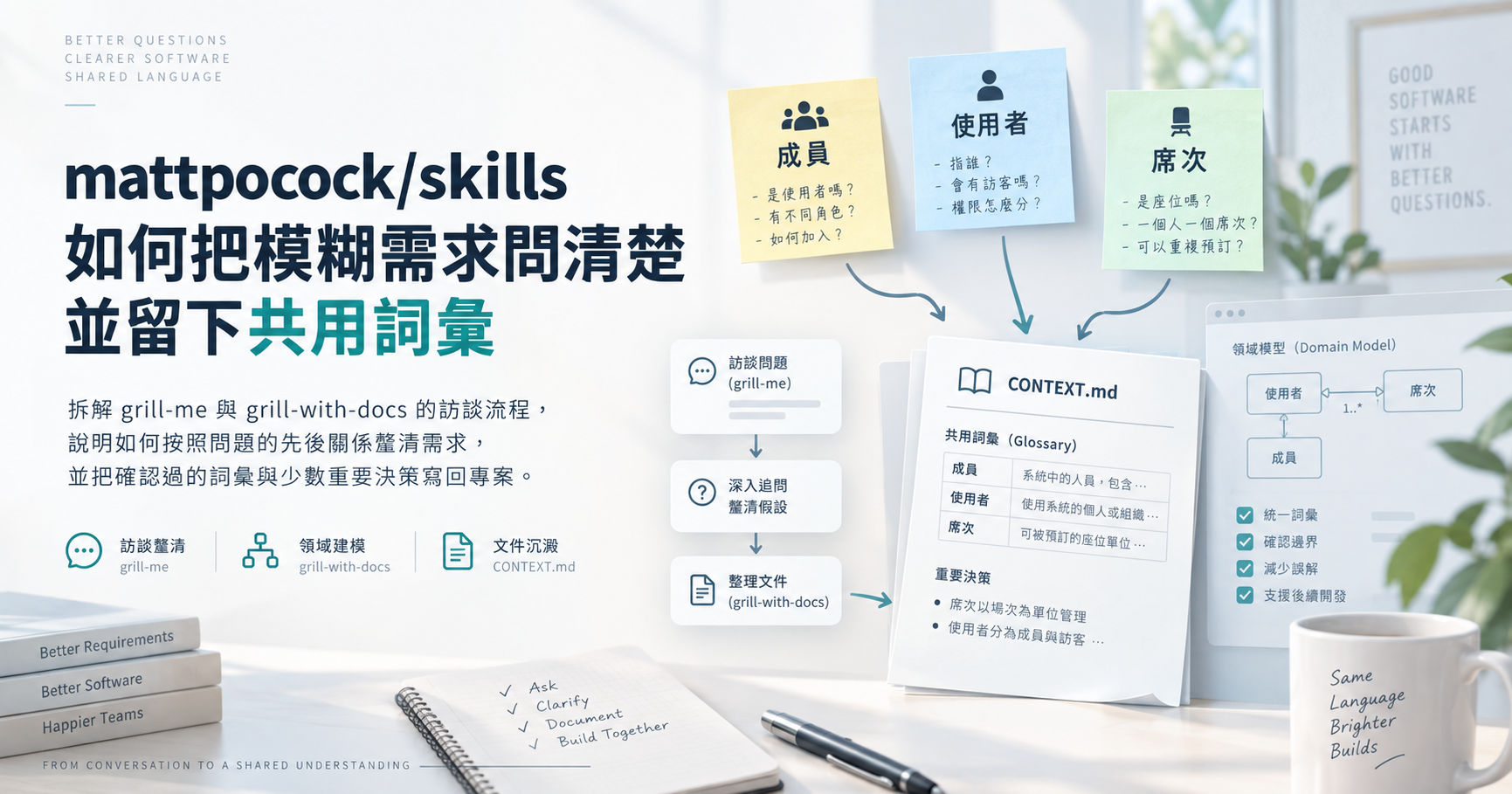
You’re about to add per-seat billing to a subscription service. The meeting notes use “member,” “user,” and “seat” more or less interchangeably, yet nobody has checked whether the three words mean the same thing. Before the team can discuss whether deactivated members should still be charged, it first needs to pin down what is actually being billed: a person, an account, or an entitlement that can be assigned.
A skill, as used in this post, can be thought of as a set of instructions that tells an AI coding assistant how to do a specific job. mattpocock/skills breaks this kind of work into interviewing, vocabulary curation, and re-explaining. This post lays out how five related skills divide the work and what stays in the project once the interview is over.
mattpocock/skills Series Part 2
- Previous (Part 1): Set Up Your Project Rules First, Then Let ask-matt Find the Next Step
- Next (Part 3): Find the Gap First, Then Decide Whether to Write a Spec or Break Down Tickets
This post is based on version
1.2.3.
How the five skills relate
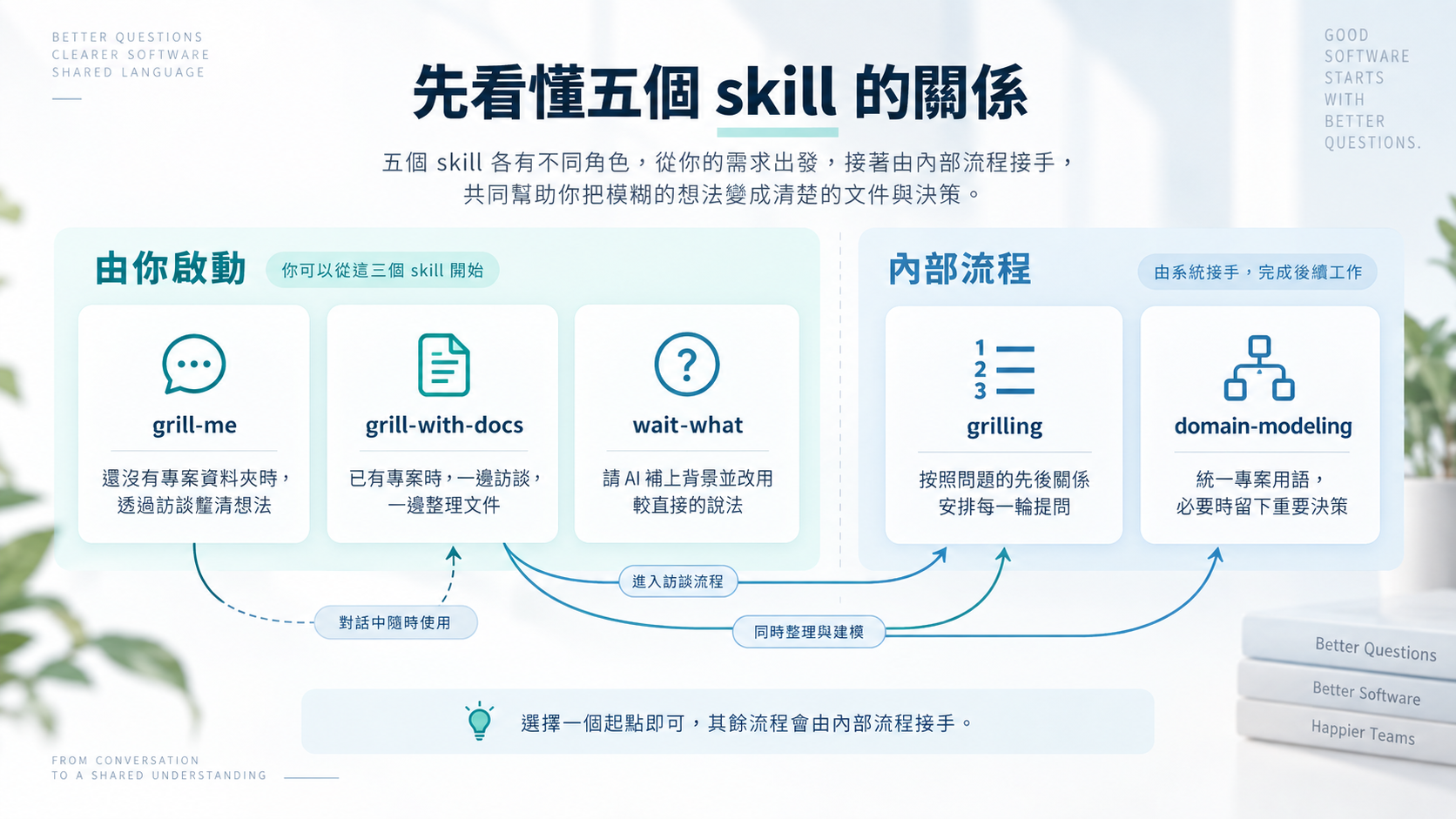 Pick the entry point that fits your current situation, and the internal flows take over the rest.
These five skills are not a sequence of steps you must run in order. grill-me and grill-with-docs are two alternative starting points. grilling and domain-modeling take over the interview and the vocabulary work behind the scenes. wait-what asks the AI to re-explain its last message when it wasn’t clear.
| Role | Skill | What it’s for |
|---|---|---|
| Invoked by you | grill-me | Clarify an idea through an interview when there’s no project folder yet |
| Invoked by you | grill-with-docs | Interview and update documentation at the same time in an existing project |
| Internal flow | grilling | Order each round of questions by how they depend on each other |
| Internal flow | domain-modeling | Keep project terminology consistent and record key decisions when needed |
| Invoked by you | wait-what | Ask the AI to fill in the background and say it more plainly |
grill-me, grill-with-docs, and wait-what only run when you call them by name; the AI won’t use them on its own. grilling and domain-modeling, on the other hand, can be picked up by the AI on its own and can also be called by other skills. The invocation rules document this difference. In everyday use, you only choose the starting point, and the internal flows handle the rest.
The two starting points differ in whether they leave documents behind
Both starting points use the same interview approach. The difference is whether project documentation gets updated during the interview.
grill-me only starts the interview. It suits situations where there’s no project folder yet, such as talking through an idea that hasn’t taken shape. It doesn’t build a glossary, and it leaves no files on your machine when the conversation ends.
grill-with-docs starts two internal flows at once. grilling runs the interview, and domain-modeling curates terms and decisions. When a project folder already exists, ask-matt recommends this starting point first; see its routing rules for the exact conditions.
grilling first asks the questions that can’t be skipped
grilling starts by working out the order in which questions depend on each other. The skill’s rules call this structure a “decision tree.” If a question depends on the answer to an earlier one, the AI holds it for a later round.
“Should deactivated members be billed?” can’t be answered until the definition of a billable seat is settled. While that definition is still open, the AI shouldn’t guess at the deactivation rule. In each round, the AI lists every question that can be decided right now, numbers them, and attaches a recommended answer to each. Once you reply, it decides what to ask in the next round.
The grilling rules also spell out who answers what. Facts that can be found in files, code, or tools are for the AI to investigate; choices between different approaches are yours to make. While the AI is looking something up, it doesn’t stall the whole round: only the questions that need that information wait for the result, and the rest are asked as usual. The interview ends only when every question has been dealt with and you’ve confirmed that you and the AI understand things the same way.
domain-modeling builds a project glossary
The “domain” in domain-modeling means the things and rules the project deals with. In this post’s example, that’s workspaces, members, seats, and how billing works. This skill writes confirmed names into CONTEXT.md. You can think of that file as a glossary specific to the project.
If you’re only reading the glossary and reusing existing names, you don’t need to invoke domain-modeling explicitly. It only needs to step in when an existing definition might be wrong, a name isn’t clear enough, or an important decision needs to be recorded.
If a word you use conflicts with an existing definition, the AI should point out the discrepancy right away; when a name carries more than one meaning, it proposes a more precise canonical term. When discussing how terms relate to each other, the AI also comes up with edge cases to test the definitions, such as “If a member is deactivated and later reactivated, do they still have their original seat?”, so that both sides spell out where one concept ends and another begins. When you describe existing behavior, it also has to check the code. If the code disagrees with what you said, you are still the one who decides whether to keep the current behavior or change it.
Once a term is confirmed, domain-modeling updates CONTEXT.md immediately instead of waiting until the interview is over. The file holds only names and definitions, not implementation details. A large project made up of several subprojects may have a separate glossary for each one. In that case, CONTEXT-MAP.md in the project’s top-level folder works like an index that points to where each glossary lives. The file rules in domain-modeling define these boundaries.
Significant technical choices may be written up as an ADR, short for Architecture Decision Record. It’s a short document that explains what was chosen and why. The AI proposes an ADR only when a decision will be hard to change later, will be hard to understand without context, and actually involved weighing alternatives. It writes the ADR only after you agree. The skill’s format allows an ADR to be a single paragraph and doesn’t ask you to pad it out just to fill a template. You can check the three conditions and the format in ADR-FORMAT.md.
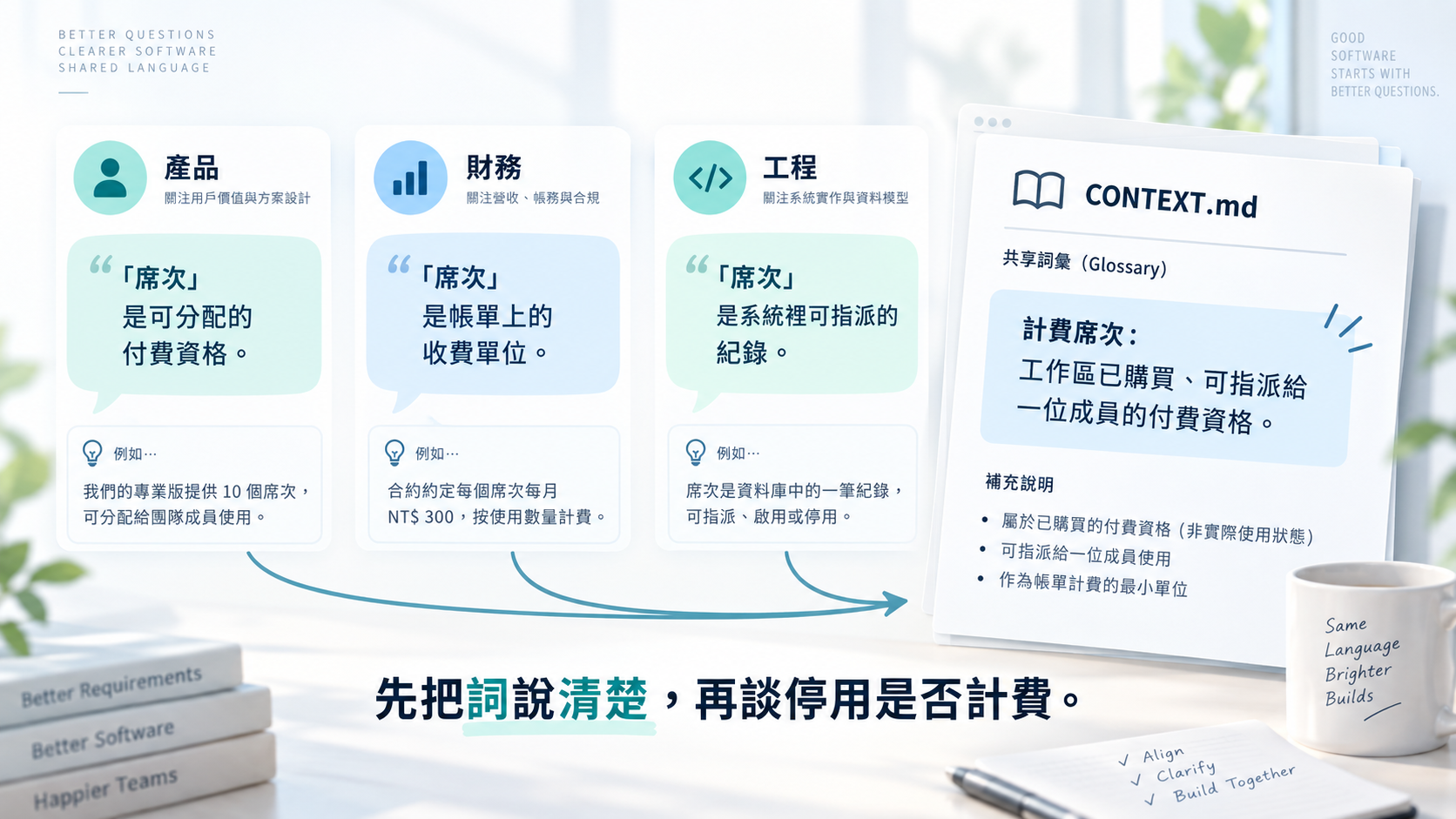 Agreeing on the same word is not the same as agreeing on the same thing.
wait-what only handles what you just didn’t follow
wait-what is a correction entry point you use mid-conversation. When the AI’s last explanation skips ahead too quickly or leaves out context, you invoke it explicitly.
It asks the AI to re-explain what it just said and add the background needed to understand it. The re-explanation must be worded in English that follows ASD-STE100, a standard that restricts the vocabulary and sentence patterns used in technical English. You don’t need to learn the standard first; its role here is to make the AI use shorter sentences and consistent terms. The content must also stick to the terms already confirmed in CONTEXT.md.
If the project uses multiple glossary files, it first looks up the right one in CONTEXT-MAP.md. The full instruction is a single paragraph; you can check it in wait-what/SKILL.md.
Its instruction only asks for the previous message to be re-explained; it doesn’t rerun the whole interview. If the problem isn’t a single message you didn’t follow but requirements that are still vague overall, go back to grill-with-docs and continue the interview.
Interview results don’t all go into the same document
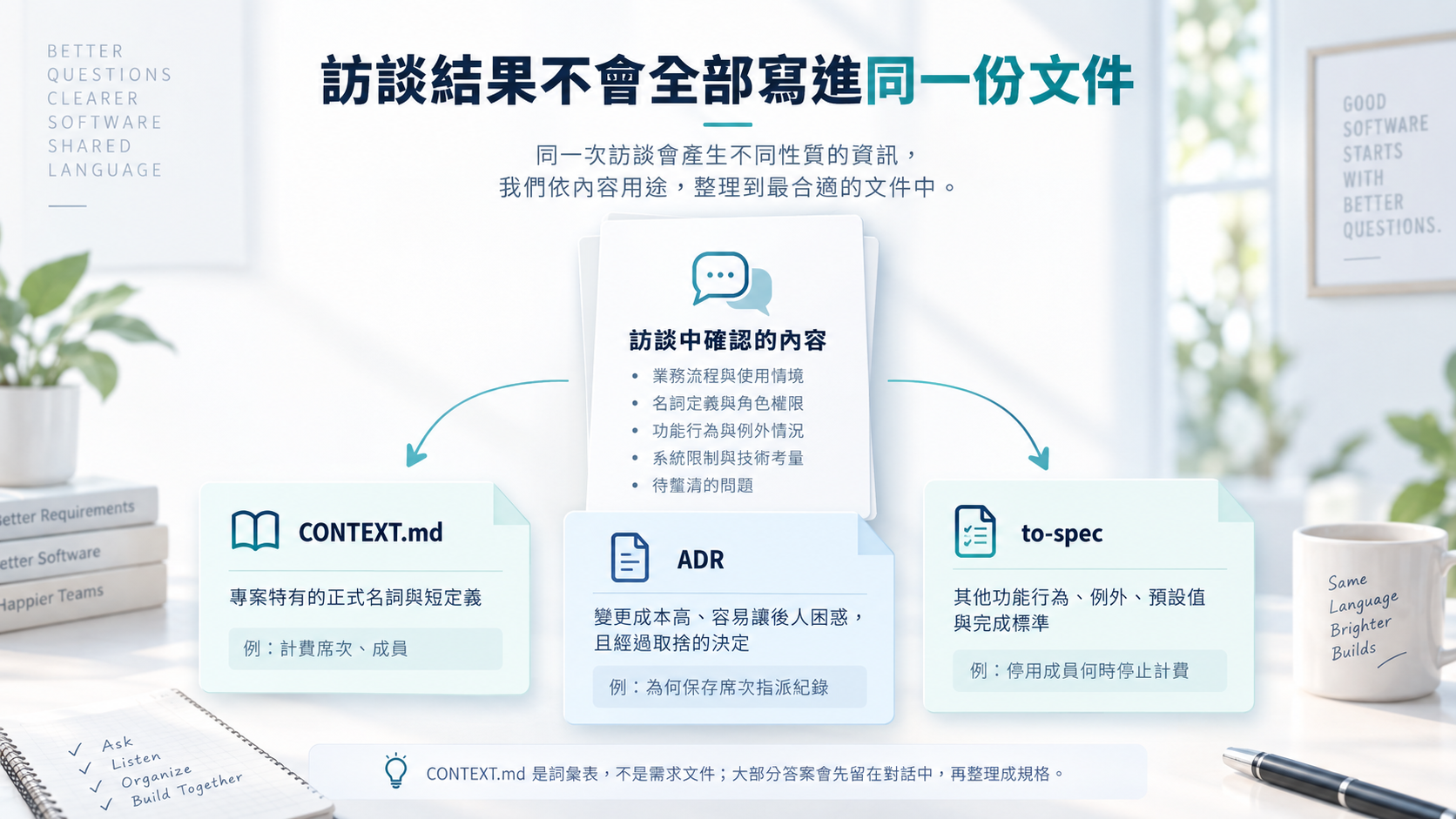 Interview results are written to the glossary, an ADR, or a later spec depending on what kind of content they are.
grill-with-docs writes documentation, but that doesn’t mean it stuffs every answer into CONTEXT.md. Interview content goes to one of three places:
| Content | Destination | Example |
|---|---|---|
| Canonical, project-specific terms with short definitions | CONTEXT.md | What “billable seat” and “member” each mean |
| Decisions that are costly to change, likely to confuse future readers, and involved trade-offs | An ADR, created once you agree | Why the billing code keeps the seat assignment records |
| Other feature behavior, exceptions, defaults, and acceptance criteria | Stays in the conversation for now, later handed to to-spec | When a deactivated member stops being billed |
CONTEXT.md is a glossary, not a requirements document, and ADRs aren’t a running log of every answer. Most answers stay in the conversation at first. Only when you separately invoke to-spec does that skill turn the confirmed requirements into a feature spec for later development.
There’s no fixed number of interview questions
The two starting points don’t have their own question banks; both hand the interview to grilling. And grilling has no fixed number of rounds or questions either. If a question needs an earlier answer, the AI saves it for later. The interview ends only when every question has been dealt with and you’ve confirmed that both sides understand things the same way.
How long the interview takes depends on how much is still undecided, not on which skill you used. Rather than counting how many questions the AI asked, check three things: which questions already have answers, which are still waiting on earlier answers, and whether terms and ADRs were written to the right place.
Because grill-with-docs modifies project documentation, the team still needs to review whether newly added terms are ones the team should adopt, and whether each ADR meets the three conditions. Definitions that haven’t been agreed on shouldn’t be written down early; otherwise, the next person or AI to pick up the work will just be reading another vague definition.
Check whether you have a project first, then pick a starting point
First determine whether you already have a project folder holding code and docs, then look at what you’re stuck on: the requirements, the vocabulary, or the last explanation.
| Current situation | Choose | What not to expect from it |
|---|---|---|
| No project folder yet; you just want to test an idea | grill-me | It won’t write results into project documentation |
| Already in a project and need to record terms or decisions along the way | grill-with-docs | It won’t directly produce a complete requirements document for later development |
| You only want the round-by-round questioning method | grilling | It won’t maintain the glossary on its own |
| You only need to sort out project terminology or key decisions | domain-modeling | It won’t capture every requirements answer |
| You didn’t follow the last explanation | wait-what | It won’t rerun the whole interview |
This table helps you choose a starting point; it isn’t an order of execution. Normally you only invoke one starting point, and the rest of the flow takes over on its own.
grill-with-docs suits requirements that can be fully clarified in a single conversation. If the requirements are too big to clarify in one conversation, the ask-matt routing rules point you to wayfinder instead. wayfinder is a separate skill for exploring large pieces of work first to figure out where to start.
Simulated scenario: questioning seats until a spec can be written
I didn’t actually run this flow for this post. What follows is worked out from the skills’ rules alone, not the result of a real test. The scenario: you’ve finished the project setup from the previous post, and you’re now working on per-seat billing inside the subscription service’s project folder.
Using Codex, an AI coding assistant, as the example, start by entering the requirement and explicitly invoking grill-with-docs:
1
2
3
$grill-with-docs

We want to add per-seat billing to our existing subscription service. Please help me get the requirements clear.
The AI first reads the existing glossary, related ADRs, and code. Facts that can be looked up in the project, such as “Does the system currently charge through the payment platform based on the number of active members?”, are for the AI to investigate, not to toss back to you.
The first round handles questions that don’t depend on any other answer. For example: is billing based on purchased seats, assigned seats, or the number of active members? And does the subscription belong to the workspace or to a single payer? Suppose the team eventually confirms that a workspace owns a pool of purchased seats, and a member can use paid features only after being given a seat. domain-modeling can then write the terms down right away:
1
2
3
4
5
6
7
8
9
10
11
12
13
14
15
**Workspace**:
A space made up of multiple members that shares one subscription.
_Avoid_: account, organization

**Billable seat**:
A paid entitlement that the workspace has purchased and that can be assigned to one member.
_Avoid_: user, headcount

**Seat assignment**:
A record of allocating one billable seat to one member for a period of time.
_Avoid_: membership, subscription item

**Member**:
A person who has joined the workspace. Becoming a member and getting a billable seat are two separate things.
_Avoid_: user, seat
This is illustrative content organized according to CONTEXT-FORMAT.md, not actual output from the tool. Each _Avoid_ line lists names that are easy to mix up and should be avoided from now on.
Only with these definitions in place can the second round follow up on whether a pending invitation takes up a seat, what happens to the assignment when a member is deactivated, and when adding or removing seats affects the price. If the existing code bills directly by the number of active members, the AI also has to point out that the new definition differs from the current behavior and ask you to confirm whether to change it.
Suppose the team then decides that the billing code should store the start and end time of every seat assignment, instead of working backward from the current member list to reconstruct past counts. This makes it easy to look up history later, at the cost of having to update billing data every time membership changes. This choice may meet the three ADR conditions, so domain-modeling should first propose an ADR and write it only after getting your agreement.
Suppose the AI then explains seat changes in a long block of text, but you don’t follow how “seat change” relates to “seat assignment.” That’s the moment to invoke wait-what and ask it to re-explain using the terms it just wrote down.
When this stretch of the flow is done, the requirements still haven’t been turned into a full spec. What you have at this point are the answers confirmed in the conversation, the terms in CONTEXT.md, and a few ADRs created with your agreement. If this feature will take several conversations to build, the next step is to invoke to-spec in the same conversation and have it organize the requirements into a spec.
What matters more to me is what gets left behind
At this point, both the invocation rules and the document-keeping rules can be checked against the original sources. But the rules themselves can’t prove that a shared vocabulary will necessarily improve how a team works together.
I still think that, once requirements are clarified, what’s most worth leaving behind is vocabulary the next person can reuse directly, plus the few decisions that are hard to understand from the code alone. The Q&A stays in the conversation; the confirmed definitions make it into the project.
This view only applies to projects maintained by several people, or ones that take several conversations to finish. A one-off brainstorm doesn’t need every term documented; finishing the interview with grill-me is enough.
Make the same word mean the same thing first
If you want to try this flow, start by finding the one word in your requirements that’s most likely to be ambiguous, such as “seat.” Invoke grill-with-docs inside the project, confirm how it relates to “member” first, and then discuss whether inviting a member takes up a seat and when billing stops after deactivation.
The goal of the interview isn’t to pile up questions, but to make sure the same word always means the same thing throughout the spec that follows. The next post covers how to use to-spec to write the spec, and then to-tickets to break it down into tickets you can start working on right away.
Further reading
grill-me: confirm that it only starts the interview flow.grill-with-docs: see which two internal flows it starts at once.grilling: understand the decision tree, round-by-round questioning, and when it stops.domain-modeling: check where the glossary and ADRs should and shouldn’t be used.wait-what: see how it asks the AI to re-explain its last message.to-spec: confirm how interview content makes it into a formal spec.