mattpocock/skills Series (3): Find the Gap First, Then Decide Whether to Write a Spec or Break Down Tickets
Once the requirements have been talked through, should you write a spec, break the work into tickets, or go ask the person who holds the answer? Using per-seat billing as the example, this post explains which kind of gap to-spec, to-tickets, triage, wayfinder, and to-questionnaire each fill.
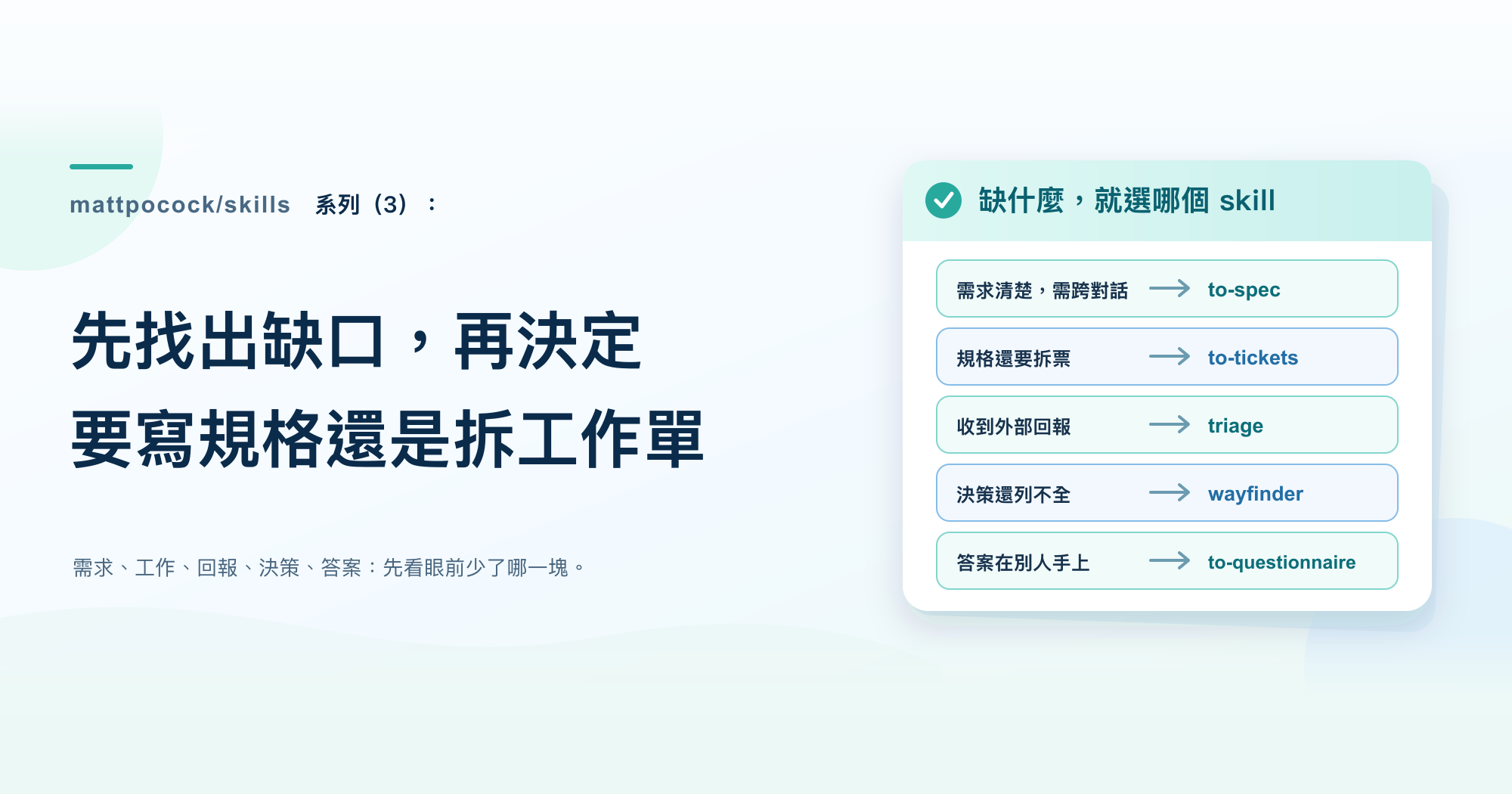
In the previous post, we finished talking through the per-seat billing requirements. CONTEXT.md now records the difference between a “billable seat” and a “member”, and the conversation also settled what happens when a member is deactivated. The next step is to turn those conclusions into work someone can actually start on, but there are five skills in front of us that all seem to have something to do with “planning”: to-spec, to-tickets, triage, wayfinder, and to-questionnaire.
All five skills produce documents, but each fills a different gap. Pick the wrong one and the AI will still follow the instructions to the end, but all you get is one more document that nobody needs yet.
mattpocock/skills series Part 3
- Previous (Part 2): Clarify Vague Requirements and Leave Behind a Shared Vocabulary
- Next (Part 4): Before AI Starts Coding, Decide Which Signal to Trust
This post is based on version
1.2.3. The per-seat billing walkthrough is inferred from the original instructions, not taken from an actual test run.
A few terms first
All five skills revolve around the team’s issue tracker. The following terms come up again and again:
| Term used in this post | Original | Meaning |
|---|---|---|
| Issue tracker | issue tracker | Where the team records its to-dos, such as GitHub Issues. Each item is a card that can be labeled, commented on, and ordered |
| Spec | spec | A document describing what an entire feature should look like |
| Ticket | ticket | A small piece of work cut from a spec that can be completed on its own |
| Session | session | One stretch of work with the AI from start to finish. There’s a limit to how much the AI can handle in one session; once too much content piles up, its judgment becomes less precise |
Each of the five skills fills a different gap
Regular feature development follows a main path: first clarify the requirements through an interview, then start implementing. When a feature is small enough to finish in one session, you can go straight to implementation after the interview. Only when it takes several sessions do to-spec and to-tickets come in between. The former organizes what was agreed into a spec; the latter cuts the spec into individual tickets. The main flow in ask-matt also requires these two steps to follow the requirements interview and to stay in the same conversation, so the AI remembers what was discussed earlier.
The other three skills are off the main path. triage handles work that other people send in, and wayfinder handles work too big to talk through in one go; both hand back to the main path once they’ve sorted things out. to-questionnaire is for tracking down the person who holds the answer.
| What’s missing | Skill to use | What it leaves behind |
|---|---|---|
| The requirements are clear, but not yet written up as a formal spec | to-spec | A spec in the issue tracker |
| The spec hasn’t been cut into pieces that can be completed separately | to-tickets | A set of tickets with their order marked |
| Reports from others haven’t been verified and categorized | triage | A category, a status, and a handoff note for the AI |
| The work is so big you can’t even list all the decisions it needs | wayfinder | A “map” and several open “decision tickets” |
| The key answer is in someone else’s hands | to-questionnaire | A questionnaire for that person to fill out |
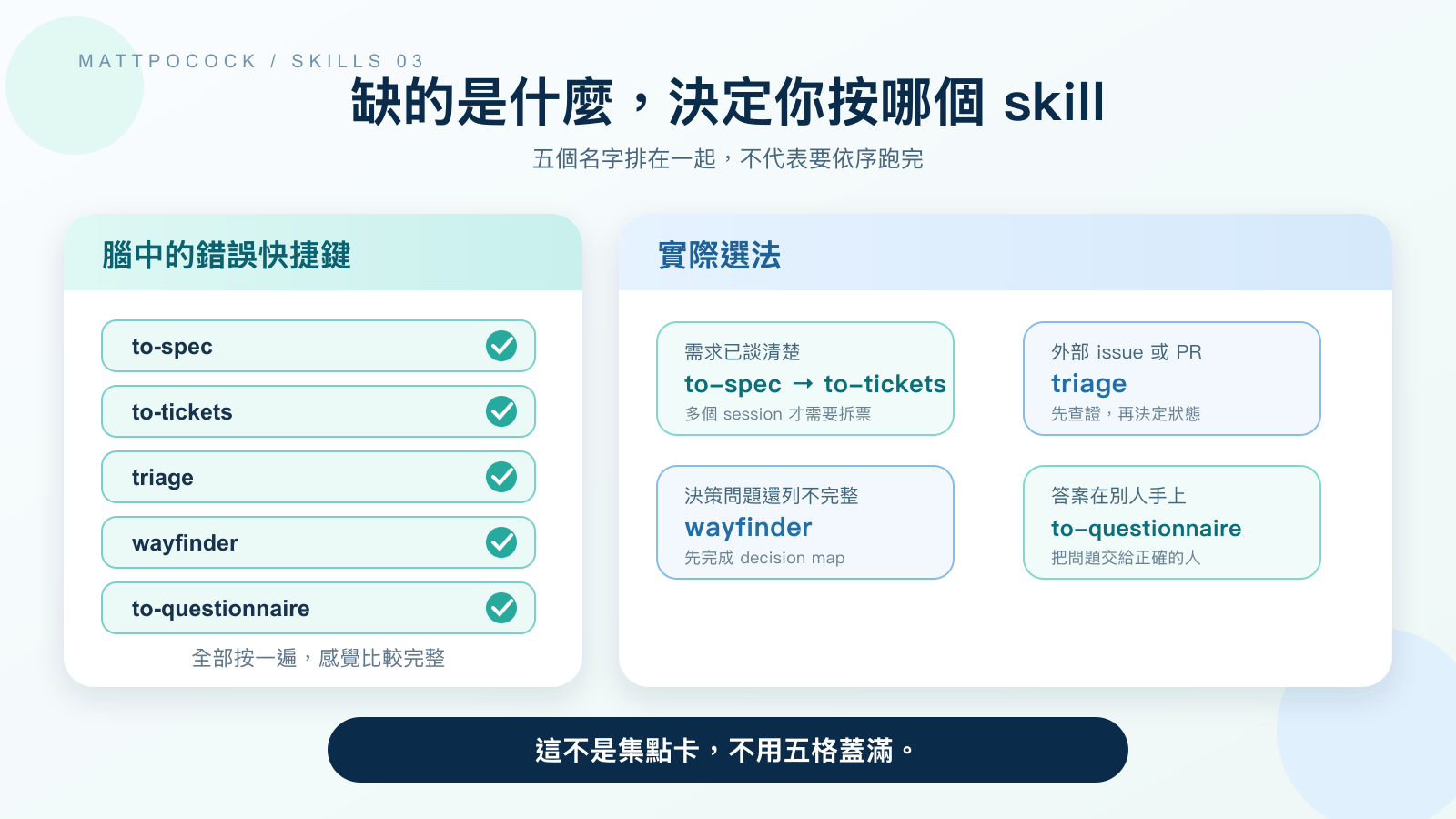 Having five names on the same list doesn’t mean you run all of them every time.
to-spec only organizes what’s already been discussed
to-spec works from the current conversation and the AI’s understanding of the existing code. Its first rule explicitly tells it not to interview you again, but only to synthesize what has already been discussed. So if the requirements still have open questions, calling it now won’t get you answers; those gaps will simply be carried over into the spec as-is.
Before writing anything, the AI first gets familiar with the current state of the project, reuses the names from the glossary, and respects the decision records left behind earlier (ADRs, introduced in the previous post). Then it has to decide where you’ll later check whether the feature was built correctly. The original rules favor checkpoints that sit as close as possible to what the user actually does, and as few of them as possible, ideally just one. This step needs human confirmation: the AI first asks you whether these checkpoints match your expectations.
Only after you confirm does to-spec publish the spec to the issue tracker and apply the ready-for-agent label, meaning “the information is complete and it can be handed to the AI.” The spec has fixed sections: the problem to solve, the solution, user stories, implementation decisions, testing decisions, what’s out of scope this time, and further notes. A “user story” is a fixed sentence pattern for describing a requirement: “As a [role], I want to [do something], so that [I get some benefit].”
The spec doesn’t include specific file paths or code, because those details go stale quickly once the code changes. The only exception: if an earlier prototype contains a small snippet that expresses a decision more precisely than prose can, the spec may quote the most essential part of it.
Short tasks don’t necessarily need a spec. If the whole feature can be finished in this session, the main flow goes straight to implementation.
to-spec example
Suppose the team has confirmed two things: when a member is deactivated, their seat is reclaimed immediately; and there’s no refund on the current bill, with the reduced seat count taking effect from the next one. to-spec could turn the conversation into the following spec (excerpt):
1
2
3
4
5
6
7
8
9
10
11
12
13
14
15
16
17
18
19
20
21
## Problem

Workspace admins don't know when a seat is freed up after they deactivate a member, so they often miscalculate available seats and the billing amount.

## User stories

1. As a workspace admin, I want to see available seats increase immediately after I deactivate a member, so that I can reassign the seat to another member.

## Implementation decisions

- When a member is deactivated, reclaim their seat immediately.
- No refund for the current bill; the reduced seat count is reflected on the bill starting from the next billing cycle.

## Testing decisions

- Simulate an admin deactivating one member and confirm available seats increase by one.
- Confirm the billing system receives the new seat count, marked as effective from the next billing cycle.

## Out of scope

- Prorated refunds based on days of usage are not handled this time.
This spec only contains confirmed answers. If “takes effect from the next bill” hasn’t been confirmed by finance yet, to-spec shouldn’t write it in on the team’s behalf. In that case, use to-questionnaire (covered later) to get the answer first.
to-tickets makes every ticket a small, complete slice of the feature
to-tickets can take a spec, a plan, an existing issue, or just the current conversation. After reading everything, it cuts the work into individual tickets.
The key to how it slices: every ticket has to be a small slice of functionality that works end to end, not one that touches only a single layer. Software features usually span several layers, such as where the data is stored, the code that applies the rules, the screens users see, and the tests that check the feature. The original rules call this kind of slice a tracer bullet. When firing at night, tracer rounds glow so the shooter can see the trajectory and correct their aim on the spot. In the same way, once a small slice of functionality runs through every layer, the team can immediately see whether it’s heading in the right direction. A ticket that only changes the data or only changes the UI doesn’t satisfy this rule.
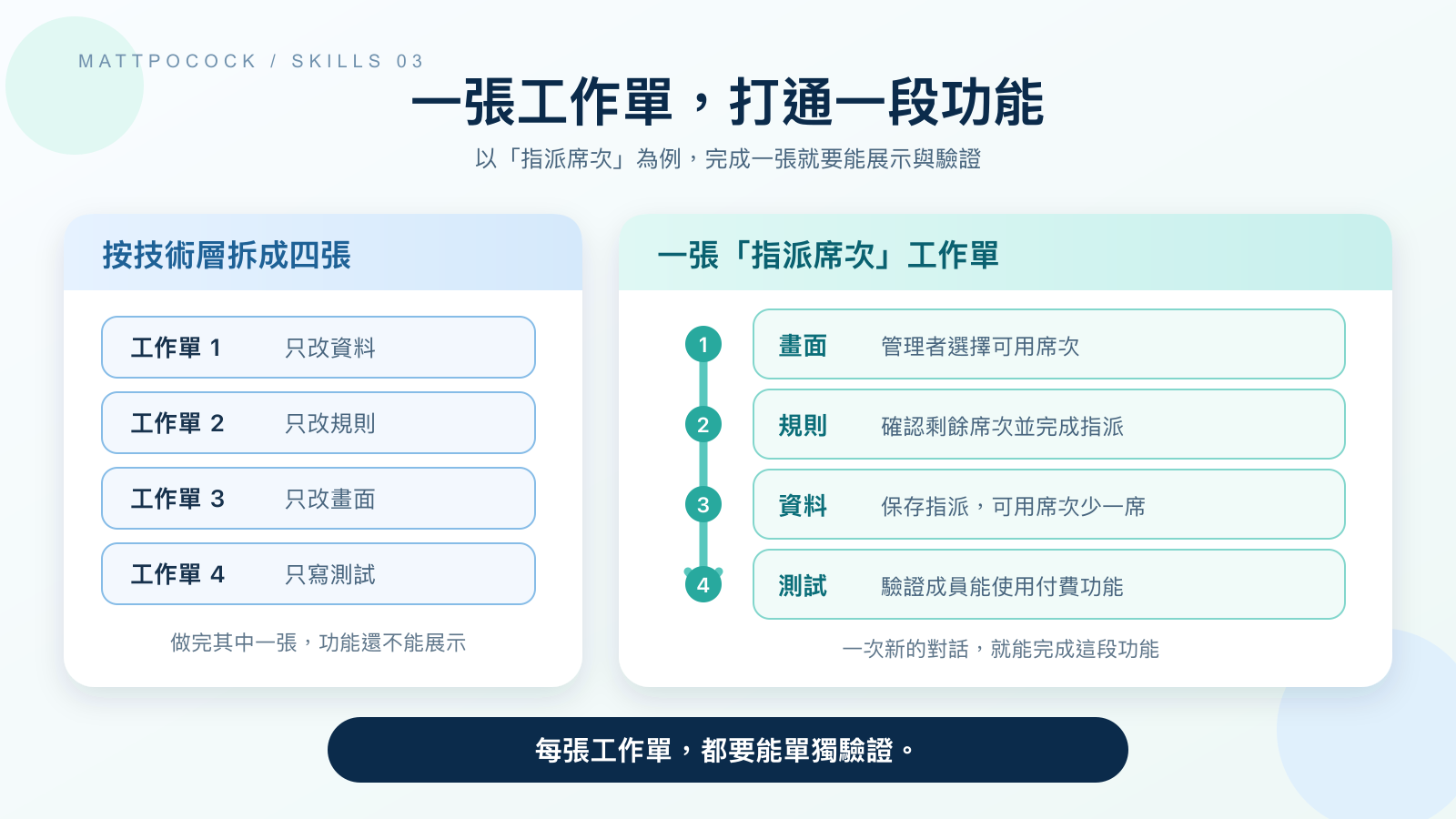 A feature should be cut into small slices that can be completed independently, not split by technical layer into tickets that wait on each other.
The original rules give every ticket two checkable conditions: first, once done, it can be demonstrated or verified on its own; second, it’s small enough to finish in one fresh session. Each ticket also lists what it’s “blocked by”: other tickets that must be done before it can start; a ticket with nothing blocking it can start right away. The slicing rules and blocking relationships are all written in to-tickets/SKILL.md.
The AI doesn’t publish its first cut directly. It first lists each ticket’s title, what blocks it, and what it makes possible once done, then asks you to review: Is it sliced too coarsely or too finely? Are the blocking relationships really necessary? Should any tickets be merged or split further? Only after you agree does it publish the tickets, either as files in the project folder or in the issue tracker, depending on the project’s configuration. The publishing rules also forbid it from closing or modifying the original parent issue along the way.
There’s one exception: mechanical changes that ripple across the whole project, such as renaming a field that’s used everywhere. A change like this affects the entire project at once, so it can’t be cut into slices that each work independently. For these, the original rules switch to an “expand-contract” approach: first let the old and new forms coexist so nothing breaks; then migrate usages to the new form in batches; and finally, after confirming nothing still uses the old form, delete it.
to-tickets example
The same seat spec won’t be split into three tickets for “change the data,” “change the code,” and “change the UI.” One of the tickets could read:
1
2
3
4
5
6
7
8
9
10
11
12
13
# Admins can assign an available seat to a member

Blocked by: Show the workspace's purchased and available seats

## What this enables

After an admin picks an unused seat on the members page and completes the assignment, that member can use paid features, and the available seat count on the page drops by one.

## Acceptance criteria

- [ ] After the assignment, available seats show one fewer.
- [ ] The assigned member can use paid features immediately.
- [ ] When no seats are available, the system rejects the assignment and explains why.
This ticket touches everything from data storage to the UI, but once it’s done it can be demonstrated on its own. The later “Deactivate a member and free their seat” ticket will list it as a blocker, because the system has to be able to assign seats before you can verify the behavior of reclaiming them.
triage takes on work that other people send in
“Triage” originally refers to sorting patients in an emergency room. Here it means sorting work you didn’t create yourself: problems reported by users, feature requests from others, and, if the project is configured for it, code changes (PRs) sent in directly by outside contributors. Tickets produced by to-tickets already carry the label for handing off to the AI, so they don’t need to go through triage.
Each item gets one category and one status. There are only two categories: bug means something is broken, and enhancement means a new feature or improvement. There are five statuses:
| Status | Meaning |
|---|---|
needs-triage | Waiting for a maintainer to evaluate |
needs-info | Waiting for the reporter to provide more information |
ready-for-agent | Information is complete; it can be handed to the AI |
ready-for-human | Needs to be handled by a person |
wontfix | Decided not to address |
If an item ends up with conflicting statuses, triage’s status rules require it to flag this and ask the maintainer before doing anything else.
Categorization can’t rely on the report text alone. The AI first reads the entire discussion thread, checks whether the code already implements the requested feature, and looks at similar requests that were rejected in the past. Then it proposes a category and status, then stops and waits for the maintainer’s instructions. After that, it follows the reported steps to reproduce the problem, confirms the report is accurate, and asks follow-up questions if needed. Finally, it acts on the result: for items that can go to the AI, it leaves a handoff note; for items that need a person, it writes one in the same format and notes why it can’t be handed to the AI; for items missing information, it lists what’s been confirmed and what the reporter still needs to provide; for features that already exist, it points out where they are and closes the item. The full processing order separates verification, follow-up questions, and status updates into distinct steps.
triage example
Suppose a user sends in a report that says only, “After deactivating a member, the available seats didn’t increase.” After reading the report and checking the existing code, the AI first proposes a category to the maintainer. Once the maintainer agrees, it follows the steps in the report and confirms the problem exists. The organized result might look like this:
| Field | Content |
|---|---|
| Category | bug |
| Status | ready-for-agent |
| Verification result | After deactivation, the member can no longer use paid features, but the seat is still recorded under their name; after refreshing the page, available seats still haven’t increased |
| Comparison with existing rules | The seat spec requires the seat to be freed immediately on deactivation, and the project has no decision record overriding that rule |
| Handoff note | Find and fix the step that fails to reclaim the seat when a member is deactivated; once fixed, deactivating one member should increase available seats by one |
If verification shows the system actually does free the seat and only the UI isn’t updating, the handoff note should narrow the scope to the display. If the report doesn’t say which plan was used or what actions were taken, the status should first be set to needs-info, asking the reporter for more details, rather than guessing at the cause.
wayfinder handles the decisions you can’t fully list yet
Some work is so big that you can’t see the whole picture in one session; you can’t even list which decisions need to be made. Literally, a wayfinder is “someone who finds the way.” It first creates a “map” in the issue tracker, recording the destination, the decisions already made, the areas that are still unclear, and what’s out of scope this time. Questions that can already be stated clearly each get their own “decision ticket.”
When a decision ticket is done, what it produces is a decision, not a finished feature. wayfinder’s rules require it, by default, to only plan and not start implementing. Each session resolves at most one decision ticket; the only exception is pure-research decision tickets, which can be handed to multiple AIs to investigate in parallel. The answer is written as a comment on that decision ticket. Once a decision ticket is closed, the map only gets a one-line summary and a link, and the details stay in the decision ticket. If an answer clarifies an area that was previously unclear, a new decision ticket is opened for it.
If the first pass shows every question is already clear and the whole thing can be talked through in one session, there’s no need for a map, and the AI stops to ask how you’d like to proceed. Once all the decisions on the map are done, the flow returns to to-spec, which gathers the answers scattered across the decision tickets into a single spec and then passes it to to-tickets.
wayfinder example
Suppose you need to switch existing billing from “per member” to “per assigned seat,” and at the start the team may not even know which decisions need to be made. At this point, you can write up what you can currently see as a map:
1
2
3
4
5
6
7
8
9
10
11
12
13
14
15
16
17
18
19
20
21
22
23
# Seat billing migration map

## Destination

All existing workspaces switch to seat-based billing, with no double charging and no interruption to paid features during the migration.

## Notes

- New workspaces use seat-based billing from the start.
- Existing contracts keep their original price until renewal.

## Decisions made

(None yet. Each time a decision ticket is closed, add a one-line summary and link here.)

## Still unclear

- How existing members will be converted into seat assignments.
- How to restore the original billing and access permissions if the migration fails.

## Out of scope

- No redesign of pricing plans.
The map itself doesn’t list unresolved decision tickets; those are opened separately in the issue tracker and grouped under this map. Two can be opened for now: “How many batches should existing workspaces be migrated in, and when do we pause if something goes wrong?” and “While old and new billing run in parallel, which set of numbers should the bill be based on?”
After the first decision ticket is resolved, “how to restore if the migration fails,” originally listed under “Still unclear,” may become concrete enough to write as a question, such as “When a single workspace’s migration fails, under what conditions should it fall back to the old billing method?” Only then does wayfinder open it as a new decision ticket and remove it from “Still unclear.” It doesn’t pretend from the start that it has already listed every question.
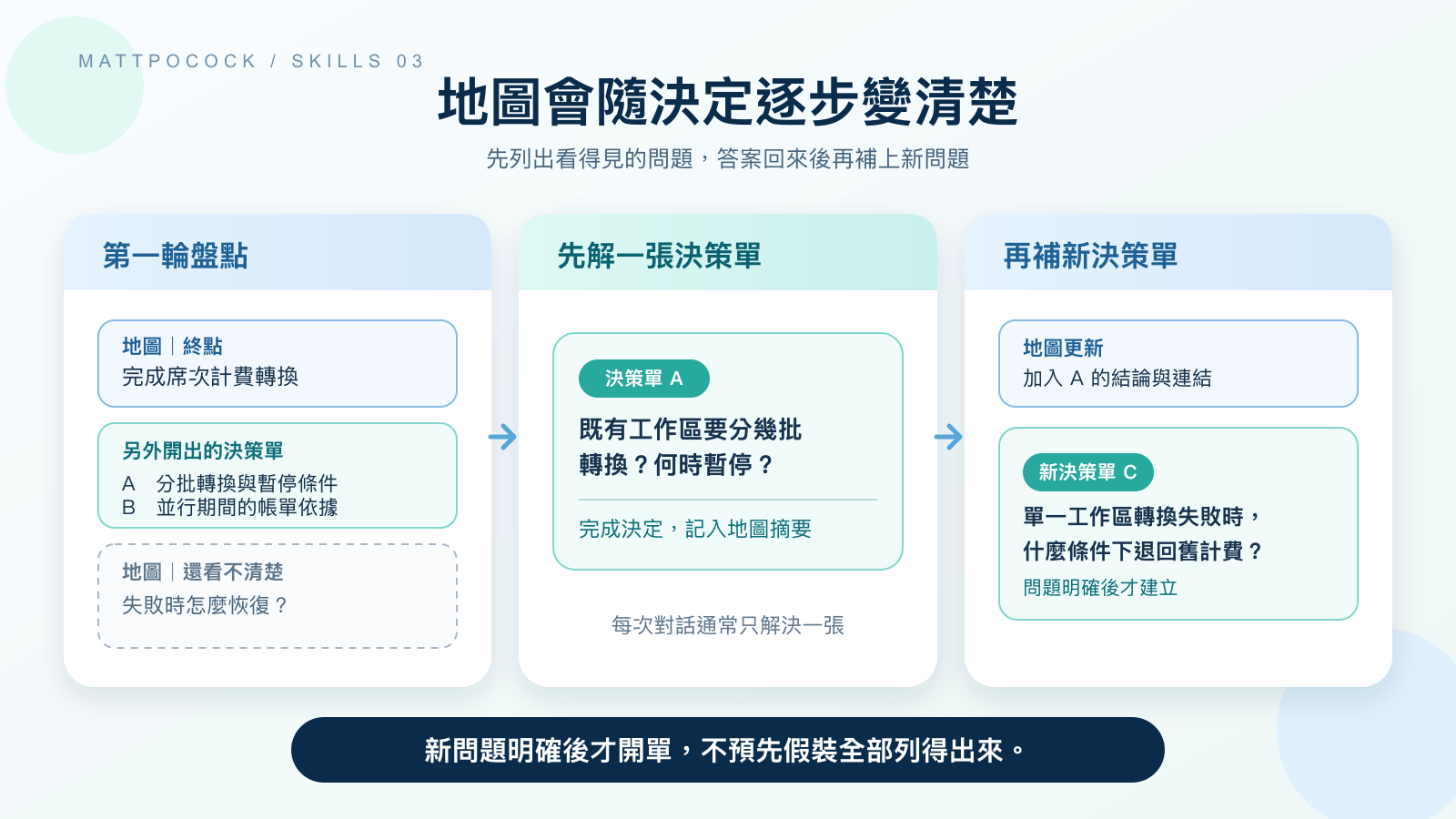 Decision tickets are opened separately under the map; the answer to one decision ticket may make the next question concrete enough to ask.
to-questionnaire goes to the person who holds the answer
Some questions can’t be looked up, and shouldn’t be decided by whoever is in the current conversation. Let’s switch scenarios: suppose the finance lead hasn’t yet confirmed in which billing period seat changes should take effect. to-questionnaire turns questions like this into a questionnaire that the other person can fill out when they have time, or that you fill out together in a meeting.
It only asks you two things: who the questionnaire is for (their role, expertise, and relationship to you), and which answers you need to bring back. It won’t ask you to answer expert questions on their behalf. After that, it generates a questionnaire file in the current folder, named after the topic, such as to-questionnaire-seat-billing.md.
The questionnaire explains the purpose, the background, and how to answer. Questions are ordered by importance, because the recipient may only fill it out once; each question asks about just one thing, and the questionnaire ends with “Is there anything we didn’t ask that we should know?” Only once the answers come back do they become material for grill-with-docs or to-spec, and ask-matt also lists these two flows as where a questionnaire goes next. The questionnaire itself doesn’t make decisions for the project.
to-questionnaire example
If the answer lies with the finance lead, the generated to-questionnaire-seat-billing.md could include:
1
2
3
4
5
6
7
8
9
10
11
12
13
14
15
16
17
18
19
20
21
22
23
24
25
26
27
28
29
# Billing rules for seat changes

**Purpose:** Confirm which bill seat increases and decreases take effect from, so the product and the billing system follow the same rules.

**From:** Product lead  **To:** Finance lead

## How to answer

Please reply by this Friday; it takes about 10 minutes. Pick one option per question; if you choose "Other," please add when it takes effect and how it's calculated. For any question you're unsure about, just write "Not sure" instead of skipping it.

## Monthly plans

1. When does billing start after a seat is added?
   - From the moment of assignment, prorated by remaining days
   - From the next billing cycle
   - Other:

2. When does billing stop after a seat is freed?
   - From the moment it's freed, with a prorated refund for remaining days
   - No refund this period; billing stops from the next billing cycle
   - Other:

## Annual plans

3. Which rules for seat changes on annual contracts differ from monthly ones? If they're exactly the same, write "Same."

## Other

4. Is there anything we didn't ask that we should know?
Only after the recipient fills in the answers can the team write conclusions like “no refund this period” into the spec. The options in the questionnaire are there just to make answering easier; they don’t mean the team already leans toward any of them.
They all leave documents, but for different purposes
All five skills leave text behind. Look at who each artifact goes to next, and the differences become clear.
| Artifact | Content | Who it goes to next |
|---|---|---|
| Spec | Confirmed requirements and decisions for an entire feature | to-tickets, or straight to implementation |
| Ticket | A small, complete slice of functionality that fits in one session | Implementation (implement) |
| Handoff note | Verification results for an outside report, plus the information needed to pick it up | The AI or the person responsible |
| Decision ticket | One question to be decided, and the final conclusion | Follow-up decision tickets, or to-spec |
| Questionnaire | Answers the project is missing that a specific person must provide | grill-with-docs or to-spec |
Specs and tickets can both carry ready-for-agent, but they differ in size: a spec covers an entire feature, while a ticket is just one small slice of it. Only when a feature is too big to finish in one session does it need to be cut into tickets.
Every extra layer of planning adds another round of human review
This process doesn’t skip human review; it moves the review to before the documents are published.
With to-spec, you confirm the checkpoints; with to-tickets, you confirm how coarse or fine the slicing is and the blocking relationships. triage makes a recommendation first and then waits for the maintainer’s instructions; to-questionnaire needs you to explain who the recipient is and what answers to bring back.
wayfinder takes the most human effort. It breaks work that can’t be talked through in one go into many decision tickets, and each session usually resolves only one, so all that time is paid for by the people involved in the decisions. If the questions could have been laid out clearly in a single session to begin with, building a map just leaves the issue tracker with a pile of extra items to maintain.
First look at where the information is missing
When choosing, start by looking at the situation in front of you:
| Current situation | Next step | What you can skip |
|---|---|---|
| Requirements are clear, but it will take several sessions to finish | to-spec, then to-tickets | No need for wayfinder |
| Requirements are clear, and it fits in one session | Implement directly | Skip both to-spec and to-tickets |
| You’ve received an unverified report from someone else | triage | No need to write a new spec first |
| You can’t even list which decisions need to be made | wayfinder | Don’t rush to cut tickets yet |
| A decision needs an answer from a specific person | to-questionnaire | Don’t let the AI guess the answer |
This table only decides where to start right now. After wayfinder finishes, the flow returns to to-spec; once a questionnaire comes back, its answers can also feed back into the requirements discussion. The skills off the main path fill in gaps, and once the gaps are filled, you return to the main path.
Simulated scenario: cutting per-seat billing into work you can start on
The walkthrough below doesn’t actually run these skills, because they would write to the project’s issue tracker or the current folder. It is inferred from the original rules in version 1.2.3; actual results will vary with the project’s content, existing decision records, and the conversation.
Continuing the scenario from the previous post: CONTEXT.md already defines billable seats, members, and seat assignments, and deactivation, assignment, and billing timing have all been confirmed in the conversation. The team estimates that this feature will take several sessions to finish, so, still in the same conversation, they run:
1
$to-spec
The AI first looks at the existing code, then proposes checkpoints. Suppose the team confirms that the best single checkpoint for the entire feature is “after a seat change completes, the billing system receives the correct seat count.” The AI then organizes what was discussed (the problem, solution, user stories, and implementation and testing decisions) into a spec and publishes it once you confirm.
Once the spec is created, pass in its link, still in the same conversation:
1
$to-tickets <spec link>
The AI first lists a draft breakdown, for example:
| Ticket | What it enables | Blocked by |
|---|---|---|
| Show the workspace’s purchased and available seats | Admins can see the total number of seats and how many remain | None |
| Assign an available seat to a member | After an admin completes the assignment, the member can use paid features | Show the workspace’s purchased and available seats |
| Deactivate a member and free their seat | After deactivation, the seat is reclaimed and the billing system receives the new seat count | Assign an available seat to a member |
At this point, check three things: whether each ticket can be verified on its own, whether each fits in one fresh session, and whether the blocking relationships are really necessary. For example, the acceptance criteria for “assign a seat” require seeing available seats drop by one, so it genuinely has to wait for “show seats” to be done first. Only after you agree does the AI write the tickets into the issue tracker. These tickets already carry ready-for-agent, so they don’t need to go through triage. During implementation, each ticket gets its own new session; the tickets already contain the information needed, so there’s no need to rely on the earlier conversation.
If finance hasn’t yet confirmed when seat changes show up on the bill, first use to-questionnaire to get the answer from the person responsible, then come back and finish the spec. If you can’t even list up front which decisions the migration period requires, use wayfinder to build a map instead. Different gaps mean different starting points.
I look for the gap first instead of running all five
The inputs, artifacts, and timing described above can all be found in the original instructions. What follows is my personal judgment; the source material can’t prove that this approach will always save time.
I start by asking myself: what’s missing right now? A spec, work that’s ready to start, a judgment on an outside report, decisions for a large piece of work, or an answer only someone else knows? Once I’m sure, I pick one skill.
Running all five skills produces more documents, but doesn’t necessarily make the problem any clearer. triage doesn’t need to process tickets you just cut yourself, and work whose questions can already be listed clearly doesn’t need wayfinder. Filling only the gap in front of you each time ensures that every document you produce has a clear next reader.
This judgment applies to team projects that hand off work through an issue tracker, where the work spans several sessions. If you just want to make a small change within this session, implement it directly.
First decide who the next document is for
Once the requirements are talked through, which skill should you start with? First look at who the next document is for, and what kind of information is currently missing.
If you need a complete requirements write-up to hand off for further planning, use to-spec; if the work needs to be split across several new sessions, follow up with to-tickets. Send reports from others to triage, hand large decisions you can’t fully list to wayfinder, and use to-questionnaire to ask for answers only someone else knows.
Back to the per-seat billing scenario: the smallest next step is to stay in the same conversation, run to-spec, confirm the checkpoints, and then decide based on the amount of work whether to cut it into tickets.
Further reading
to-spec: see the spec’s fixed sections, how checkpoints are confirmed, and the publishing rules.to-tickets: check the ticket slicing rules, blocking relationships, and the two ticket formats.triage: learn how reports from others go through categorization, verification, and status transitions.wayfinder: see the map, decision tickets, blocking relationships, and the one-at-a-time resolution flow.to-questionnaire: learn how the questionnaire arranges questions based on the recipient and the answers needed.