pstack, Part 1: Install, Pick Models, Start With /poteto-mode
pstack has 56 commands, but you only need /poteto-mode to start. Tested in Claude Code: installing, choosing models with /setup-pstack, and playbook routing.
You’ve heard that pstack makes AI coding assistants work more rigorously. You open it and find 56 commands, plus two dedicated subagents and more than twenty playbooks. Do you have to learn all of those names before you can start?
A few terms first. An AI coding assistant is a tool like Cursor or Claude Code that reads and edits your project files and writes code for you. A skill is a set of instructions that tells the AI how to do one kind of job. pstack is a collection of skills that Lauren Tan maintains in Cursor’s official plugin repository, cursor/plugins. A playbook is a fixed list of steps for one type of task; fixing a bug, for example, means reproduce it, find the cause, fix it, then verify. A subagent is a separate AI that the main chat sends off to do one piece of the work.
No, you don’t have to learn them all. Install the plugin, pick your models once with /setup-pstack, and from then on start every new task with /poteto-mode. Describe the symptom and what “done” looks like, and it picks the playbook. When you don’t know where to start, ask /poteto-help.
One catch showed up in this test environment, though: the model it says it used and the model it actually used were not always the same. More on that below.
pstack Series Part 1
- Series guide: What pstack is and how to read the four parts (not yet published)
- Next (Part 2): Understand the code, then design, before you change it (not yet published)
This post is based on pstack version
0.15.29, atcursor/pluginscommit88d4751(2026-10-20). When I checked at 21:31 on 2026-10-21 (Taipei time),mainincursor/pluginshad moved on, but the last change to the pstack folder was still this commit, and the version was still0.15.29.
How this was tested: I ran every test myself between 21:09 and 21:23 on 2026-10-21 (Taipei time), on my Mac (macOS 27.0, Claude Code 2.1.306), using Claude Code’s non-interactive mode,
claude -p, not by hand in the interactive interface. pstack was the copy I had already installed in Claude Code myself (user scope, so it applies to every project on this machine). It was not reinstalled for this test. For safety, the runs used a deliberate permission allowlist: no writes to the global settings under~/.claude/, and nogit push,gh,curl, or web access. Nothing was tested in Cursor.
What pstack Adds
Once version 0.15.29 is installed, Claude Code gains 56 /pstack:<skill> commands and two subagents, pstack:poteto-agent and pstack:comment-sicko. The playbooks/ folder under poteto-mode holds 23 files. pstack has no separate commands folder; every command comes from a skill.
Claude Code puts the plugin name in front of a plugin’s commands, so /poteto-mode in Cursor becomes /pstack:poteto-mode in Claude Code. The official Claude Code adapter notes list the other differences, and this post cites several of them.
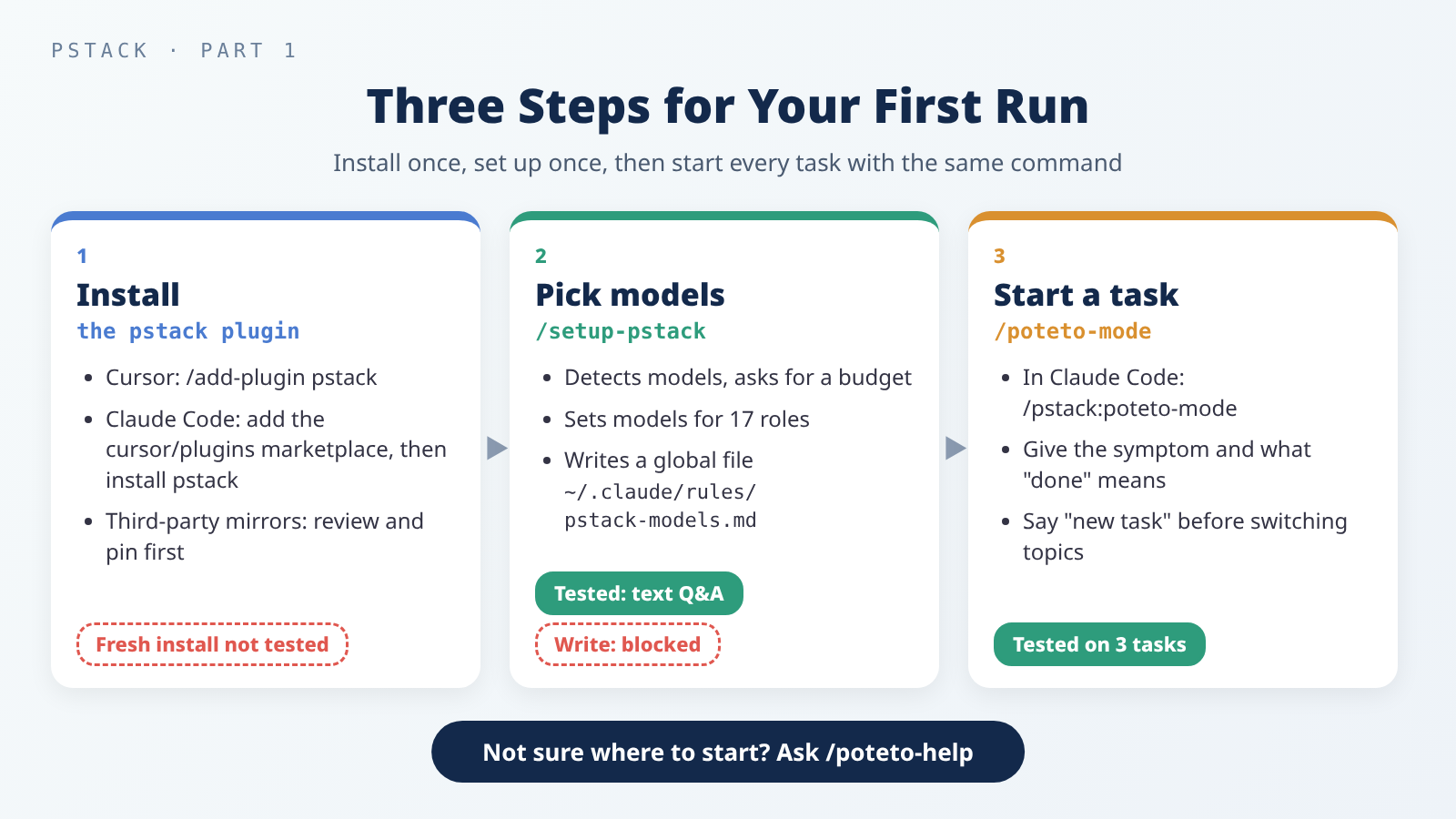 The first-run path: install, pick models, start from /poteto-mode.
Installing: Where You Install From Is Who You Trust
The README and the setup guide give two ways to install. In a Cursor chat, run:
1
/add-plugin pstack
In Claude Code, first add the cursor/plugins GitHub repository as a marketplace (a plugin catalog), then install pstack from it:
1
2
/plugin marketplace add cursor/plugins
/plugin install pstack@cursor-plugins
In the second line, pstack@cursor-plugins means “pstack from the cursor-plugins catalog.”
These commands are quoted from the
0.15.29README. A fresh install was not tested this time. My machine already had pstack, installed on 2026-10-18 and updated to88d4751on 2026-10-20, and the test used that copy.
Neither Claude Code command above pins a version. You get whatever is on the default branch of
cursor/pluginsat that moment. Cursor’s/add-plugin pstackdoesn’t name a version either. For what to check before installing someone else’s plugin, see this post on supply-chain and permission risks.
Your choice of install method decides whom you trust and when the content can change:
| Method | Where the content comes from | Can it change later? |
|---|---|---|
Cursor’s /add-plugin pstack | Cursor’s plugin system | Not tested; no conclusion here |
| Claude Code marketplace | cursor/plugins as it was when you added it | Per the Claude Code docs, third-party marketplaces don’t auto-update by default; new content arrives when you choose to update |
| A third-party mirror | Not maintained by cursor/plugins | Up to the mirror’s author |
There are also third-party mirrors of pstack, such as backnotprop/pstack. They are not maintained by cursor/plugins, so if you use one, read through it and pin a version first; this post on supply-chain and permission risks explains why.
The same logic applies to the official marketplace. Among the options listed in Claude Code’s command reference, /plugin install has none for choosing a version or commit (the page notes its tables list only commonly used options). /plugin marketplace add accepts #ref after the repository to pin the whole catalog to a branch or tag, but when I checked on 2026-10-21, cursor/plugins had no tags. The sha field that pins a commit lives in the catalog’s marketplace.json and is set by the catalog’s maintainers (see the marketplace reference); the pstack entry in cursor/plugins doesn’t set one.
If you want to pin a commit, the official docs also support adding a local folder as a marketplace: given a local path, /plugin marketplace add reads that directory in place (the install docs list this source type too). So you can clone the repository, check out a commit you’ve reviewed, and add that folder as the marketplace. The commands below were not tested:
1
2
git clone https://github.com/cursor/plugins.git ~/src/cursor-plugins
git -C ~/src/cursor-plugins checkout 88d47514b82e7c44f00f2b2a72ff6dd12158038c
Then, in Claude Code:
1
2
/plugin marketplace add ~/src/cursor-plugins
/plugin install pstack@cursor-plugins
This is the same “clone, then check out a reviewed commit” approach the supply-chain post recommends. How it coexists with a cursor/plugins marketplace you already added from GitHub wasn’t tested either.
This install’s record shows commit 88d4751, version 0.15.29. After you install, check which version you got yourself, and look at what changed in pstack before you update; the supply-chain post explains why.
/setup-pstack: Choose a Model for Each Role
pstack hands work to different roles, such as the bug fixer, the feature builder, and the design reviewers, and each role can use a different model. /setup-pstack picks those models. It detects which models you can use, asks for a reasoning budget, shows each role’s setting, and writes everything to a rule file.
The reasoning budget sets how long the model thinks, which pstack calls effort. Higher levels are more thorough and use more tokens:
| Budget | Effort |
|---|---|
| unlimited | Each model at its highest level, up to max |
| large (default) | xhigh |
| medium | high |
| small | medium |
Pay attention to where the file goes. Cursor writes ~/.cursor/rules/pstack-models.mdc, and Claude Code writes ~/.claude/rules/pstack-models.md. Both sit in your home folder, so they are global: they apply to every project on your machine, not just the current one. According to the adapter notes, Claude Code loads this file at the start of every new session.
Tested: Plain-Text Questions in -p Mode
The Cursor version asks its questions with a menu. Per the adapter notes, Claude Code’s -p mode has no menu, so it asks in plain text instead. The test ran in three calls, with the last two using --resume to continue the same conversation.
The first call was just /pstack:setup-pstack. It detected four models, opus, fable, sonnet, and haiku, read that the existing budget was medium, and listed the options as text (excerpt; the run was in Chinese):
1
2
3
4
1. unlimited — max reasoning
2. large — xhigh reasoning (same as the skill default)
3. medium — high reasoning (current)
4. small — medium reasoning
The second call replied “3.” It listed all 17 roles, such as opus high for feature, refactoring and fable high for bug-fix. Four panel roles, which run several models in parallel, each list four models: opus, fable, sonnet, and haiku, meaning one subagent per model, four in total.
The third call replied, in Chinese, “Write it as shown in this table.” The write was blocked, because these runs deliberately prohibited writes to global settings. It reported that it did not try another way around the block. The content it wanted to write was identical to the existing file, and the file’s sha256 was the same before and after. It then offered to create two kinds of verification skills, which Part 3 will cover.
The three calls took about 52 seconds in total (20, 9, and 23 seconds), with an API-equivalent cost of US$0.321.
Not tested: the menu in the interactive interface, and
/setup-pstackactually writing the rule file.
/poteto-help: Ask It When You’re Unsure
/poteto-help is pstack’s help desk. In the practice project, it got this question (translated from Chinese):
1
/pstack:poteto-help I have a small Python CLI project (this repo) and want to start using pstack. What should I do first? Which skill should I use later to fix bugs or add small features?
It took 51 seconds (API-equivalent US$0.387). The key points of its answer:
- The model rule already exists, so there’s no need to rerun
/pstack:setup-pstack. - Run
/pstack:create-verification-skillfirst, to give the project a skill that lets the AI run the CLI itself and check the results. - Use
/pstack:poteto-modefor both bug fixes and small features. When the project has cheap unit tests, add/pstack:tdd, which writes a failing test first and then fixes the code. - Very small, obvious edits don’t need pstack. Just ask directly and save tokens.
- Claude Code has no Cursor Custom Mode (a mode that keeps a skill active for the whole chat), so start every new task with
/pstack:poteto-mode, and say “new task” before switching topics in the same chat.
The poteto-help instructions spell out the last point as well, and “small edits don’t need pstack” matches the advice in the setup guide. In Cursor, choosing /poteto-mode from the / menu with Option+Enter (Mac) or Alt+Enter (Windows) turns it into a Custom Mode. That part was not tested.
/poteto-mode: One Command, Three Tasks
/poteto-mode first decides what kind of task it has, then opens the matching playbook and copies its steps into a to-do list verbatim. Steps it decides to skip don’t disappear; they stay on the list marked skip: <reason>.
The poteto-mode playbook list covers Investigation, Bug fix, Perf issue, Feature, Refactoring, Prototype, Authoring a skill, and more. Large or cross-cutting work, or a task with no matching playbook, goes to the figure-it-out skill, which designs a custom process for it.
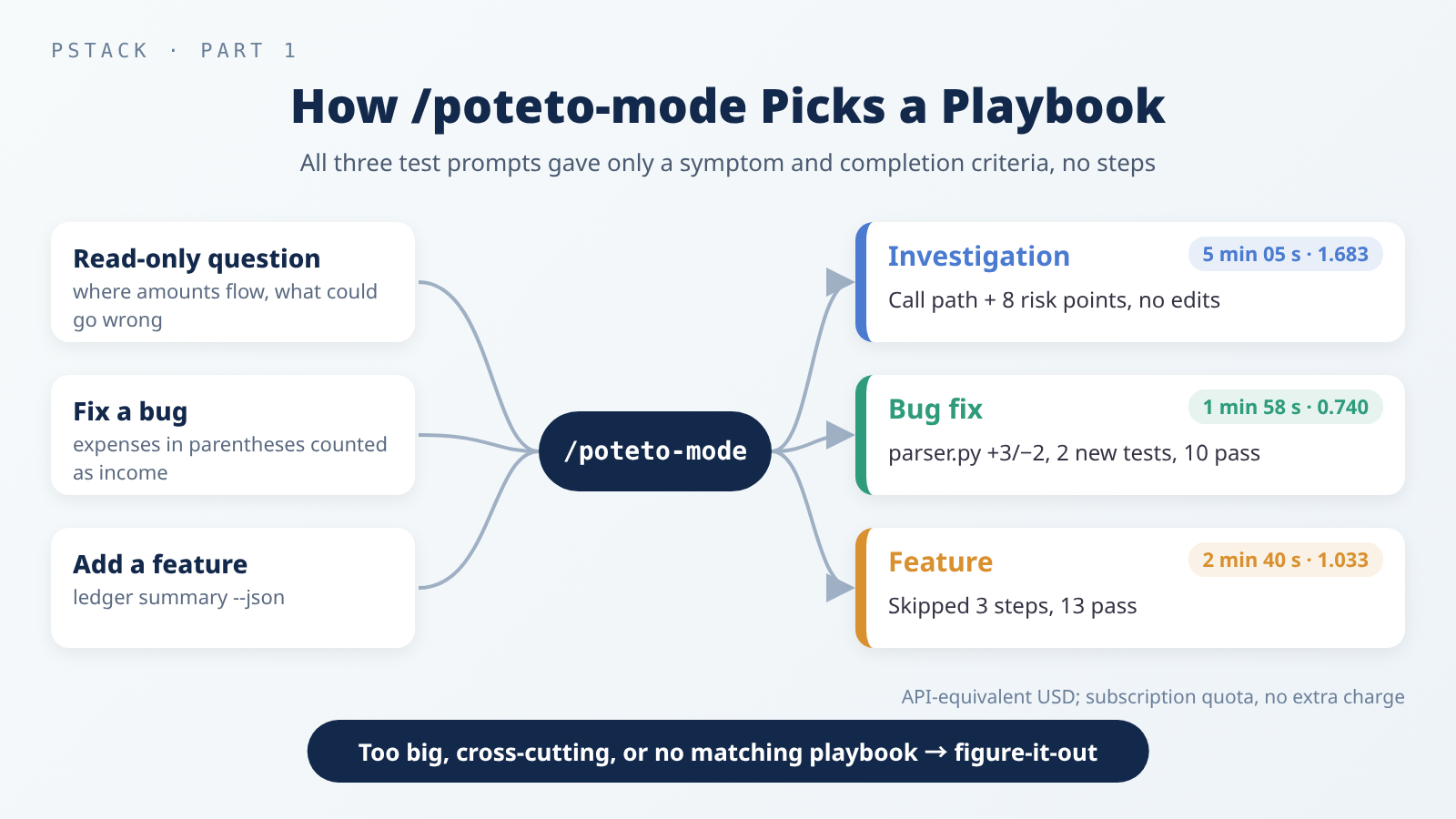 All three tasks started with the same command, and each landed on the expected playbook.
The Practice Project
The practice project, pstack-lab, is a bookkeeping CLI called ledger, written in Python 3.13.7, with 3 modules and 8 unit tests. It has a planted bug: an expense written in parentheses, such as (12.00), should count as -12.00, but the code treats it as positive.
All three tasks started with /pstack:poteto-mode and gave only the symptom and the completion criteria, with no guessed cause and no steps:
| Task | Playbook | Result | Time | API-equivalent (USD) |
|---|---|---|---|---|
| Read-only investigation: which functions an amount passes through, where rounding happens, where totals could go wrong | Investigation | Full call path and 8 risk points, the first being the planted bug; no files changed | 5 min 05 s | 1.683 |
| Bug fix: expenses in parentheses counted as income | Bug fix | parser.py +3/−2 lines, 2 new tests, all 10 tests pass | 1 min 58 s | 0.740 |
Feature: ledger summary --json | Feature | cli.py +4/−1 lines, README +1 line, 3 new tests, all 13 tests pass | 2 min 40 s | 1.033 |
All three runs read the Claude Code adapter notes first, then the matching playbook.
Bug Fix: Reproduce First, Then Fix
The bug-fix prompt asked for “the real CLI output before and after the fix,” and said “don’t commit.” Both outputs below are excerpts from its report. Before the fix, October spending came to only 4.50:
1
2
3
4
5
6
7
$ python3 -m ledger summary samples/october.csv --month 2026-10
transactions: 6
income:          3205.95
spending:           4.50
net:             3201.45
spending by category:
  food                4.50
After the fix:
1
2
3
4
5
6
7
8
$ python3 -m ledger summary samples/october.csv --month 2026-10
transactions: 6
income:          3012.00
spending:         198.45
net:             2813.55
spending by category:
  food              153.45
  transport          45.00
Its report says the expected values were worked out by hand from the CSV, not copied from the program’s output. The change is in one place: parse_amount notes whether the input had parentheses and, if so, negates the number. The last two Bug fix steps, staging commits and opening a PR, were marked skip because “you said not to commit.”
Feature: A Small Change, So It Skipped the Design Steps
The --json task went through the Feature playbook. It chose to skip three steps: mapping the related code (how), comparing several designs in parallel (architect), and having the design challenged afterward (interrogate). It gave a reason for each: it skipped how because the related code was only two small files it had already read, architect because running four design subagents would cost more than the change itself, and interrogate because the design wasn’t contested.
It ran the same four sets of arguments against the HEAD version and the changed version, and the results matched exactly, showing that the text output without --json was unchanged. Output with --json (excerpt):
1
2
3
4
5
6
7
8
$ python3 -m ledger summary samples/october.csv --month 2026-10 --json
{
  "count": 6,
  "income": "3012.00",
  "spending": "198.45",
  "net": "2813.55",
  ...
}
The two commits in the practice project (3c1ea12 and 579a745) were made by me after each run, not by pstack. Both prompts told pstack not to commit, and it didn’t.
Five Things Observed in This Environment
All five points below were observed in this particular environment (account, versions, -p mode). They won’t necessarily happen with other accounts or in the interactive interface.
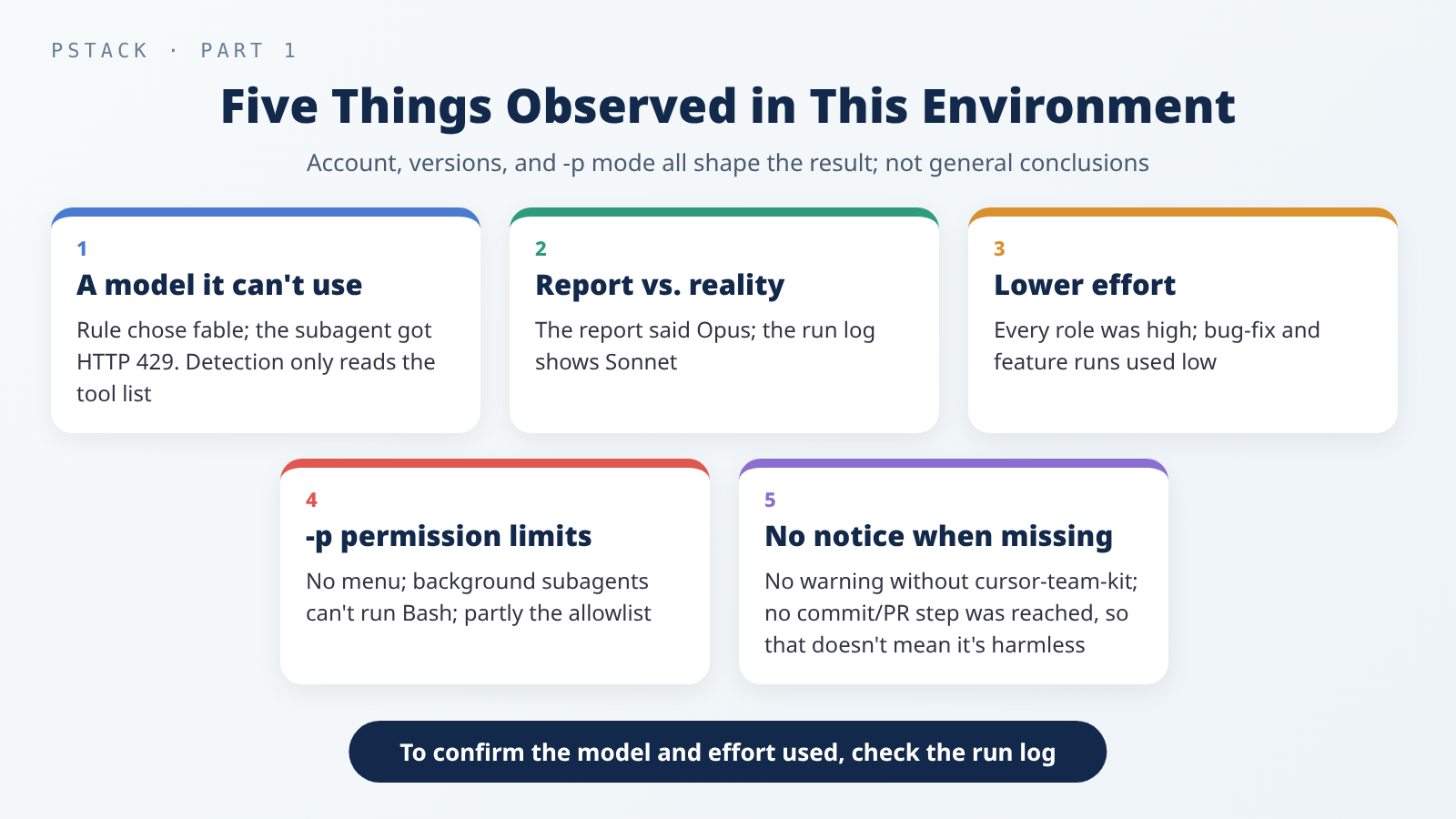 All five were seen only in this environment; none is a general conclusion.
1. The rule chose fable, but this account couldn’t use it. The bug-fix role in the rule file was fable high. When the bug-fix run sent off a subagent, it got an HTTP 429 error right away: “Fable 5.1 requires usage credits.” According to the adapter notes, /setup-pstack detects models only from the list in Claude Code’s tool definition, without checking whether your account can actually use them. A model showing up in the role table doesn’t guarantee it will run.
2. It said Opus, but the subagent ran on Sonnet. After the 429, it sent a new subagent with no model specified. Its final report said it had switched to “the session model, Opus,” but the run log shows that subagent actually ran on claude-sonnet-5-5.
3. Effort was lower than configured. Every role in the rule file was set to high. The investigation’s subagent used high, but the bug-fix and feature runs both used low; in the feature run, the stated reason was that “the spec is already fixed.”
4. Permission limits in -p mode. Besides the missing menu and the --resume round trips, subagents running in the background could never run Bash commands. The error was “Permission prompts are not available in this context.” The investigation’s subagent could therefore only read code, and the main chat ran the commands to collect evidence itself. Commands chained with semicolons, writes to /tmp, and similar operations were often blocked too: 12 times in the investigation and 7 in the feature run. Part of this comes from the deliberate allowlist, not from -p mode alone. Each time, it finished with simpler commands and did not try to get around the block.
5. No notice when cursor-team-kit was missing. The next section covers this.
Should You Install cursor-team-kit Too?
The README says three things /poteto-mode uses don’t ship in pstack but in another plugin, cursor-team-kit: /deslop, which cleans up code, and control-cli and control-ui, which drive CLIs and browser interfaces. Its advice is to install cursor-team-kit alongside pstack if you want the full set. Chapter 5 of the guide adds that the steps before opening a PR run /deslop, and without it you should ask for the same cleanup in plain words, such as removing narrating comments and unneeded defensive code.
cursor-team-kit was not installed on my machine. None of the three tasks produced an error or any notice that something was missing. In the bug-fix run, it even read the control-cli instructions straight from the marketplace copy, which had never been installed.
But none of the three tasks reached the commit and PR steps, where /deslop would be called. So this only shows that there was no notice when that step never came up. It does not show that the missing piece doesn’t matter. If you plan to let pstack go all the way to a PR, following the README and installing both is the safer choice.
Not tested: what actually happens without
/deslop. Also, when Claude Code hits a Cursor-only feature, the adapter notes say to print a “Skipped in Claude Code: …” line and move on. None of the three tasks used a Cursor-only feature, so that line wasn’t tested either.
Usage and Cost
The 7 calls (5 conversations) took about 11 minutes in total. The total_cost_usd values Claude Code reported add up to about US$4.16. That is an API-equivalent amount, priced at API rates. These runs used a subscription’s quota with no extra charge, and the subscription’s 5-hour usage went from 79% to 98%.
Of the three tasks, the investigation cost the most. Its cache reads (re-reading content that was already cached) topped 1.26 million tokens, and it produced more than 40,000 output tokens. The setup guide lists ways to spend fewer tokens: rerun /setup-pstack with a smaller budget or cheaper models, set a role to auto or inherit-parent so it uses the main chat’s model, shorten the review panels’ model lists, and save /poteto-mode for work that needs rigor.
If you’d like to see another skill set built around “set up first, then let a help desk suggest the next step,” read Part 1 of the mattpocock/skills series and the series guide.
Three Steps for Your First Run
You don’t need to memorize 56 commands to use pstack. Install it once from the official instructions, and check what changed before you update. Pick models once with /setup-pstack, choosing only models your account can actually use. Then start every new task with /poteto-mode (/pstack:poteto-mode in Claude Code), describe the symptom and the completion criteria, and let it pick the playbook. In this test, all three tasks landed on the right playbook and came back with real output, as the prompts asked.
Keep an eye on the final report. The model and effort it says it used may not match what actually ran; when it matters, trust the run log over its own account. The next part looks at how to use pstack to understand the code and design a change before you touch anything.
Further Reading
- pstack README: install methods and the components that don’t ship in pstack.
- Setup guide: Set up pstack: budgets, roles, and ways to save tokens.
- Claude Code adapter notes: differences between Cursor and Claude Code.
poteto-modeSKILL.md: the full playbook list and routing rules.- Claude Code: Install and manage plugins: adding marketplaces, pinning, and updating.
- Third-Party Skills and MCP Servers: The New Attack Surface in Your Coding Agent: what to check before installing a plugin.
- Write Your Own Agent Skill: From SKILL.md to Testing and Upkeep: descriptions, testing, and upkeep from a skill author’s side.