Claude Code Tutorial: Hooks, Sandbox, Plugins, Worktrees
AGENTS.md, hooks, the sandbox, plugins, and worktrees each cover one layer of Claude Code. Tested on 2.1.332: what each misses and where each setting goes.
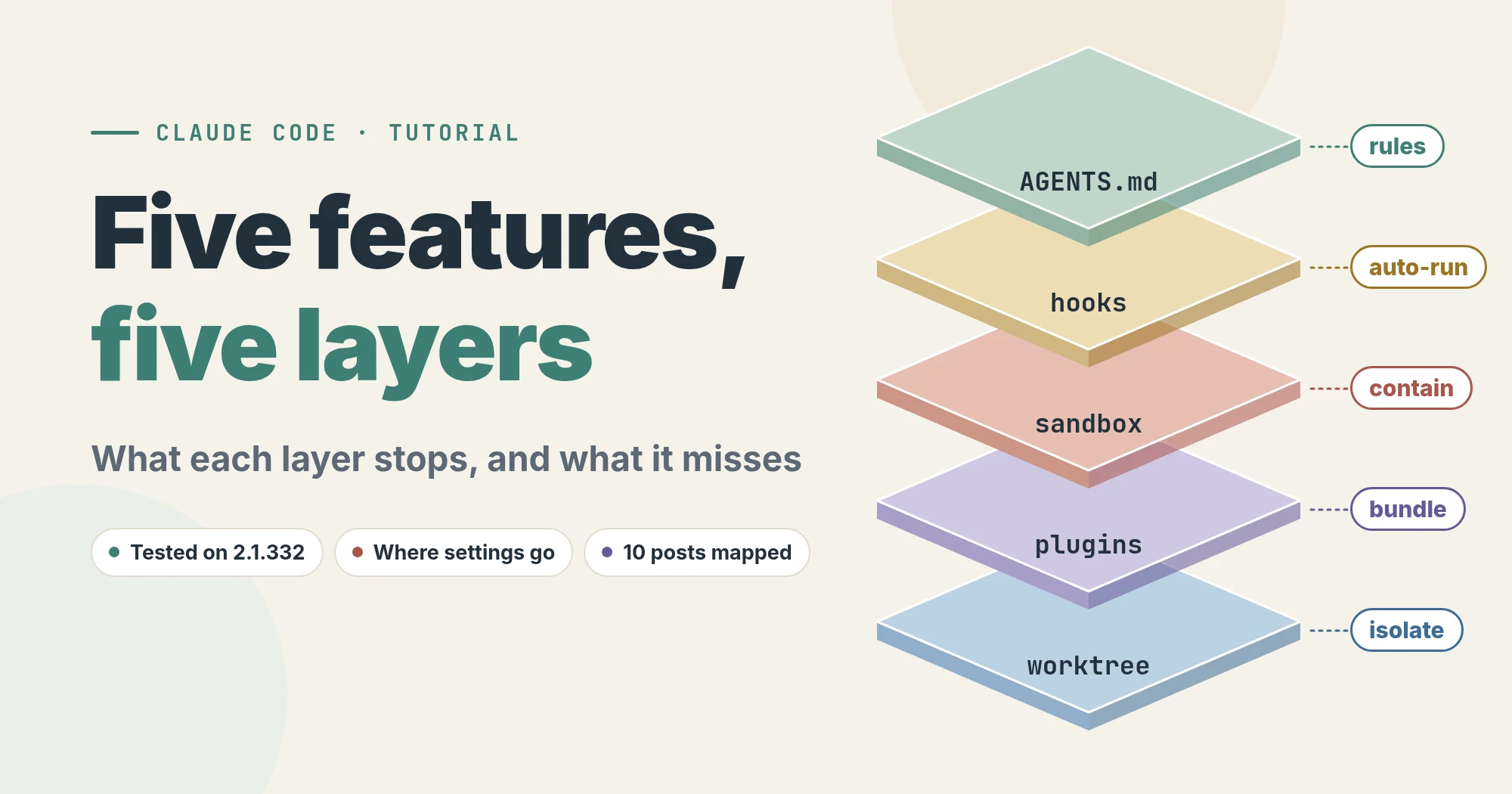
I’ve written a separate tutorial for each of AGENTS.md, hooks, the sandbox, plugins, and worktrees. But once they share one project, the problems show up between them: Claude may skip a rule, the sandbox doesn’t cover hooks, and a plugin brings in new hooks. This post puts the five side by side: what each one does, what it can’t reach, and which file each setting belongs in.
It is for people who already have Claude Code installed and have used it a few times. For installing and first launch, see the official Quickstart.
Based on the official Worktrees, Settings, Sandboxing, Memory, Plugin components, and CLI reference docs as of 2026-11-29 (Taipei time). I tested with Claude Code 2.1.332 on macOS. Each linked post states the version it was checked against.
Five Features, Five Layers
This table shows who does what. It runs from the layers you’ll use daily to the ones you add only when needed, and I’d suggest setting them up in that order.
| Feature | What it does | What it can’t reach | Post |
|---|---|---|---|
| AGENTS.md | Gives Claude your project rules | Claude may read a rule and still skip it | What Is AGENTS.md? |
| hooks | Runs commands at fixed points, such as formatting or tests | Matchers check tool names only, so a hook on Edit or Write misses edits Claude makes through Bash | Claude Code Hooks |
| Sandbox | The OS limits what Claude’s commands can read, write, and reach | Built-in tools such as Read; hooks; MCP servers | Claude Code Sandbox Setup |
| Plugins | Install skills, hooks, MCP servers, and more in one go | The hooks and MCP servers they bring run outside the sandbox | Claude Code Plugins |
| Worktrees | Give each session (one conversation) its own working directory | Gitignored files don’t come along | git worktree for AI Agents |
An MCP server is a program that connects Claude to an outside service. A gitignored file is one listed in .gitignore, so it stays out of version control.
Each time Claude acts, the first three layers apply in order:
flowchart TD
  A[AGENTS.md rules] --> B[Claude picks next step]
  B --> C{"PreToolUse + permissions"}
  C -->|Block| X[Not run]
  C -->|Allow| D{Run a command?}
  D -->|Yes| E[Run in sandbox]
  D -->|No| F[Run per permissions]
  E --> G[PostToolUse hook]
  F --> G
PreToolUse and PostToolUse are the two hook trigger points, just before and just after a tool runs. Plugins add hooks and MCP servers to this picture, and worktrees decide which folder all of it happens in. The sections below cover where the features meet and where they leave gaps.
Put Rules in AGENTS.md and Must-Run Steps in Hooks
AGENTS.md is guidance Claude reads. A hook is a command that runs at a set point, every time. So I split them like this: things Claude can occasionally forget, like naming and style, go in AGENTS.md; things that must happen every time, like formatting and tests, become hooks.
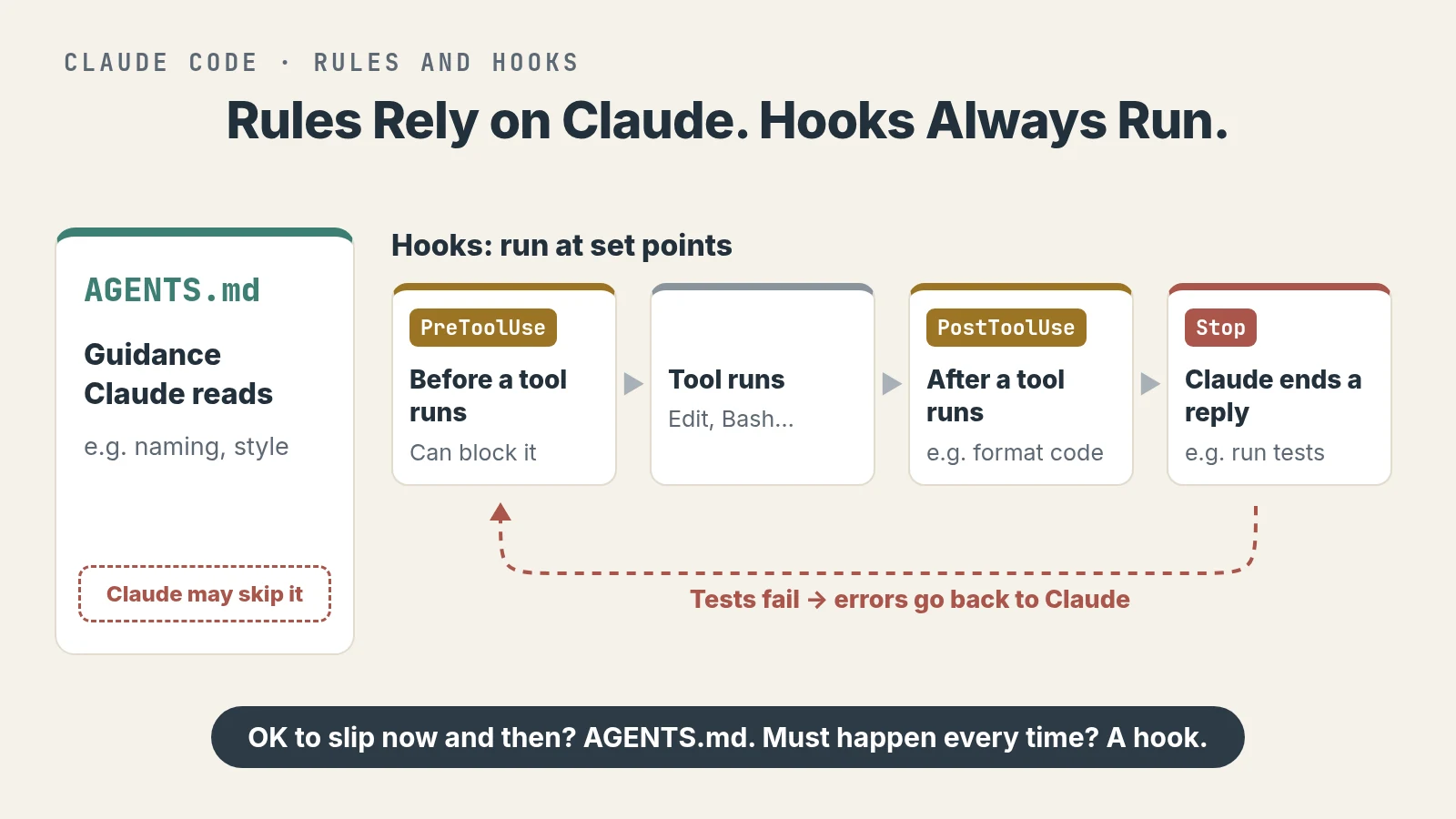
Even if AGENTS.md says “run the tests before you finish,” Claude can still skip it. Make it a Stop hook (a hook that fires when Claude finishes a reply), and the tests run every time Claude ends a reply. Failures go back to Claude so it keeps fixing them. See Claude Code Hooks: Format, Test, and Flag Sensitive Files.
There is one trap when wiring up AGENTS.md: Claude Code skips AGENTS.md by default if there is a CLAUDE.md or CLAUDE.local.md in your working directory or above it. I put @AGENTS.md on the first line of CLAUDE.md to pull it in. Details are in What Is AGENTS.md? Write One for Codex and Claude Code.
The Sandbox Wraps Commands, but Hooks and MCP Servers Run Outside It
Per the docs, the sandbox only covers commands run by the Bash, PowerShell, and Monitor tools, plus the programs those commands start. What runs outside it falls into two groups, each with its own fix:
| Outside the sandbox | Governed by | Fix |
|---|---|---|
| Built-in tools like Read, Edit, Write, and WebFetch | Permission rules | Add deny rules such as Read(~/.ssh/**) |
| Hooks, local MCP servers, plugin monitors and LSP servers | Nothing limits them; they run with your full permissions | Read the command before you add it to settings |
A monitor is a command that keeps running in the background. An LSP server is a background program that powers code navigation and error hints.
The hooks post says hooks are not a security boundary. The sandbox post says the sandbox doesn’t cover hooks. My takeaway: treat every hook, whether you wrote it or a plugin brought it, as a command you typed into your own terminal.
For turning on the sandbox, blocking keys and tokens, and my test of the Read tool bypassing it, see Claude Code Sandbox Setup: Keep SSH Keys and Tokens Out.
Plugins Bring In Hooks and MCP Servers All at Once
A plugin is a packaged extension. Per the docs on plugin components, one plugin can bring several kinds of components. I sort them into two groups:
- For Claude to read: skills, subagents (helpers Claude sends off on subtasks)
- Running their own programs: hooks, MCP servers, LSP servers, monitors
Everything in the second group runs outside the sandbox.
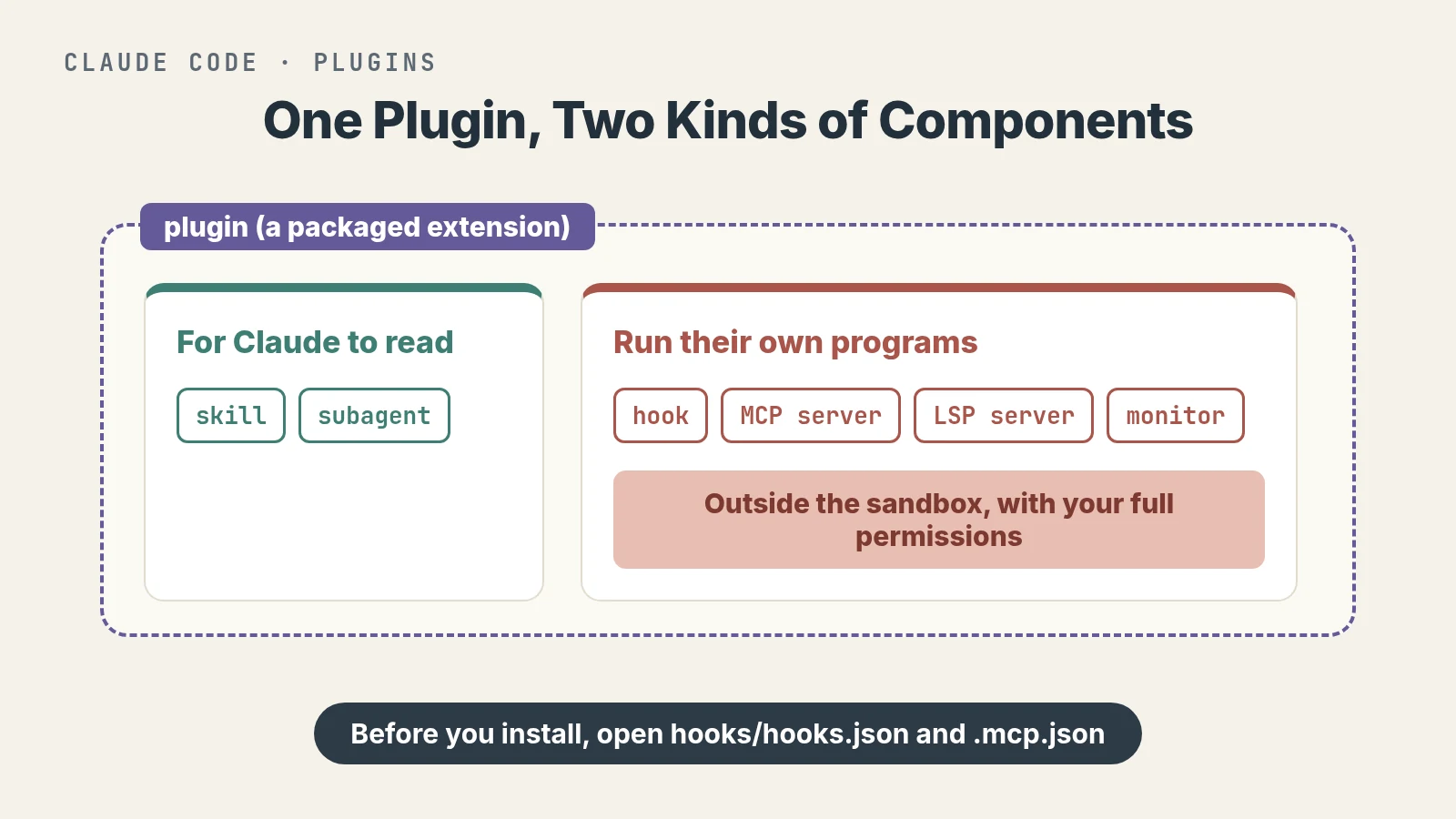
So installing a plugin adds code you haven’t read to the second row of the table in the previous section. Before I install one, I always open hooks/hooks.json and .mcp.json. For a full checklist, see Claude Code Plugins: What to Check Before You Install One.
When Claude starts acting oddly after I’ve added a few plugins and hooks, I first launch in safe mode:
1
claude --safe-mode
Per the docs, this mode skips customizations like CLAUDE.md, skills, plugins, hooks, and MCP servers, while organization-managed settings still apply.
I ran both modes in the same folder: normal mode loaded my ~/.claude/rules/ files and auto memory, and safe mode loaded neither. If the problem goes away in safe mode, it is in your customizations. Go back to normal mode and disable plugins, hooks, and the rest one at a time to find it.
Worktrees Split the Files, but Personal Settings May Not Follow
A worktree is another working directory for the same repo, holding only committed files. The folder you originally cloned is the main worktree. This site’s repo lists CLAUDE.md in .gitignore, so a worktree I open by hand doesn’t have it:
1
2
$ ls CLAUDE.md
ls: CLAUDE.md: No such file or directory
Claude Code can also open a worktree itself. From the repo root, run:
1
claude -w login-page
Per the docs, it creates the worktree in .claude/worktrees/login-page/ on a new branch named worktree-login-page. The branch starts from the remote’s default branch, usually main. To branch from where you are now instead, set worktree.baseRef to "head".
To bring gitignored files along, put a .worktreeinclude in the repo root. It uses .gitignore syntax:
1
2
.env
.env.local
Per the docs, .worktreeinclude only applies to worktrees Claude Code creates itself, such as claude -w and subagent worktrees.
I set up a few test repos that gitignore CLAUDE.md, CLAUDE.local.md, .env, and .claude/settings.local.json, and turned on the sandbox in settings.local.json.
CLAUDE.md and CLAUDE.local.md each held a different passphrase. I opened two kinds of worktree and asked claude -p for the passphrase in each; a correct answer means the file was read:
| Gitignored file in the main worktree | Worktree under .claude/worktrees/ | Worktree opened by hand outside the repo |
|---|---|---|
CLAUDE.md | Not read; claude -w copies it only if .worktreeinclude lists it | Not read |
CLAUDE.local.md | Not copied, but still read | Not read |
.claude/settings.local.json | Not copied, sandbox still on | Not copied, sandbox still on |
.env | claude -w copies it only if .worktreeinclude lists it | Missing |
The CLAUDE.md row matters most. What I saw: even a worktree under .claude/worktrees/ doesn’t read the main worktree’s CLAUDE.md, only its own copy.
If CLAUDE.md is committed, both copies match, so it makes no difference. If you gitignore it like this site does, sessions in a worktree don’t see your project rules. I tested listing CLAUDE.md in .worktreeinclude, and claude -w worktrees then read it; I’d suggest doing that, or just committing it.
The CLAUDE.local.md result differs a bit from the docs. The docs say a gitignored CLAUDE.local.md only exists in the worktree where you created it. I found it was read under .claude/worktrees/ but not outside the repo.
To have every worktree read your personal instructions reliably, I’d follow the docs: in CLAUDE.md, import a file from your home directory, such as @~/.claude/my-project-instructions.md. That only works if CLAUDE.md itself reaches the worktree: committed, or listed in .worktreeinclude.
Per the docs, sessions in a worktree always use the main worktree’s settings.local.json. So the sandbox you turned on in the /sandbox panel, and the commands you approved with “don’t ask again”, follow you into every worktree. I tested the sandbox part:
1
2
3
4
5
6
7
8
9
# Asked Claude to run: touch <file outside working dir> && echo created
# main worktree
touch: ../probe-main.txt: Operation not permitted
# worktree opened with claude -w
touch: ../../../probe-wt.txt: Operation not permitted
# worktree opened by hand outside the repo
touch: ../probe-sib.txt: Operation not permitted
# control: a repo with no sandbox settings
created
Worktree Isolation Checks Paths, but the Sandbox Stops Writes
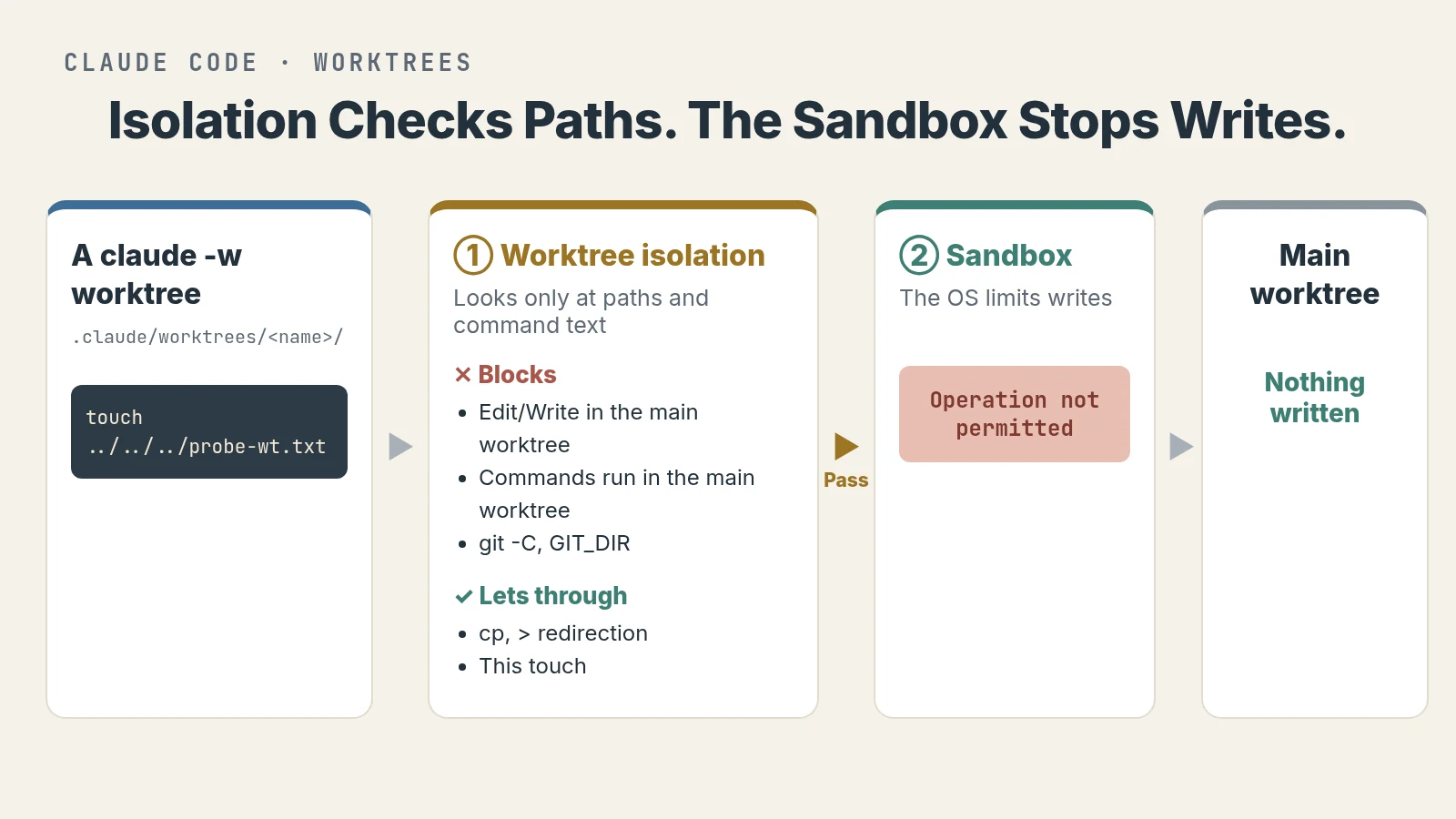
Per the docs, a session is isolated to its worktree in two cases: it started with claude -w without --tmux, or Claude entered a worktree mid-conversation. While isolated, Claude Code blocks these actions:
- Edit or Write on files in the main worktree
- Commands run in the main worktree
- Pointing git at the main worktree with
git -C,GIT_DIR, and similar - Commands where it can’t tell which repo git will act on
These checks look only at paths and command text, not at which files a command actually writes. The docs give cp and shell redirection (using > to write output to a file) as examples. They can write straight into the main worktree without being blocked, so permission rules and the sandbox have to stop them.
The test in the previous section shows this. A claude -w worktree lives in .claude/worktrees/<name>/, so ../../../probe-wt.txt lands in the main worktree. The isolation check let that touch run, and the sandbox is what blocked it.
It works the other way too: the sandbox affects worktrees. As the sandbox post notes, git worktree add and remove fail inside the sandbox, so asking Claude to create a worktree with git doesn’t work. In my tests, claude -w still created a worktree with the sandbox on in the main worktree.
So with the sandbox on, I start with claude -w or create worktrees myself in a terminal. Per the docs, blockWritesOutsideWorkingDirectories from the sandbox post also removes Claude’s tools for entering and leaving worktrees, which leaves only those two ways.
Hooks need care with paths, too. Per the docs, after Claude enters a worktree mid-conversation, ${CLAUDE_PROJECT_DIR} in hooks still points to the main worktree. To get the worktree path, read the cwd field in the hook’s input JSON.
Going by the docs, the Stop hook in the hooks post, which uses CLAUDE_PROJECT_DIR to run tests, would test the main worktree’s code in that case.
Which File Each Setting Goes In
Pulling the earlier sections together, here is where I’d suggest each thing goes. For a committed file, a worktree uses that branch’s copy. For uncommitted files, the last column comes from my tests and the docs in the last two sections:
| File | What goes in it | Committed | In a worktree |
|---|---|---|---|
AGENTS.md | Rules shared across tools | Yes | The worktree branch’s copy |
CLAUDE.md | @AGENTS.md on line one, then Claude-only rules | Yes | The worktree branch’s copy |
CLAUDE.local.md | Notes just for you | No | May not be read; import a home-directory file instead |
.claude/settings.json | Team hooks and permission rules | Yes | The worktree branch’s copy |
.claude/settings.local.json | Your command approvals, /sandbox panel settings | No | Always the main worktree’s copy |
.worktreeinclude | Gitignored files to copy into worktrees | Yes | Used when Claude Code creates a worktree |
~/.claude/settings.json | Defaults for all projects, such as the sandbox | Not in the repo | Applies as usual |
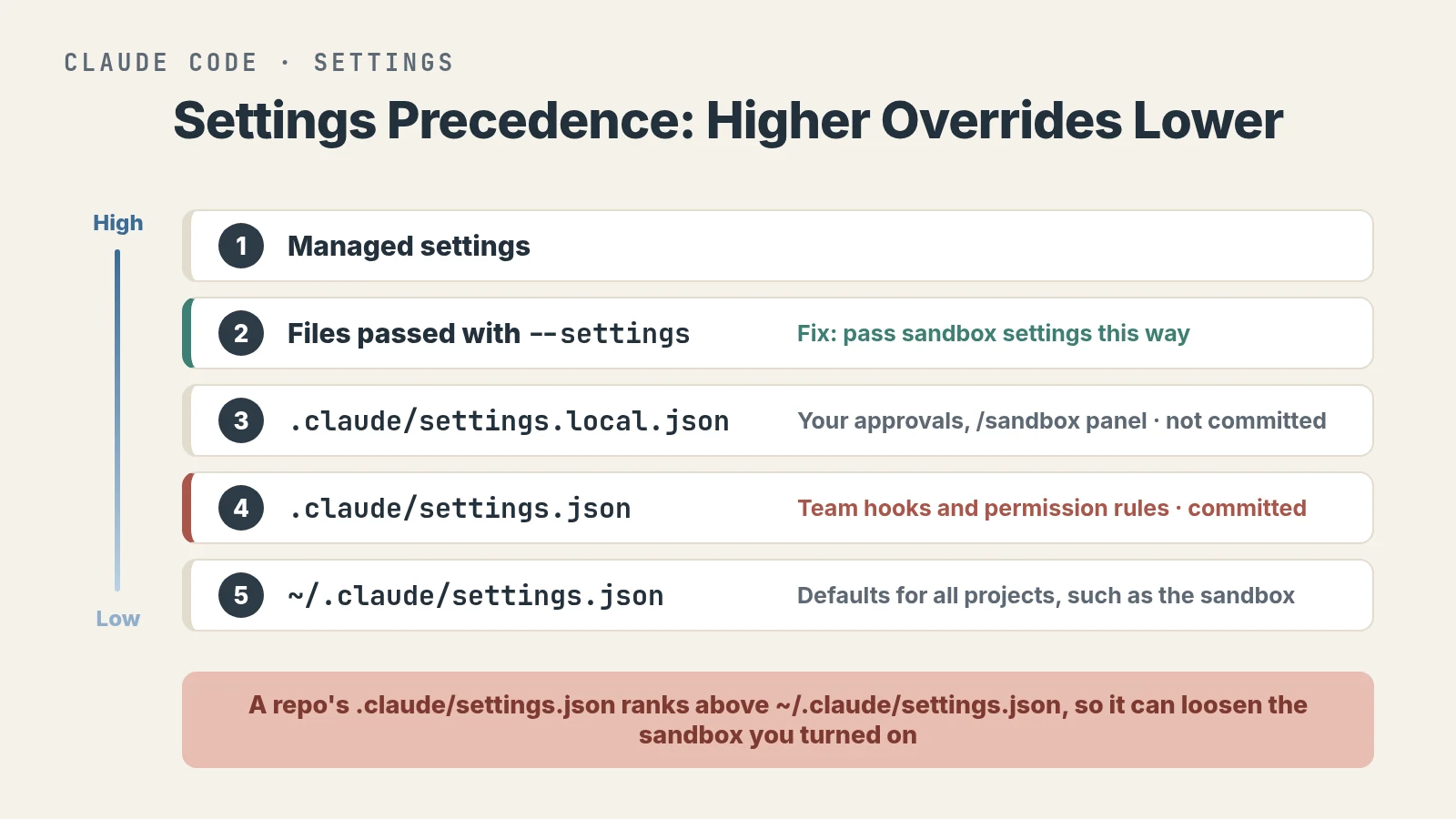
These settings files have a precedence order. Per the docs, from highest to lowest:
- Managed settings
- Files passed with
--settings .claude/settings.local.json.claude/settings.json~/.claude/settings.json
Project settings rank above user settings, so a repo’s .claude/settings.json can override and loosen the sandbox you turned on at the user level. The sandbox post’s fix is to save the sandbox settings to a separate file and pass it with --settings.
Pick a Post by Where You’re Stuck
Each of the five features has its own post with the full setup:
- What Is AGENTS.md? Write One for Codex and Claude Code: Claude ignores your project rules, or you also use Codex.
- Claude Code Hooks: Format, Test, and Flag Sensitive Files: you keep reminding it to format and run tests.
- Claude Code Sandbox Setup: Keep SSH Keys and Tokens Out: you worry it can read SSH keys or tokens.
- Claude Code Plugins: What to Check Before You Install One: you want to install someone else’s plugin.
- git worktree for AI Agents: Run Two Agents in One Repo: you want two AIs working separately in one repo.
To run several AIs at once, or connect AI to the rest of your workflow, read these five:
- herdr Tutorial: Run Multiple AI Agents in One Terminal: you run several AIs in a terminal and want to see which one is waiting.
- Herdr Desktop App: Manage AI Agents With Spaces and Tabs: you want a desktop app to manage AIs across repos.
- agent-browser Tutorial: Let AI Test Its Own Web Pages: you want AI to open a browser and check its own web changes.
- AI PR Review With Codex and GitHub Actions: A Real PR: you want AI review on your PRs.
- Anthropic’s AI-Native SDLC Playbook, With a Worked Example: you want the whole AI development flow before choosing what to set up.
Conclusion
If you remember one thing: hooks, MCP servers, and plugin code all run outside the sandbox with your full permissions. Before you add a hook or install a plugin, read the commands it runs.
Further Reading
- Agent Skill and MCP Security Risks: 5 Cases, a Checklist: supply chain risks from plugins, skills, and MCP.
- OWASP Agentic Top 10 Checklist: Audit Your AI Workflow: check your whole setup against ten risks.