Multilingual Jekyll Blog With Polyglot and hreflang
How this site keeps Traditional Chinese, Simplified Chinese, and English versions of every post: the URLs, translations, missed plugin URLs, and hreflang.
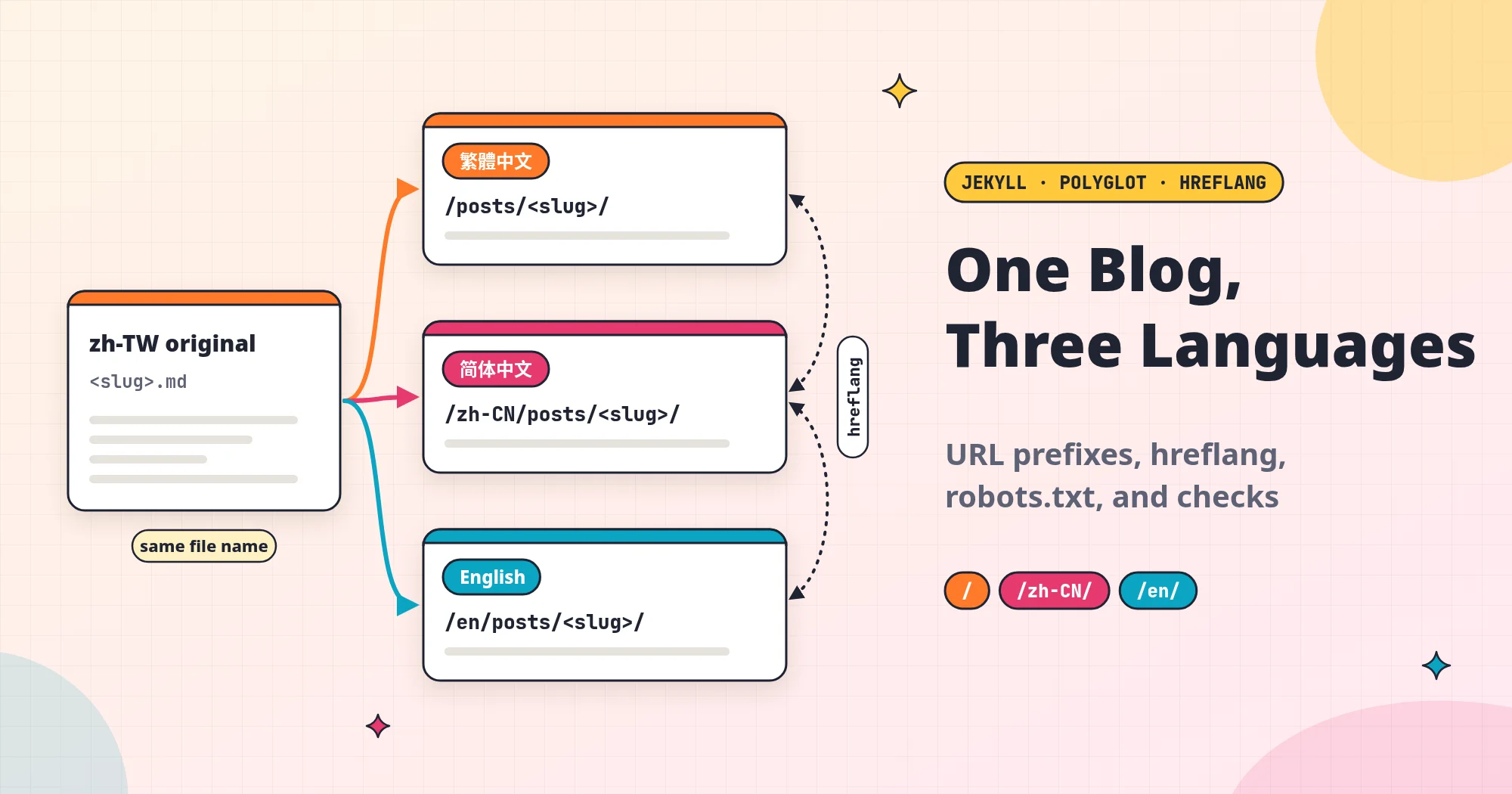
Since late September 2026, every post on this site has come in three versions: Traditional Chinese, Simplified Chinese, and English. As I write this, each language has 28 posts (not counting this one), with none missing. I wanted three languages because my readers are not only in Taiwan.
Once I started, I found that “translating each post into three copies” was the easiest part. The harder parts are the ones you cannot see. Which language does a shared link point to? Do search engines know the three pages are the same post? Does a reader who clicks through from Google get redirected somewhere else? If you get these wrong, the site still loads. It just goes wrong quietly.
This post uses the site’s actual configuration to show how I handle these things, so you can use it as a reference if you want to add languages to your own personal site. This site uses Jekyll with the Chirpy theme. With other tools, the steps will be different, but most of the problems you need to solve are the same.
Version note: This post is based on the configuration in my site’s repo as of 2026-11-13 (Taipei time), using Jekyll 4.4.1, Chirpy theme 7.6.0, and jekyll-polyglot 1.14.0. What I cite from Google and polyglot comes from their official docs, which I read the same day. The whole site’s configuration is public in the GitHub repo, where you can read every file this post mentions except
CLAUDE.md.
Before you start: a few terms
- Jekyll: a tool that turns Markdown posts into web pages. It generates every page in one go before publishing (a site built this way is called a static site), so the server only has to send the files out.
- Theme: the full set of files that decides how the site looks and how its pages are laid out. This site uses Chirpy.
- Front matter: the settings at the very top of each post, between two
---lines, where you write the title, date, categories, and similar data. - Permalink: the fixed URL path of a post, for example
/posts/jekyll-blog-three-languages/. - Plugin and hook: a plugin is a program that adds features to Jekyll. A hook is a piece of code that Jekyll calls automatically at a certain point in the build (for example, “after all the pages have been generated”).
- GitHub Actions: GitHub’s automation service. Every time I merge a new change to this site, it builds the site and publishes it to GitHub Pages automatically.
- Sitemap: a file that lists every URL on the site, for search engines to read.
- hreflang: a tag written into a web page that tells search engines “this page also exists in these languages, and here are their URLs.”
How the URLs are split: Traditional Chinese at the root, a prefix for the others
Here are the URLs for the three languages:
| Language | Home page | This post |
|---|---|---|
| Traditional Chinese (default) | / | /posts/jekyll-blog-three-languages/ |
| Simplified Chinese | /zh-CN/ | /zh-CN/posts/jekyll-blog-three-languages/ |
| English | /en/ | /en/posts/jekyll-blog-three-languages/ |
Traditional Chinese is the language I write in, so it sits at the root, and the other languages put a language code at the front of the URL. This is how the jekyll-polyglot plugin (polyglot from here on) does it. The setup is only a few lines in _config.yml. This is an excerpt; the real exclude_from_localization lists more files:
1
2
3
4
5
6
7
8
9
10
11
languages: ["zh-TW", "zh-CN", "en"]
default_lang: zh-TW
lang_vars: [lang]

# These files are output once at the root and not copied under /<lang>/
exclude_from_localization:
  - assets/lib
  - assets/img
  - assets/js/i18n.js
  - assets/robots.txt
  - CNAME
The idea behind polyglot is to build the complete site once for each language. Its README says it will “spawn a separate process for each language you intend to process the site for.” The default language goes to the root, and the other languages go under /zh-CN/ and /en/. In each build, the site’s language variable is set to that language.
The Chirpy theme already ships its interface text in Traditional Chinese, Simplified Chinese, and English. Once the language variable changes, labels such as the “Older” post link, “Categories,” and the search box appear in the matching language on their own. I do not have to translate them.
exclude_from_localization lists the files that all three languages share and only need one copy of, such as images and JavaScript. If you leave them off the list, every image ends up copied three times.
Where the translations go: the same file name in three folders
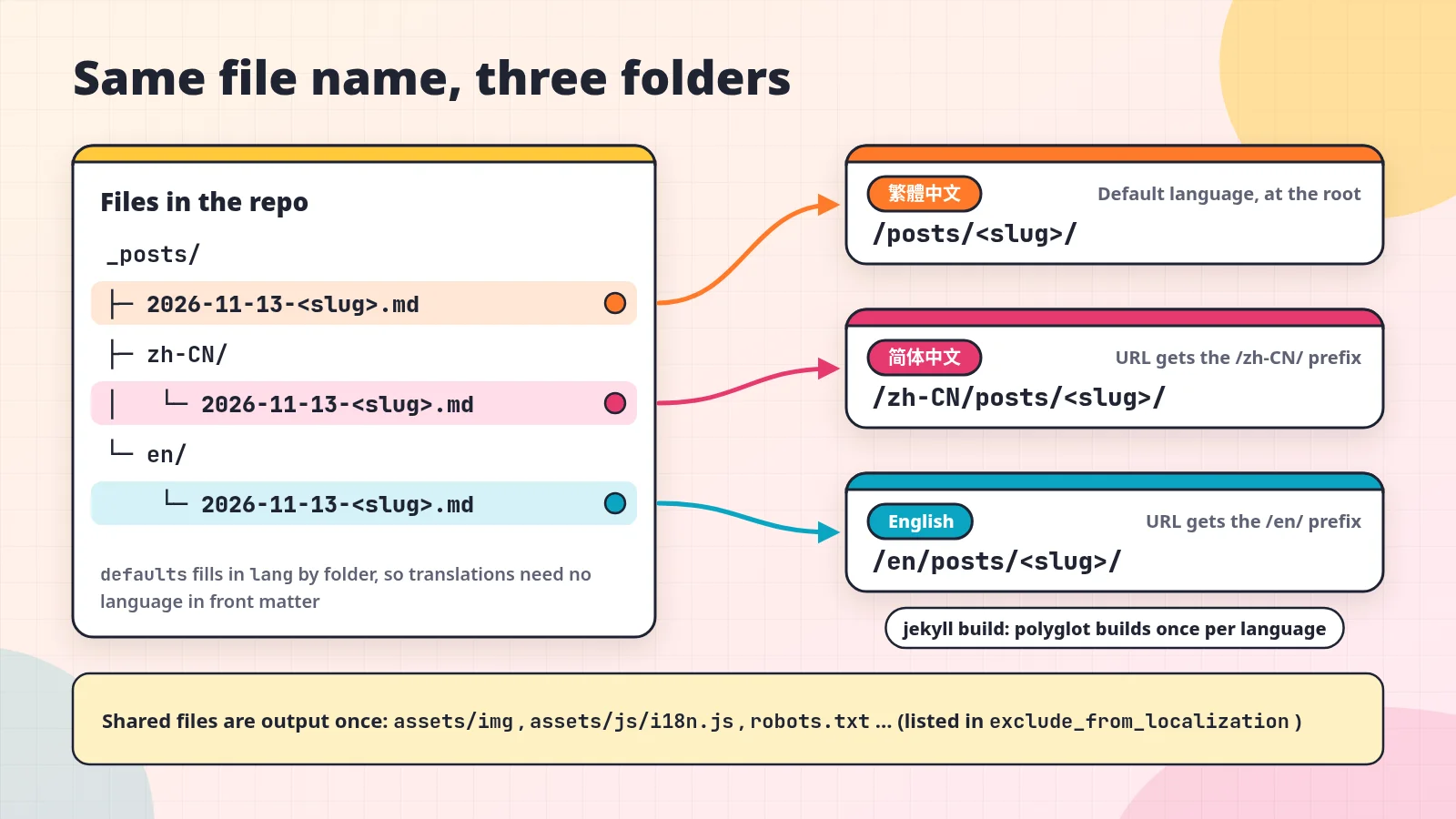
The three versions of a post have exactly the same file name. They just sit in different folders:
1
2
3
4
5
6
_posts/
├── 2026-11-13-jekyll-blog-three-languages.md        ← Traditional Chinese original
├── zh-CN/
│   └── 2026-11-13-jekyll-blog-three-languages.md    ← Simplified Chinese
└── en/
    └── 2026-11-13-jekyll-blog-three-languages.md    ← English
The translations do not need a language in their front matter. The defaults in _config.yml fill it in based on the folder:
1
2
3
4
5
6
7
8
9
defaults:
  - scope:
      path: _posts/zh-CN
    values:
      lang: zh-CN
  - scope:
      path: _posts/en
    values:
      lang: en
When polyglot sees three files with the same permalink, it treats them as different language versions of the same post.
If a language is missing a translation, polyglot uses the Traditional Chinese original in its place. In the README’s words, pages without a counterpart “will fallback to your default_lang,” so no content disappears. This would let me publish in Traditional Chinese first and add the translations later, but this site’s rule is to publish all three versions together, so in practice I do not use it.
Sidebar pages with their own text, such as “About” and “Projects,” work the same way. Their translations go in _tabs/zh-CN/ and _tabs/en/.
The translation rules live in the repo
Keeping the three versions consistent depends on written rules, not on memory. I keep the rules in the repo at docs/translation-guide.md.
That document is compiled from CLAUDE.md, the project notes the AI assistant reads; CLAUDE.md itself is listed in .gitignore and is not on GitHub. Whether I translate a post myself or have AI write the first draft, the same rules apply. For how to write a rules file for AI tools, see How to Write AGENTS.md: Give Coding Agents Your Project Rules. The rules:
- Simplified Chinese takes more than converting the characters. The wording has to change to what readers in mainland China use. For example, 軟體 (software) becomes 软件, 程式碼 (code) becomes 代码, and the corner-bracket quotation marks 「」 become “”. The same word depends on context. For example, 指令 becomes 命令 only when it means a command-line command.
- The
tagsmust be exactly the same in all three versions, because the languages share tag pages with the same names. categoriesfollow a fixed mapping table. For example, the category 資訊安全 is 信息安全 in Simplified Chinese and Security in English. When I add a new category, I add a row to the table.- I always write links to other posts on this site as
/posts/<slug>/, with no language prefix. The build adds the prefix automatically.
The last rule is important. If I hand-write /en/posts/... in an English post, it looks correct. But if the URL scheme ever changes, I would have to find and fix those links one post at a time.
URLs that polyglot misses: filling them in with my own hook
For site links written as href="..." in the HTML, polyglot adds the language prefix, so links on an English page lead to other English pages. The problem is that a page has many other URLs that are not in an href, and those still point to the Traditional Chinese version:
og:url: the URL that the preview card links to when you share a page on social media.- JSON-LD: structured data written for search engines. It contains the page’s own URL and the URL of the author’s “About” page.
- Share buttons: the buttons encode the page URL and put it in the link’s parameters.
search.json, which the site search reads: both its own path and the URL of every post inside it.- The full URLs in the RSS feed and the sitemap.
If these stay unfixed, a reader clicks “Share” on an English post, and the friend who opens the link sees the Traditional Chinese version. A search engine reads the structured data on an English page, and the page URL it finds there is the Traditional Chinese one. The site looks perfectly normal, so these problems are hard to spot.
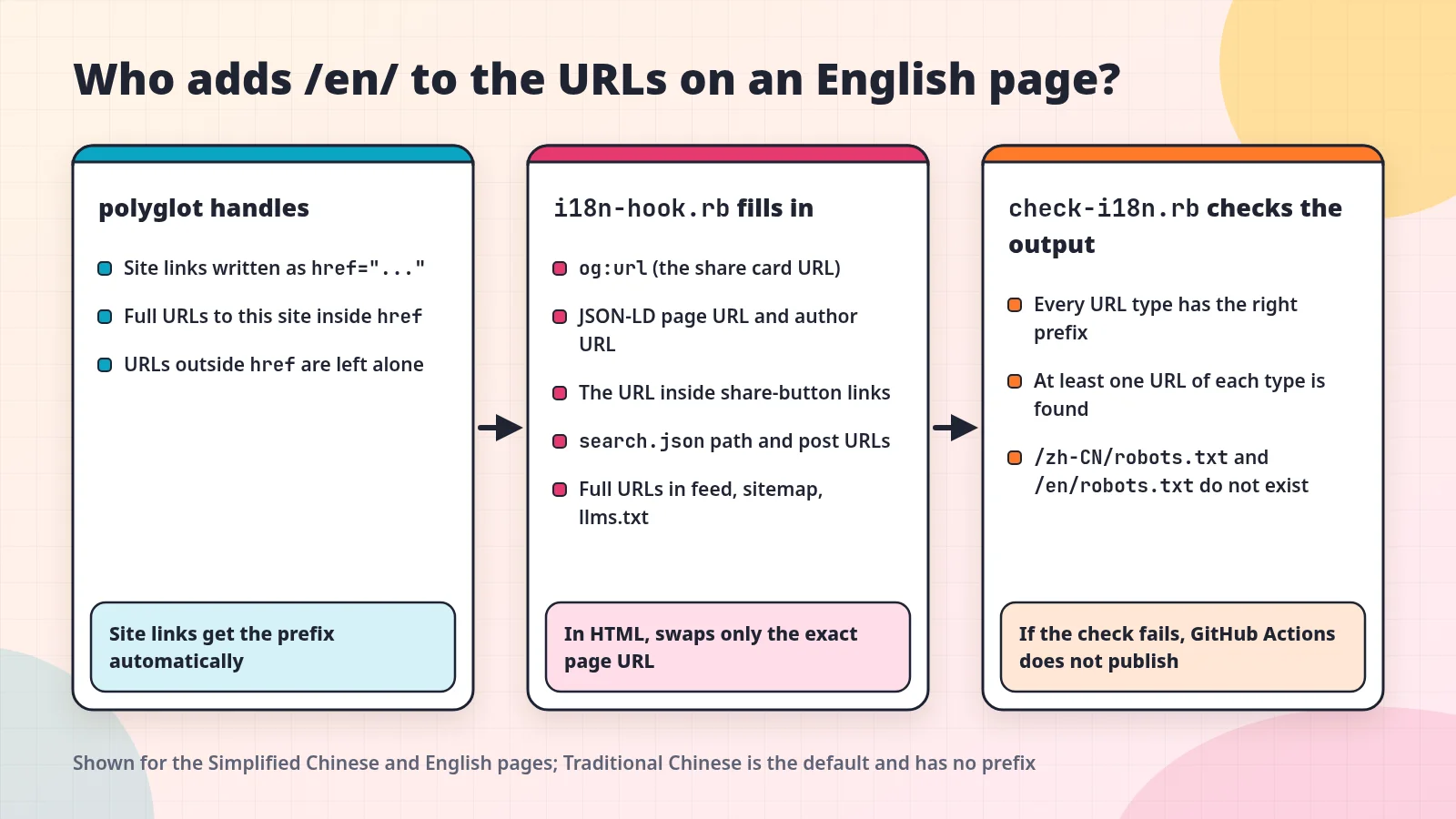
I wrote a hook in _plugins/i18n-hook.rb to fill in these URLs. It runs after polyglot has finished, and replaces the exact string “this page’s Traditional Chinese URL” with the URL for that language. Here is the core of the part that handles HTML:
1
2
3
4
5
6
7
page_url = "#{ origin }#{ doc.url }"
local_url = "#{ origin }/#{ lang }#{ doc.url }"
doc.output = doc.output
  .gsub(%(content="#{ page_url }"), %(content="#{ local_url }"))
  .gsub(%("url":"#{ page_url }"), %("url":"#{ local_url }"))
  .gsub(%("@id":"#{ page_url }"), %("@id":"#{ local_url }"))
  .gsub(CGI.escape(page_url), CGI.escape(local_url)) # query string of the share buttons
It replaces only the exact string so that it does not change other URLs by mistake. Image URLs should not get a prefix, because there is only one copy of each image. Neither should the hreflang link that points to the Traditional Chinese version.
The same hook also swaps in each language’s site name and description. _config.yml has an i18n_site section that holds things like the English site title and the Simplified Chinese tagline, and the build applies them when it builds that language.
Helping search engines tell the three versions apart
To a search engine, three languages are just three different URLs. If you tell it nothing, it may treat the three pages as duplicate content, or show the English version to someone searching in Chinese. Below are the SEO settings on this site that relate directly to multiple languages.
Every page lists all three language versions
Google uses hreflang to work out the other language versions of a page. Google’s documentation has a few rules to watch for:
- Each language version must list itself as well as every other language version.
- Two pages must point to each other. Google ignores tags that point only one way.
- URLs must be complete, including
https://.
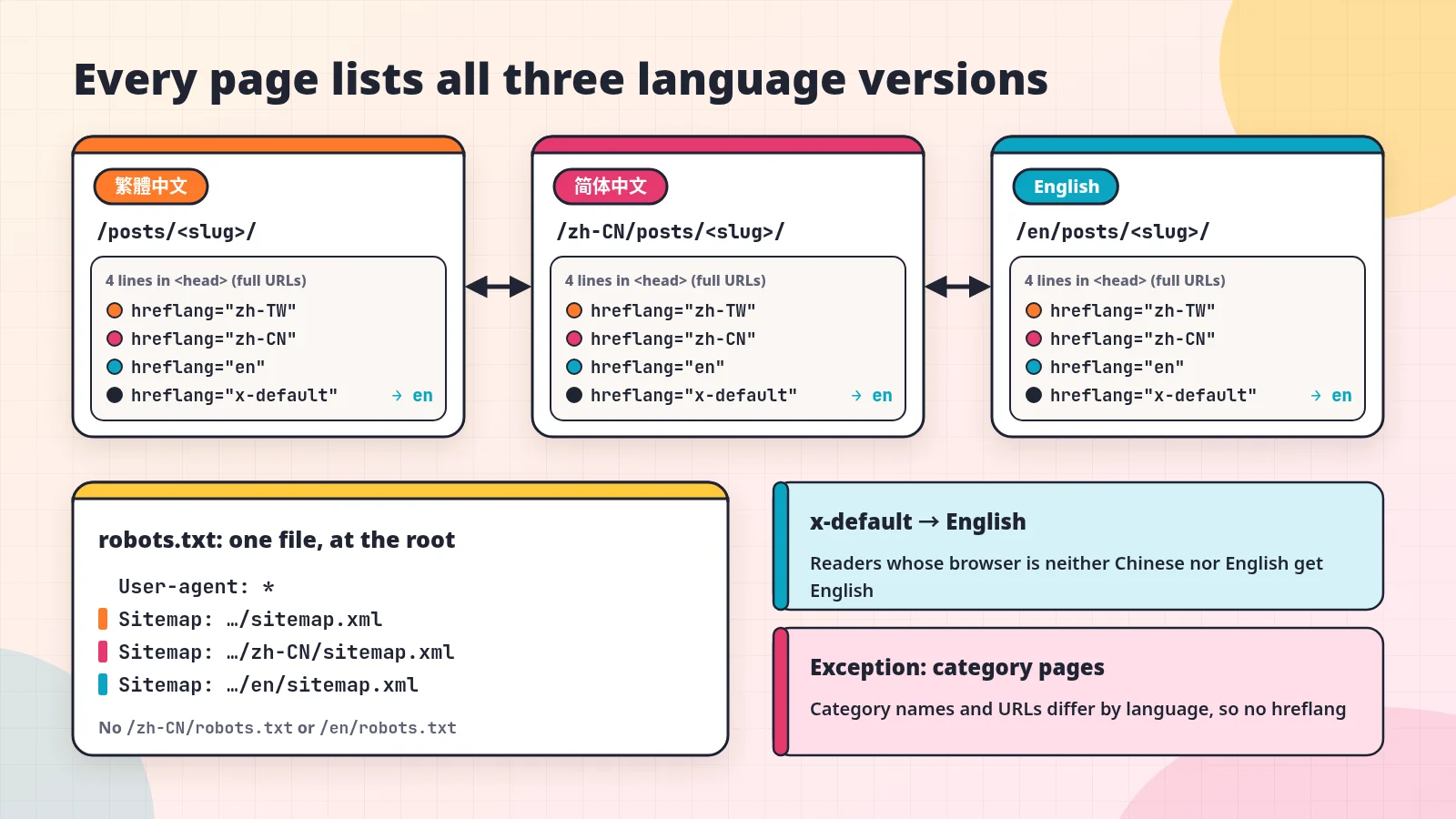
This site outputs four lines in the <head> of every page, one for each language plus one for x-default:
1
2
3
4
<link rel="alternate" hreflang="zh-TW" href="https://justmao.com/posts/jekyll-blog-three-languages/">
<link rel="alternate" hreflang="zh-CN" href="https://justmao.com/zh-CN/posts/jekyll-blog-three-languages/">
<link rel="alternate" hreflang="en" href="https://justmao.com/en/posts/jekyll-blog-three-languages/">
<link rel="alternate" hreflang="x-default" href="https://justmao.com/en/posts/jekyll-blog-three-languages/">
All three language versions of a page come from the same template, so every version outputs the same four lines. That meets the “list itself” and “point to each other” rules without extra work. The template is _includes/metadata-hook.html, a spot Chirpy reserves for users to add things to the <head>.
Google says x-default is “used when no other language/region matches the user’s browser setting.” I point it to the English version, because readers whose browser language is neither Chinese nor English are most likely to be able to read English.
Category pages are the one exception. Category names differ across the three languages. For example, the same category is 資訊安全 in Traditional Chinese, 信息安全 in Simplified Chinese, and Security in English. Because the names differ, the URLs differ too, and there is no one-to-one matching version. So category pages do not output hreflang.
A single robots.txt lists all three sitemaps
Each language generates its own sitemap: /sitemap.xml, /zh-CN/sitemap.xml, and /en/sitemap.xml. Search engines only read the robots.txt at the root of the domain, so I have that one file list all three sitemaps:
1
2
3
4
5
6
7
User-agent: *

Disallow: /norobots/

Sitemap: https://justmao.com/sitemap.xml
Sitemap: https://justmao.com/zh-CN/sitemap.xml
Sitemap: https://justmao.com/en/sitemap.xml
There is a small trap here. When jekyll-sitemap, the plugin that generates the sitemaps, finds that a language has no robots.txt, it adds one automatically, so /zh-CN/robots.txt and /en/robots.txt show up after all.
These two files do nothing except confuse people, so I have i18n-hook.rb wait until the sitemaps are generated, then take these two files off the output list so they are never written.
Which language readers see when they arrive
A common approach on multilingual sites is to check the browser language and automatically redirect readers to the matching version. Google’s documentation recommends avoiding this, because such redirects can keep users and search engines from seeing all versions of a site. Instead, it recommends putting links to the other language versions on the page and letting users choose.
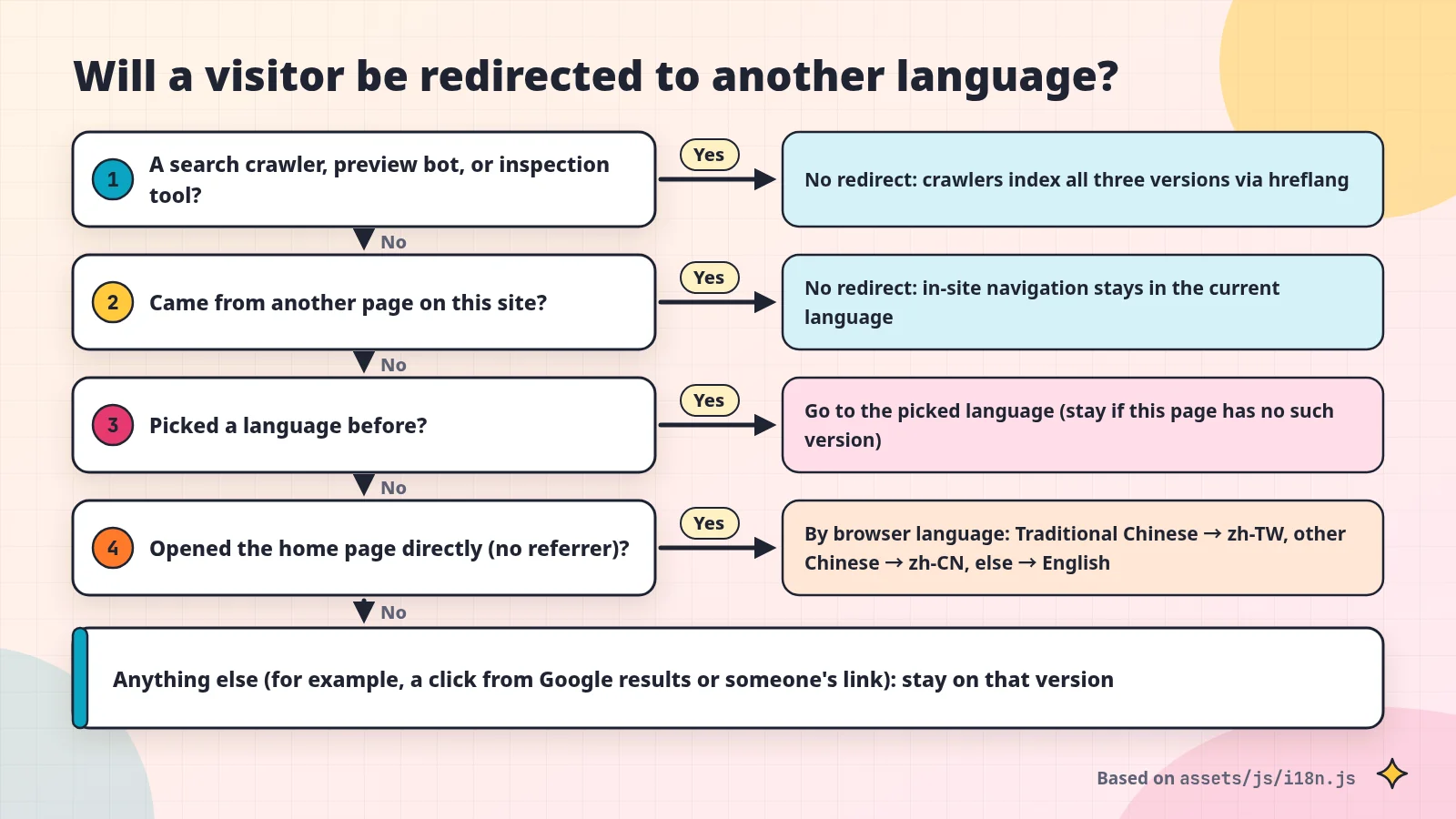
This site’s rules live in assets/js/i18n.js. Roughly, they work like this:
- There is a language menu next to the search box in the top bar. When a reader picks a language, the site remembers the choice.
- If a reader has picked a language before, the site takes them to that language when they later arrive from another site. The reader stated this preference themselves. The site is not guessing. If the page has no version in that language (a category page, for example), the reader stays where they are.
- For readers who have never picked one, the site redirects by browser language only when they open the home page directly (not by clicking through from another page). Traditional Chinese (including Taiwan, Hong Kong, and Macau settings) goes to the Traditional Chinese version, other Chinese settings go to Simplified Chinese, and every other language goes to English.
- Readers who have never picked a language and click through from Google search results or from someone else’s link stay on the version they clicked, with no redirect.
- The site never redirects search engine crawlers, so they can index all three versions separately through hreflang.
These redirect rules only come into play when a reader arrives from outside the site. Moving between pages on the site never triggers a redirect, so a reader who clicks a link to another language stays in that language.
The crawler list behind item 5 has one entry that is easy to miss: Google-InspectionTool, which Google Search Console uses to inspect URLs. Its User-Agent (the string a browser or crawler sends to identify itself) does not contain the word bot.
At first, I matched crawlers only on words like bot and crawl, so the script did not recognize this one. If you miss it, the tool may be treated as an ordinary reader and redirected to another language when it inspects an English page. Then it is not inspecting the page you wanted to check.
A side note: llms.txt for AI tools
The root of this site has an llms.txt file. It is an index of posts for AI browsers and coding agents to read (the format is described at llmstxt.org), and it is generated automatically from the list of posts. Each language gets its own copy of it too, and i18n-hook.rb adds the language prefix to the URLs inside it as well. The parts of it that have nothing to do with languages, and other general SEO settings, are outside the scope of this post.
Using checks to stop things from “quietly breaking”
i18n-hook.rb rewrites URLs by matching exact strings. This approach is simple but fragile. If the Chirpy theme or jekyll-seo-tag ever changes its output format, for example by adding a space after "url":, the match fails and the URL does not get replaced. The build reports no error, and the site still loads.
So I also wrote a check program, tools/check-i18n.rb. It does not care how the hook is written. It looks only at the built output. In the Simplified Chinese and English output, every type of URL mentioned above must carry the correct language prefix, and the check must find at least one URL of each type.
The “at least one” rule prevents a false pass like “the format changed, so nothing matched, so there are zero errors.” It also checks that /zh-CN/robots.txt and /en/robots.txt do not exist.
The checks are written as a table. When a new type of URL needs a prefix, I just add a row to the table. The head[s] below takes only the <head> part of the page, because the same strings can also appear in a post’s code blocks, as they do in this post:
1
2
3
4
5
checks = [
  ['og:url', html, ->(s) { head[s].scan(/property="og:url" content="([^"]*)"/).flatten }, is_local_page],
  ['JSON-LD @id', html, ->(s) { head[s].scan(/"@id":"([^"]*)"/).flatten }, is_local_page],
  # …share buttons, search.json, feed.xml, sitemap.xml, llms.txt
]
This check runs in the GitHub Actions publishing workflow. Pull requests run the same checks but do not publish:
flowchart TD
  M[Merge a change] --> B[Build the site]
  R[Open a pull request] --> B
  B --> C[check-i18n.rb]
  C --> S[SEO check]
  S --> H[html-proofer link check]
  H --> Q{All checks pass?}
  Q -- No --> N[Do not publish]
  Q -- Yes --> T{Triggered by a PR?}
  T -- Yes --> N
  T -- No --> D[Publish to GitHub Pages]
html-proofer is a tool that checks pages for broken links and images. To run the whole set locally, run:
1
bash tools/test.sh
The costs: three versions of every post, plus more build and maintenance work
These are the real costs of three languages:
- Every post gets written three times. Even with AI writing the first draft, I still have to review the Simplified Chinese wording and the English tone. When the original changes, both translations have to change with it.
- Builds have more work to do. polyglot builds the complete site once for each language (in parallel by default), so the more languages there are, the more work every build has to do.
- There are two more programs to maintain. I only need
i18n-hook.rbandcheck-i18n.rbbecause of what polyglot does not handle. After upgrading the theme or a plugin, I have to rerun the check.
If you want to do this too
Based on my experience with this site, you can go in this order:
- Decide on the URL scheme first, meaning which language goes at the root and what prefix the other languages use. If you change it later, every old URL needs a redirect.
- Write down your translation rules, especially how categories and tags map across languages.
- After building, open the page source of a page in a non-default language, search for your domain, and check that every URL carries the language prefix.
og:url, structured data, share buttons, and the sitemap are the easiest to miss. - Output complete hreflang tags on every page, including the line that points to the page itself.
- Do not force redirects based on browser language. Put a language menu on the page instead.
- Turn step 3 into an automated check and put it in the workflow that runs on every publish.
Step 3 is the easiest one to skip. A site that looks normal does not mean every URL is right.