OpenSSH Password Authentication Bypass: Which Hosts Are Affected, and How Alpine Users Can Patch
I explain who is affected by CVE-2026-123158, how to check an Alpine host, how to update safely, and what to do if patching has to wait.
The obvious question after reading that someone can bypass an OpenSSH password check is: does this affect my server? After checking the OpenSSH and Alpine advisories, I would start with the operating system and whether the machine accepts remote logins over SSH.
The vulnerability is CVE-2026-123158. With certain system and account settings, an attacker may be able to log in without knowing the correct password. It affects sshd, the server program that accepts connections, and several conditions have to line up.
Here is how I would decide whether to investigate further:
- A standard Ubuntu, Debian, Fedora, or RHEL installation: these normally use glibc and are outside this vulnerability’s scope.
- An Alpine host that accepts SSH logins: this needs a closer look. Using a key for my own logins would not be enough to put it in the clear.
- A computer used only to connect elsewhere with
ssh, or a container without sshd: the problem is not in that client or container itself. The server accepting the connection still needs checking.
If you do not manage servers, I suggest sharing this with whoever handles your systems. The commands below are for administrators; understanding the risk does not require running them yourself.
Three terms worth knowing
Before getting into the checks, I want to explain the terms that keep appearing in the advisories.
sshd accepts remote logins. It runs on a server and waits for incoming connections. ssh is the client used to connect to another machine. The server program is the one that needs this fix.
musl and glibc are low-level C libraries. Think of them as shared tools that programs use for basic tasks, including password calculations. Alpine uses musl; most familiar Linux distributions use glibc. This advisory concerns musl environments.
PAM is a framework for checking logins. sshd can ask PAM to verify a password, or it can call system functions directly. The vulnerable path is the one that does not use PAM.
What happened, and how serious is it?
OpenSSH released Portable OpenSSH 10.6p2 on 2026-11-05, adding protection in sshd against this password authentication bypass. The project considers the root cause to be outside sshd, but blocks it there because it can be triggered through the server.
The same day, Alpine published an advisory and provided fixed packages for branches from 3.16 through edge. My first priorities would be to check whether a host is patched and whether an attacker can reach it. Alpine explains that when the exploitation conditions hold, knowing the account name can be enough; guessing the correct password is unnecessary.
OpenSSH calls the release a “critical security workaround.” In the CVE record, MITRE gives it a CVSS 3.1 severity score of 8.1, rated High. I would keep the project’s urgent warning separate from that severity score: they come from different sources. As of 2026-11-07, NVD still lists it as Received and has not supplied its own score.
If you notice “no CVE assigned” in Alpine’s advisory, that describes the situation when it was written. The CVE record was published on 2026-11-05 at 23:46 Taipei time, and Alpine’s security database now lists the corresponding fixes.
Which conditions would I check first?
Following Alpine’s advisory, I would check whether all of these conditions hold:
- The host runs Linux with musl, and its running sshd is unpatched. A host with its distribution’s fixed package installed and sshd restarted is not affected by this vulnerability.
- sshd does not use PAM to verify passwords. On Alpine, that includes
openssh-server, andopenssh-server-pamconfigured withUsePAM no. The latter withUsePAM yesis not affected. - Password authentication is still allowed:
PasswordAuthentication yes. This is the upstream OpenSSH default, but a host may override it. I would check the settings actually applied. - An account has
*as its password field. This includes some accounts that use keys and have no usable password set. Alpine also lists directory-service users obtained through musl-nscd: these accounts come from a central account system and have no local shadow entry. - At least one other local account has a password hash starting with
$5$or$6$. A hash is the calculated value used to verify a password. This condition means that another account’s password settings can change the risk.
The attacker must also be able to reach the SSH port and know the target account’s name. Other login restrictions still apply to that account; bypassing the password comparison does not automatically override a rule that denies it access. I would not treat one * field as proof that a login is possible, or skip these checks just because I normally use keys.
Two distinctions matter here:
*means there is no usable password hash. It is not an empty password and does not mean all logins are disabled. The account may still accept keys. Alpine separately notes that locked accounts with!as their password field are not affected by this flaw.- Using a key does not mean the server has password authentication disabled. I would check
PasswordAuthenticationrather than infer the setting from my own login habits.
Why pay particular attention to Alpine cloud images?
Alpine identifies official tiny-cloud images from 3.18.11 through 3.24.3 as affected versions. Their alpine account has a * password field and can use doas without a password to gain root, the system administrator account.
The advisory says these images do not meet the exploitation conditions on first boot. But adding a $6$ password hash later, for example by setting a console password, can turn the existing alpine account into an entry point. My takeaway is that account changes can change the risk; being safe on first boot is not a lasting guarantee.
Root has a separate login rule. The default PermitRootLogin prohibit-password prevents password logins directly as root. It does not stop an attacker who first logs in as alpine and then uses doas to become root.
Alpine lists images configured through cloud-init as unaffected because cloud-init writes PasswordAuthentication no. I would still check the current configuration, since later changes may have enabled it again.
How does an error turn into “correct password”?
With the risk in view, the mechanism is easier to follow. My simplified version of the normal process is: sshd uses crypt() to turn the submitted password into a hash, then compares it with the stored value.
A field containing only * has no salt, an additional parameter needed for normal password hashing. sshd borrows parameters from another account instead. That explains why another account having a password matters.
According to Alpine, musl’s crypt() returns * to signal an error when the password exceeds 256 bytes. Unpatched sshd compares that result with the account’s password field, which is also *, and mistakenly accepts it. A calculation error that should reject the login is treated as a matching password.
OpenSSH’s fix adds a length check on the stored hash so that short values such as * cannot pass the comparison. Alpine’s older branches carry corresponding fixes.
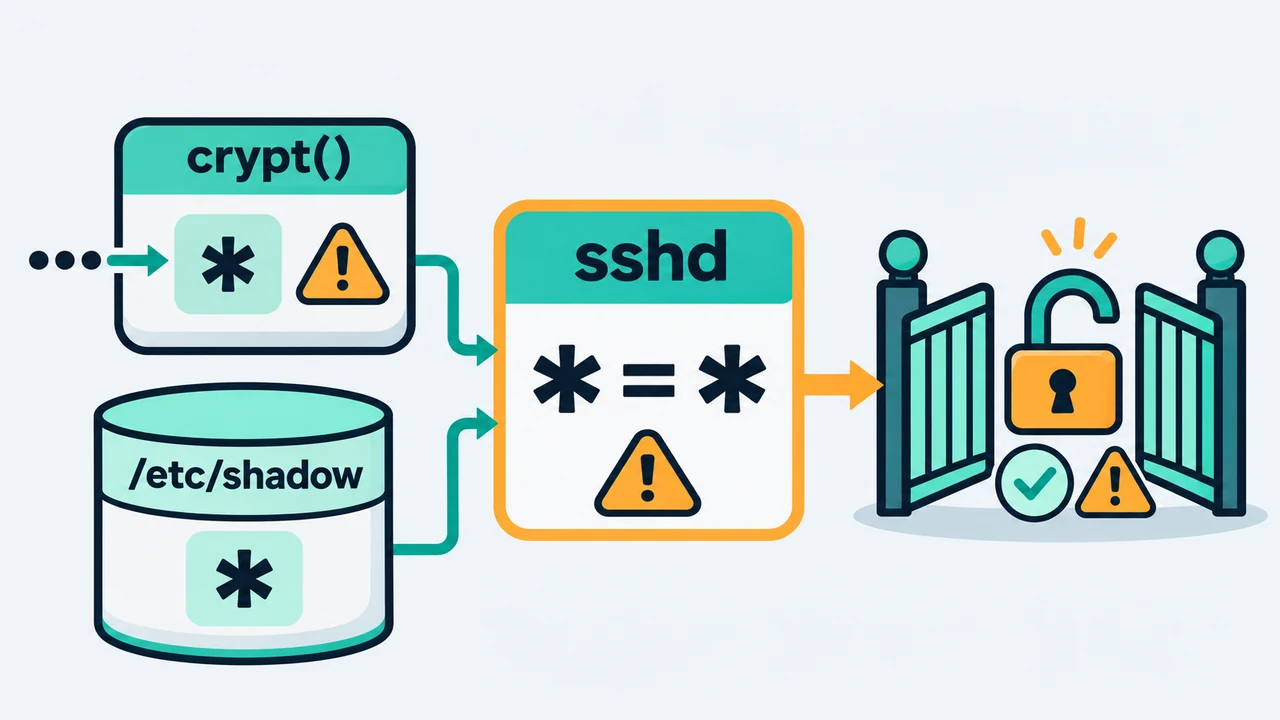 I use
* = * to show the mistaken comparison: the calculation’s error return matches the account’s stored value and is treated as a correct password.
How would I check a server?
These are read-only checks for Alpine administrators. I would check the system and packages first, then the settings and accounts. Reading /etc/shadow, running the sshd checks, and applying the updates below should be done from an administrative shell with root privileges.
1. Identify the system and installed packages
1
2
cat /etc/os-release
apk info -v | grep openssh
The first command identifies Alpine and its release; the second lists installed OpenSSH packages for comparison with the fixed versions below. On another distribution, use that distribution’s package tools and advisory instead.
I would not rely on ssh -V: it reports the client version and cannot establish whether the server has the distribution’s fix.
2. Check the settings sshd would apply
1
sshd -T | grep -Ei '^(usepam|passwordauthentication|permitrootlogin) '
I would first check whether passwordauthentication is yes or no, then consider the PAM package and settings. A build without PAM support may not list usepam; its absence is not evidence that PAM is enabled.
sshd -T reads configuration files from disk and prints the parsed settings. It does not ask the running service which settings it is using. Seeing no after editing a file still requires the service to reload its configuration before the change takes effect. These commands assume the default configuration file; custom paths or service startup options need to be reflected in the checks too.
If the configuration has Match blocks, which define exceptions for particular users or connection sources, I would test those contexts separately. For example, to check deploy connecting from 203.0.113.10:
1
sshd -T -C user=deploy,addr=203.0.113.10 | grep -i passwordauthentication
Replace the example account and IP with real values. The sshd manual explains that host= supplies the source hostname when rules match it; laddr= and lport= supply the server’s address and port if needed. I would also check files loaded by Include, rather than rely on one line in the main file.
3. List relevant accounts without displaying password hashes
1
awk -F: '$2=="*"{print "password field is *:", $1} $2 ~ /^\$[56]\$/{print "has SHA password hash:", $1}' /etc/shadow
I use this to check whether both account types are present. It prints account names, not the hashes. Finding both types means the other conditions need checking; the list alone cannot establish exploitability.
It is not a complete account inventory either: directory-service users obtained through musl-nscd are absent from the local /etc/shadow. The full file contains sensitive information, so I would not paste it into forums, chats, or AI tools.
What does a complete Alpine update involve?
I would judge patch status by the package version for the relevant Alpine branch. Alpine applies fixes to older packages, a practice called backporting, so not every host needs to move to OpenSSH 10.6p2.
The advisory lists these as the first fixed versions for selected branches. Later packages in the same branch that retain the fix are suitable too:
| Alpine branch | Fixed openssh package version |
|---|---|
| edge | 10.6_p2-r0 |
| 3.24 | 10.3_p1-r2 |
| 3.23 | 10.2_p1-r1 |
| 3.22 | 10.0_p1-r11 |
For 3.16 through 3.21, see the advisory’s full table. It also notes that 3.21 reached end of support on 2026-11-01, and older branches no longer receive routine updates either. This exceptional fix does not restore ongoing support. I would still plan a move to a supported release.
Before making changes, I would confirm key login works in another window, keep my current SSH session open, and check that a cloud console or another recovery route is available. I would schedule maintenance because Alpine’s recommended apk upgrade -U -a updates packages across the system, not just OpenSSH.
I would proceed in order, continuing only when each step succeeds:
- Refresh package indexes with
apk update, then preview changes withapk upgrade -a --simulate. The preview does not upgrade packages. - After reviewing the impact, update with
apk upgrade -U -a. - Check sshd’s configuration with
sshd -t. Resolve errors before attempting a restart. - Restart with
rc-service sshd restartand confirm the command succeeds. - Recheck the package version and relevant settings, then test a new SSH connection.
- Close the original session only after the new one works.
Installing the fixed package must be followed by a successful sshd restart. Alpine stresses that upgrading the package does not replace the running service; the old program may still be accepting connections. Testing a new connection checks availability. Being able to log in is not, by itself, proof that the vulnerability is fixed.
 I would follow steps 1 → 2 → 3: keep the existing session open, update and restart sshd, then test a new connection. I would close the old session only after that succeeds.
Alpine 3.21.10, 3.22.8, 3.23.8, and 3.24.4 images include the fix, but a new image release does not automatically repair existing hosts. For a container running sshd, I would update the packages used in the build, rebuild the image, and redeploy the running containers. For a source-built OpenSSH installation, I would use 10.6p2 or a later release containing the fix and confirm that the service is running the new program.
What would I do if updating has to wait?
Alpine’s temporary measure is PasswordAuthentication no, which closes the password authentication path used by this vulnerability. I would verify key login before changing the setting to avoid locking myself out. Blocking exploitation temporarily still needs to be followed by a planned update.
I would watch for two issues: Match blocks may separately set PasswordAuthentication yes, and Alpine’s default configuration only starts reading /etc/ssh/sshd_config.d/ in 3.19. Older releases do not automatically read that extra configuration directory. Custom configurations may differ too.
I would back up the configuration, then follow the advisory’s “If you cannot update” section, making sure the change covers the main file, included files, and relevant Match rules. After checking for errors with sshd -t, I would restart sshd. Finally, I would use sshd -T and -C as above to confirm passwordauthentication no for the relevant contexts and test another connection.
For a lasting policy of allowing only keys, I would check other authentication methods too. For example, keyboard-interactive authentication can use PAM to ask for a password or one-time code. Setting PasswordAuthentication no alone does not disable every interactive password prompt. Any existing multifactor authentication requirements need to be considered before making further changes.
What if someone may already have logged in?
As of 2026-11-07, the OpenSSH and Alpine advisories I checked do not mention known attacks. CISA labels the exploitation status poc in the CVE record, indicating a proof of concept. That is not confirmation of real attacks, and it is not a guarantee that none have occurred.
For a host that was reachable over the network and met the affected conditions, I would follow Alpine’s advice and check:
Accepted password forentries in/var/log/messages, especially for accounts without a usable password that should only use keys. I would also check any centrally stored logs.doasrecords for unfamiliar use of administrator privileges.- Recently created accounts and files, and unfamiliar login keys in
authorized_keys.
I would not treat an absence of records as proof of safety. Logs may be missing, rotated, or altered. Alpine recommends treating the host as compromised if a login cannot be ruled out.
In practice, I would first restrict network access and preserve available logs and disk snapshots for investigation. Then I would rebuild from a trusted, clean image and use a clean administrative environment to revoke and replace potentially exposed credentials, such as private keys held on the host, passwords, and API tokens. Patching stops further exploitation of the flaw; it does not remove what an intruder may already have left behind.
The habits I would keep after this
For me, the useful habit is to check “how I normally log in” separately from “how the server allows logins.” For a host intended to use keys, I would explicitly review its authentication settings. To verify a fix, I would check the distribution’s advisory, the package version, and whether the service has been restarted.
Checking all three helps avoid an updated package leaving an old service running and accepting connections.
Main sources
I checked these sources on 2026-11-07 (Taipei time). For later vulnerability status or package changes, use the latest official information.
- OpenSSH 10.6p2 release notes
- OpenSSH password authentication bypass fix
- Alpine Linux advisory and complete fixed-version table
- Alpine secdb (v3.24 main) and v3.22 main: CVE-to-fixed-version mappings
- CVE-2026-123158 record (CVE Services API)
- CVE-2026-123158 on NVD (API)
- sshd check options and sshd_config authentication settings