自己寫 Agent Skill:從 SKILL.md 結構到觸發測試與維護
想自己寫 Agent Skill?從 SKILL.md 的欄位規則、能被正確觸發的 description,到拆分參考檔與腳本、觸發測試、跨 agent 檢查與版本維護,用寫 commit 訊息和整理會議待辦兩個日常範例走一遍。
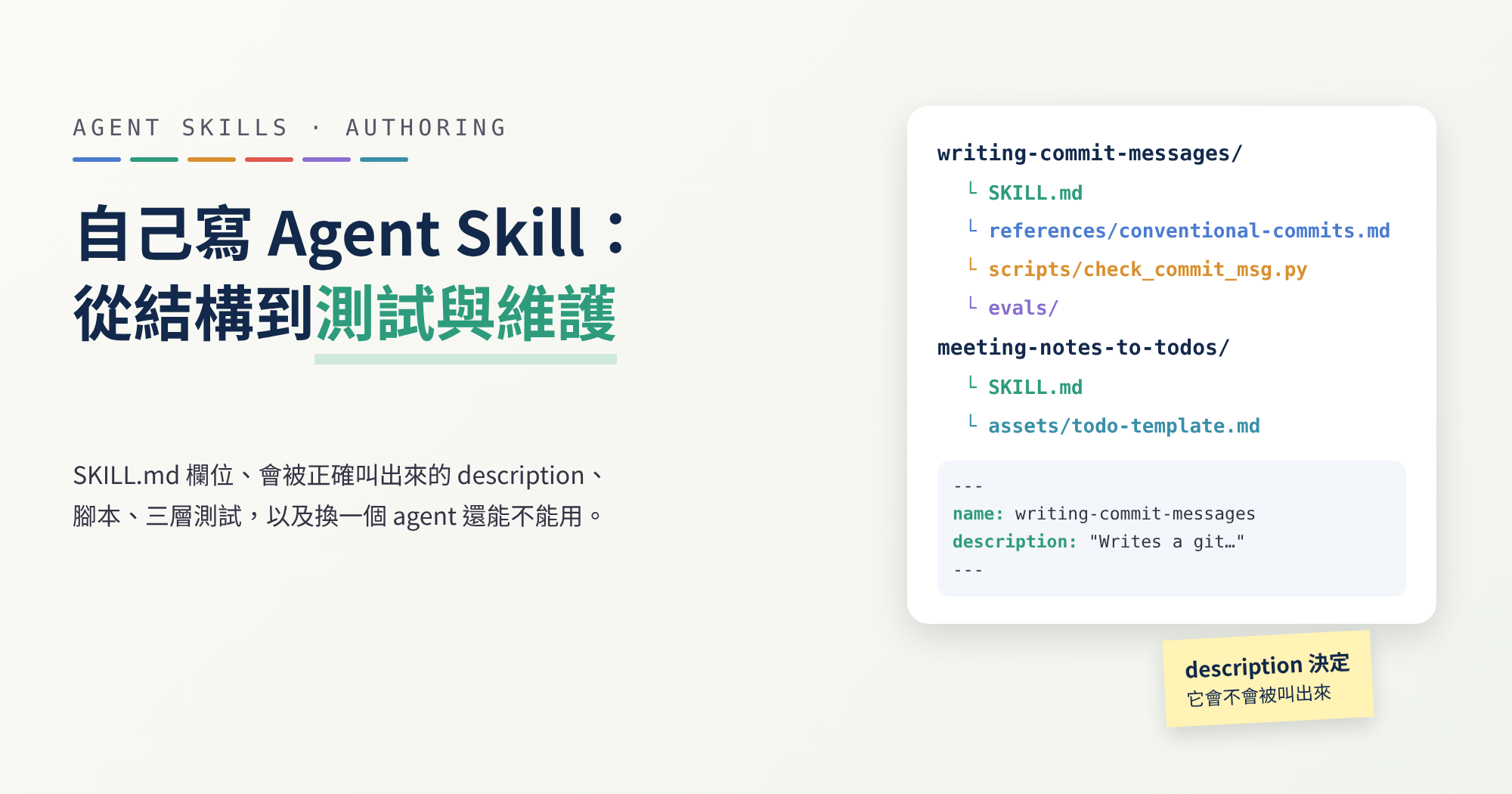
每次請 AI 幫忙寫 commit 訊息,我都要再交代一次同一串規則:開頭要標 fix: 或 feat: 這種類型、第一行不要太長、結尾不加句號、只寫已經加進暫存區的改動……交代到第五次,就會開始想:能不能讓它自己記得?
Agent Skill 就是做這件事的。這篇從「寫 skill 的人」的角度出發:什麼時候值得寫、檔案怎麼放、description 怎麼寫才會在對的時候被叫出來、怎麼測、換一個 agent 還能不能用,以及之後怎麼維護。過程中我會實際做兩個 skill:
- A:
writing-commit-messages。讀 git 暫存區的改動,寫出符合 Conventional Commits 格式的 commit 訊息,再用一支小腳本檢查格式。這是主線範例,用來示範怎麼建立、怎麼寫腳本、怎麼分三層測試。 - B:
meeting-notes-to-todos。把會議紀錄整理成有負責人和期限的待辦清單。它只有說明檔和一份輸出範本,沒有任何程式,用來對照「不寫程式的 skill」長什麼樣,以及 description 怎麼寫才不會被誤叫出來。
這篇不教怎麼安裝別人寫好的 skill。想先用現成的,可以從 mattpocock/skills 系列導讀開始。
規範和各家工具的說法,依 2026 年 10 月 17 日查閱的官方文件;Conventional Commits、commitlint 和 git 的說明,依 2026 年 10 月 18 日查閱的版本。這些文件網址沒有版本號,內容會更新,用之前請再對照一次。
範例的檢查在 2026 年 10 月 18 日實際執行,使用 skills-ref 0.1.0(agentskills/agentskills commit
69ef37e)、git 2.47.3 與 Python 3.13.5,文中的指令和輸出都是當時跑出來的。觸發率測試和輸出品質評測沒有實跑,兩個 skill 也都沒有在任何 agent 裡跑過,原因寫在「分三層測試」一節。
先認識幾個詞
| 詞 | 一句話解釋 |
|---|---|
| Skill | 一個資料夾,核心是給 AI 看的說明檔 SKILL.md,也可以附腳本和參考資料。 |
| Front matter | 檔案最上面兩條 --- 之間的設定區,SKILL.md 用它寫名稱和說明。 |
| YAML | 一種用「名稱: 值」一行一行寫設定的格式,front matter 就是用它寫的。 |
| 暫存區 | 用 git add 挑出「下一次 commit 要放進去」的改動的地方,git 文件也叫它 index。 |
| Conventional Commits | 一種 commit 訊息的寫法約定,第一行寫成「類型(範圍): 摘要」,例如 fix(login): reject empty passwords。 |
| Context window | AI 一次能看到的文字量上限。常駐的東西越多,留給工作的空間就越少。 |
| Token | AI 計算文字長度的單位。字越多,token 就越多。 |
什麼時候值得寫成 Skill
Claude Code 的文件給了一個很實際的判準:你一直把同一段指示、檢查清單或多步驟流程貼進對話,或是 CLAUDE.md 裡某一段已經從「事實」長成了「流程」,就該寫成 skill。
差別在載入的時機。CLAUDE.md 每次對話都會讀進去;skill 的本文只在用到時才載入。同一份文件也寫明,長篇參考資料在用到之前幾乎不佔成本。AGENTS.md 也是常駐的,每一行都有成本,系列第 6 篇談過這一點。
反過來,也有不必寫的時候。agentskills.io 的最佳實踐講得很直接:如果 agent 沒有這個 skill 也能把整件事做好,這個 skill 可能沒有價值。Anthropic 的撰寫指南建議先做評測:讓 AI 在沒有 skill 的情況下做幾次代表性的任務,記下它具體錯在哪裡,再寫剛好能補上這些缺口的指示。
拿 A 來說,AI 本來就會寫 commit 訊息,也懂 git,但它不知道你的團隊用哪幾種類型、第一行最多幾個字元,也不知道「沒加進暫存區的東西,不要自己 git add」這種你在意的規矩。B 也一樣:AI 讀得懂會議紀錄,但每次整理出來的格式都不同,有時還會替沒人認領的事情猜一個負責人。這些正是 skill 該補的東西。
至於「寫給 AI 看的文件」通用的寫作原則,像是指引句怎麼寫、常用的放前面、刪掉多餘的句子,系列第 6 篇的 writing-for-agents 一節已經整理過,這裡不再重複,只談 skill 特有的機制。
一個 Skill 的最小結構
依 Agent Skills 規範,一個 skill 最少只要一個資料夾,裡面放一個 SKILL.md。其他都是選用的:scripts/ 放可以執行的程式,references/ 放需要時才讀的文件,assets/ 放範本、圖片這類資源。
SKILL.md 的開頭是 YAML front matter,後面接 Markdown 本文。最小的寫法長這樣:
1
2
3
4
---
name: skill-name
description: A description of what this skill does and when to use it.
---
規範裡的欄位只有六個:
| 欄位 | 必填 | 規則 |
|---|---|---|
name | 是 | 1–64 字元;只能用小寫英文字母、數字和 -;不能以 - 開頭或結尾;不能有連續的 --;必須和上層資料夾同名 |
description | 是 | 1–1024 字元;要寫這個 skill 做什麼,以及什麼時候用 |
license | 否 | 授權名稱,或附在 skill 裡的授權檔名 |
compatibility | 否 | 1–500 字元;寫環境需求,例如需要哪些系統套件。規範說多數 skill 不需要 |
metadata | 否 | 字串對字串的對應表,放規範沒定義的額外資訊 |
allowed-tools | 否 | 以空白分隔的預先核准工具清單;實驗性,各家支援程度不同 |
各家工具在這之上還有自己的規定:
- Anthropic 平台:
name不能含 XML 標籤,也不能含保留字anthropic、claude;description不能含 XML 標籤。 - Claude Code:所有欄位都是選填,沒寫
name就用資料夾名稱;欄位名稱打錯或不認得,會直接忽略,不會報錯;YAML 解析失敗時 skill 仍會載入,只是所有欄位都是空的。 - claude.ai 上傳與 Skills API:同一份文件寫明,這兩條路只接受規範的六個欄位,多一個就直接報錯:
1
Unexpected key(s) in SKILL.md frontmatter: argument-hint. Allowed properties are: allowed-tools, compatibility, description, license, metadata, name
把這三條放在一起看就知道麻煩在哪:在 Claude Code 裡寫錯,沒有人會提醒你;等你想把同一個 skill 上傳到別的地方,才會出錯。所以最穩的做法是只用規範的六個欄位,這也是後面「換一個 agent 還能用嗎」的基礎。
Description 決定它會不會被叫出來
agent 啟動時,不會把每個 skill 都讀完。依規範的漸進式揭露,它只先載入每個 skill 的 name 和 description,等任務看起來對得上,才去讀整份 SKILL.md。agentskills.io 的 description 最佳化指南說得更直接:觸發與否,整個落在 description 身上。
同一份指南還提到一個容易忽略的地方:agent 通常只在自己做不到的任務才會去找 skill。像「讀這個 PDF」這種一步就能做完的請求,就算 description 完全吻合,也可能不觸發,因為 agent 用基本工具就做得到。
兩份文件,兩種寫法
關於 description 該怎麼寫,兩份官方文件的說法不一樣,我照實列出來:
- agentskills.io(最佳化指南):用祈使語氣,寫成對 agent 的指示,例如「Use this skill when…」,而不是「This skill does…」;寫使用者想達成什麼,而不是 skill 內部怎麼做;主動列出適用情境,包括使用者沒講出領域名稱的時候;保持精簡。
- Anthropic(撰寫指南):一律用第三人稱,例如「Processes Excel files and generates reports」,避免「I can help you…」或「You can use this to…」。理由是 description 會被放進系統提示,視角不一致可能影響 skill 被找到。
這兩種寫法其實是互相衝突的:agentskills.io 明說要寫「Use this skill when…」,而不是「This skill does…」;Anthropic 的例子卻正是「Processes Excel files…」這種第三人稱的句子。我的兩個範例都用折衷寫法,這是我自己的選擇,不是哪份文件的建議:第一句用第三人稱說它做什麼,第二句用「Use this skill when…」列出情境,最後一句寫明什麼時候不用。A 的寫法:
1
description: "Writes a git commit message for the currently staged changes, in Conventional Commits format (type(scope): summary, optional body and footers). Use this skill when the user asks for a commit message, asks you to commit what they staged, or asks how to describe their changes, even if they don't say 'Conventional Commits'. Do not use it to explain git commands, to edit commits that were already pushed, or to write changelogs or release notes."
整段用雙引號包起來不是習慣問題,原因在後面的「格式檢查」會看到。最後那句「Do not use it to…」也有出處:最佳化指南建議,如果不該觸發的查詢一直誤觸發,就補上 skill 不做什麼,把它和相鄰的能力分開。
用 B 看怎麼避免誤觸發
會議紀錄很容易和其他請求混在一起:「幫我摘要這場會」「把待辦排個優先順序」「幫我約下次開會」聽起來都和會議有關,但要的東西不一樣。B 的 description 是這樣寫的:
1
description: Turns meeting notes or a meeting transcript into a to-do list of tasks with owners and due dates, in a fixed Markdown format. Use this skill when the user shares notes, minutes or a transcript of a meeting or call and asks what needs to be done, who is doing what, or for the follow-ups, even if they don't say "action items". Do not use it for a plain meeting summary with no tasks, for editing or prioritizing an existing to-do list, or for scheduling a meeting.
它做了三件事:第一句講清楚產出是「有負責人和期限的待辦」,不是摘要;第二句列出使用者實際會怎麼說(筆記、逐字稿、誰要做什麼、後續追蹤),包括沒講「action items」這個詞的時候;最後一句把三個最像的請求排除掉。拿幾條查詢來對照:
| 查詢 | 該觸發嗎 | 為什麼 |
|---|---|---|
| 「這是昨天週會的筆記,誰要做什麼?」 | 該 | 沒說「待辦」,但問的就是誰負責什麼 |
| 「幫我把這場會議摘要成三點」 | 不該 | 要的是摘要,不是待辦 |
| 「把我的待辦清單照優先順序排好」 | 不該 | 已經是待辦清單,不是從會議紀錄裡抽出來 |
| 「幫我約下週三下午開會」 | 不該 | 是排會議,不是整理會議 |
這張表是我寫的測試題起點,沒有在任何 agent 裡跑過。怎麼把它變成真的測試,見後面的「觸發測試」。
長度要算預算
description 上限是 1024 字元,但實際能用的空間通常更小,因為所有 skill 的清單要一起擠進 context window:
| 工具 | 清單預算 | 超出時 |
|---|---|---|
| Claude Code | 整份清單佔 context window 的 1%;每個 skill 的 description 加 when_to_use 在清單裡截在 1,536 字元(文件) | 從最少用到的 skill 開始拿掉 description |
| Codex | 初始清單最多佔 context window 的 2%,不知道 context window 大小時是 8,000 字元(文件) | 先縮短 description;skill 很多時可能整個略過,並顯示警告 |
兩家都建議把關鍵用途放在最前面,被截斷時還留得住最重要的那幾個字。A 的 description 是 444 字元,B 是 464 字元,三段的順序都是照這個原則排的。
一個 Skill 只做一件事
agentskills.io 用函式來比喻:一個 skill 應該是一個完整的工作單位。切得太細,一個任務要同時載入好幾個 skill,指示可能互相打架;切得太粗,就很難在對的時候被精準叫出來。Codex 的文件也只寫了一句:Keep each skill focused on one job。
A 只管寫 commit 訊息:看暫存區、選類型、寫摘要、檢查格式。寫 PR 說明、整理 release notes、改已經推上去的 commit,都不在它的範圍裡。B 只把會議紀錄變成待辦,不做會議摘要,也不管待辦之後怎麼排。
命名方面,Anthropic 建議用動名詞,例如 processing-pdfs;名詞片語(pdf-processing)和動作導向(process-pdfs)也可以接受;要避開 helper、utils 這種看不出在做什麼的名字。A 叫 writing-commit-messages,是動名詞。B 的 meeting-notes-to-todos 是「輸入 → 輸出」的寫法,不在上面三種裡。同一份指南也提醒,同一組 skill 的命名方式要一致;如果你要把這兩個放在同一個專案,最好統一成一種,例如都改成動名詞。
誰能啟動它
有些 skill 不該讓 AI 自己決定什麼時候跑。各家的開關不一樣:
| 工具 | 設定 | 效果 |
|---|---|---|
| Claude Code | disable-model-invocation: true | Claude 不會自己啟動,只能你輸入 /名稱 叫它(文件) |
| Claude Code | user-invocable: false | 你不能用 /名稱 叫它,只有 Claude 能啟動 |
| Cursor | disable-model-invocation: true | 只有明確輸入 /skill-name 時才載入(文件) |
| Codex | agents/openai.yaml 裡的 policy.allow_implicit_invocation: false | 不會依提示自動啟動,仍可用 $skill 明確叫用(文件) |
Claude Code 的文件建議,有副作用或你想自己控制時機的流程,例如 /commit、/deploy,就設成只能手動,因為你不會想讓 Claude 覺得「程式看起來好了」就自己去部署。實際的例子可以看系列第 4 篇的 implement,它同時設了 Claude Code 和 Codex 兩種開關。
A 剛好站在這條線上,因為 commit 就是有副作用的動作。我的處理是讓 A 只寫訊息、檢查格式,只有使用者在對話裡要求 commit 時才執行 git commit(寫在步驟 5)。要注意,這是寫在指示裡的約定,不是技術上擋得住的限制。如果你想要的是「一叫它就直接 commit」,那就該設成只能手動。
這裡還有一個取捨:disable-model-invocation 和 user-invocable 都不在規範的六個欄位裡。寫進 SKILL.md,在 Claude Code 和 Cursor 有效,但 claude.ai 上傳和 Skills API 會拒收,後面的 skills-ref 檢查也會報錯。Codex 把同樣的設定放在另一個檔案 agents/openai.yaml,SKILL.md 本身就能維持只有規範欄位。兩個範例都沒有設這兩種開關。
把細節拆到參考檔與腳本
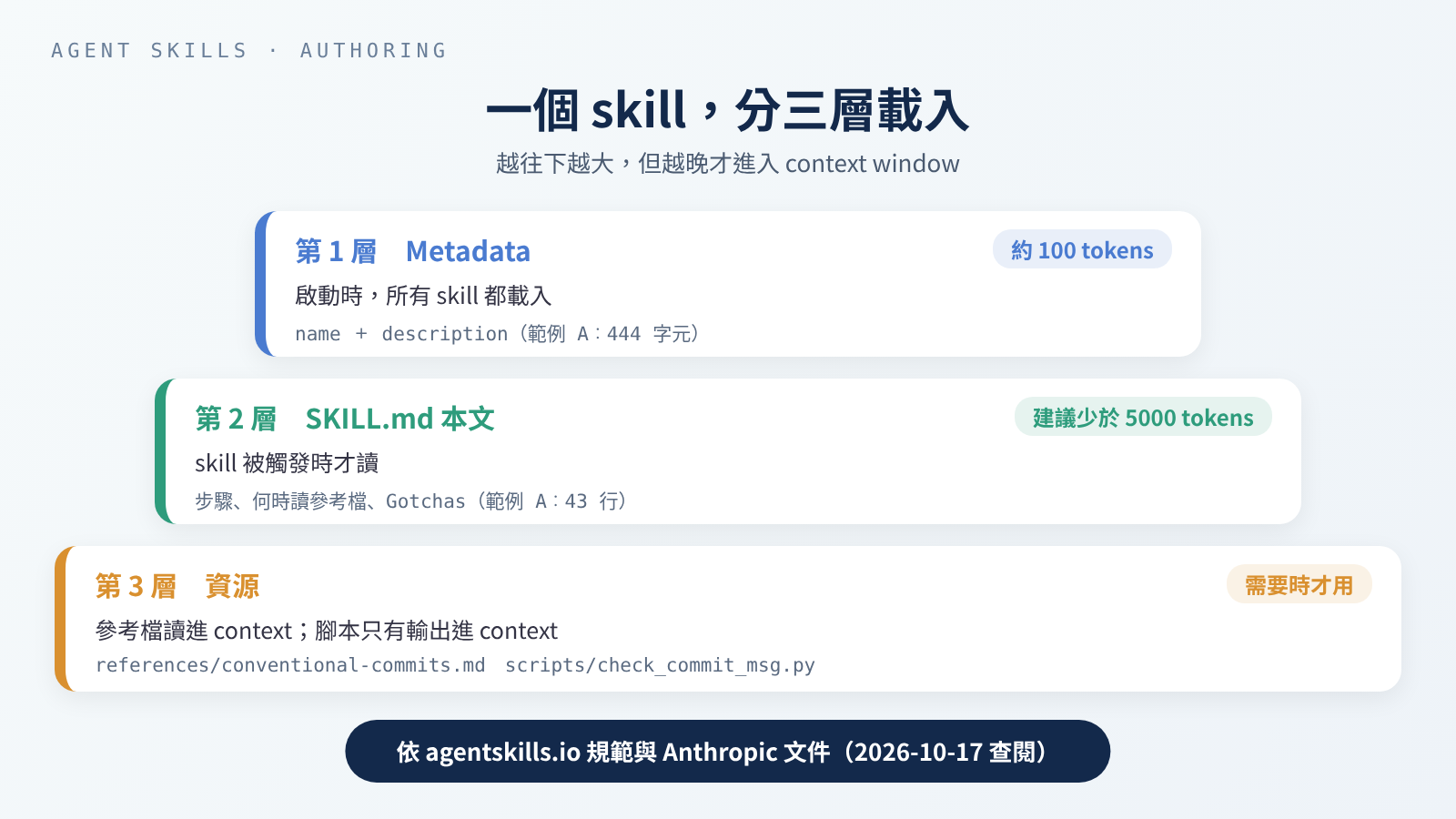 同一個 skill 分三層載入:越往下越大,但越晚才進入 context window。
規範把一個 skill 分成三層:
- Metadata(約 100 tokens):
name和description,啟動時就載入所有 skill 的這一層。 - 本文(建議少於 5000 tokens):整份
SKILL.md,skill 被啟動時才讀。 - 資源:
scripts/、references/、assets/裡的檔案,需要時才載入。
規範也建議 SKILL.md 主檔控制在 500 行以內,檔案引用只往下一層。Anthropic 的撰寫指南解釋了原因:Claude 讀到「被引用的檔案裡又引用了別的檔案」時,可能只用 head -100 這類指令看前幾行,結果讀到不完整的資訊。所以參考檔都要直接從 SKILL.md 連過去;超過 100 行的參考檔,開頭要放一份目錄。
光把檔案拆開還不夠,還要寫明什麼時候讀哪個檔。agentskills.io 的例子是「API 回傳非 200 時,讀 references/api-errors.md」,這比「詳見 references/」有用得多。A 是這樣寫的,類型清單和規則都放在參考檔,平常不必讀:
1
2
Read `references/conventional-commits.md` when you are not sure which type
fits, or when the change removes or renames something other code depends on.
腳本是拿來執行的
腳本和參考檔最大的不同:依 Anthropic 的說明,腳本是透過 bash 執行的,程式碼本身不會進入 context,只有輸出會佔 token。撰寫指南也提醒,要在指示裡寫清楚是「執行它」還是「當參考讀」。
能用程式檢查的規則,就不要用文字叫 AI 自己判斷。A 把格式規則(類型、長度、句號、空行、BREAKING CHANGE 要大寫)都寫進 scripts/check_commit_msg.py;但「這次改動算 fix 還是 feat」腳本判斷不了,還是要 AI 讀過 diff(改動前後的差異)自己決定,這一點寫在 Gotchas。腳本照 agentskills.io 的腳本指南設計:
| 指南的要求 | A 的腳本怎麼做 |
|---|---|
| 不能有互動式提問(agent 跑的是非互動 shell,等輸入會一直卡住) | 訊息從檔案讀,或用 - 從標準輸入讀,不會停下來問問題 |
提供 --help | --help 列出兩種用法、參數、輸出格式、exit code 和範例 |
| 錯誤訊息要說清楚哪裡錯、該怎麼改 | 例如 write the type in lowercase: 'fix' |
| 資料輸出到 stdout,診斷訊息輸出到 stderr | 結果一律是一個 JSON 物件;「暫存區是空的」這類提醒和錯誤寫到 stderr |
exit code 有意義,並寫在 --help 裡 | 0 通過(或有東西在暫存區)、1 有問題(或暫存區是空的)、2 用法錯誤 |
| 輸出長度可以預期 | 只回傳第一行和問題清單,不把整份 diff 印出來 |
完整的 --help 說明,就是附錄裡腳本開頭那段文字。
--repo 這個參數有它的原因。腳本指南說,SKILL.md 裡的指令路徑要寫成相對於 skill 根目錄,因為 agent 是在那裡執行指令的。但 git 要在使用者的 repo 裡跑,所以腳本用 --repo 指定 repo,SKILL.md 開頭也寫明「指令從 skill 目錄執行,<repo> 是使用者的 repo」。
依賴要寫明
腳本指南也建議在 SKILL.md 寫明前置需求,不要假設 agent 的環境已經裝好;執行階段的需求可以寫在 compatibility 欄位。用 npx 這類一次性指令時要鎖版本,例如寫 npx [email protected]。Anthropic 的撰寫指南也有一節就叫「不要假設工具已經安裝」。
A 的腳本只用 Python 標準函式庫,另外需要 git,這兩項都寫進了 compatibility。B 沒有腳本,什麼都不用裝,所以沒寫 compatibility,這也符合規範說的「多數 skill 不需要」。如果腳本要用第三方套件,就用 PEP 723 在腳本裡宣告依賴,並在 SKILL.md 寫明怎麼執行。
不一定要有腳本
B 的規則像是「紀錄沒寫負責人,就不要猜」「只有知道會議日期,才把『下週五』換成日期」,這些都要讀懂句子才能判斷,寫成程式反而不可靠。Anthropic 的撰寫指南把這叫做自由度:要看上下文做決定的事,用文字指示(自由度高);容易出錯、結果必須一致的事,用固定的腳本(自由度低)。A 的格式檢查屬於後者,B 的整理工作屬於前者。
B 唯一的資源是 assets/todo-template.md,一份固定的輸出範本。範本讓每次的結果長得一樣,你或下一個工具才好接著用;撰寫指南的範本模式講的就是這個做法,也提醒要依需要決定範本要多嚴格。
實作 A:寫 Commit 訊息的 Skill
A 的完整結構:
1
2
3
4
5
6
7
8
$ find writing-commit-messages -type f | sort
writing-commit-messages/SKILL.md
writing-commit-messages/evals/evals.json
writing-commit-messages/evals/files/empty-password.diff
writing-commit-messages/evals/files/mixed-changes.diff
writing-commit-messages/evals/trigger-queries.json
writing-commit-messages/references/conventional-commits.md
writing-commit-messages/scripts/check_commit_msg.py
evals/ 是測試用的檔案,後面「分三層測試」會用到。參考檔、腳本和兩份測試題的完整內容放在文末附錄,這裡只看 SKILL.md。
SKILL.md
1
2
3
4
5
6
7
8
9
10
11
12
13
14
15
16
17
18
19
20
21
22
23
24
25
26
27
28
29
30
31
32
33
34
35
36
37
38
39
40
41
42
43
---
name: writing-commit-messages
description: "Writes a git commit message for the currently staged changes, in Conventional Commits format (type(scope): summary, optional body and footers). Use this skill when the user asks for a commit message, asks you to commit what they staged, or asks how to describe their changes, even if they don't say 'Conventional Commits'. Do not use it to explain git commands, to edit commits that were already pushed, or to write changelogs or release notes."
compatibility: Requires git and python3 (tested with git 2.47 and Python 3.13). Standard library only.
metadata:
  version: "1.0"
---

# Writing Commit Messages

## Steps

Run the commands below from this skill's directory. `<repo>` is the path
of the user's git repository.

1. See what is staged: `python3 scripts/check_commit_msg.py --staged --repo <repo>`.
   Exit code 1 means nothing is staged: stop and tell the user. Do not run
   `git add` yourself.
2. Read the staged changes with `git -C <repo> diff --cached`. For a long
   diff, read one file at a time: `git -C <repo> diff --cached -- <path>`.
3. Write the message to a temporary file: a header `type(scope): summary`,
   then a blank line and a short body that says why, if the header alone
   does not make the reason clear.
4. Check it: `python3 scripts/check_commit_msg.py <file>`. Fix every
   problem and check again until it exits 0.
5. Show the message to the user. Run `git -C <repo> commit -F <file>` only
   if the user asked you to commit in this conversation.

Read `references/conventional-commits.md` when you are not sure which type
fits, or when the change removes or renames something other code depends on.

## Gotchas

- The checker only looks at the message. It cannot tell whether `fix` or
  `feat` matches the diff; that call is yours.
- If the staged changes do two unrelated things, suggest splitting them
  into two commits instead of writing one vague message.
- Do not invent issue numbers, `Closes #...` or `Co-authored-by` lines.
  Add footers only when the user gave you the information.
- Never use `git commit -a` or `git add .`: they would include changes the
  user did not stage.
- `BREAKING CHANGE:` must be uppercase. `!` before the colon also marks a
  breaking change.
步驟只有五步,第 4 步是 agentskills.io 說的驗證迴圈:寫完就跑檢查,有錯就改,改完再跑,直到通過為止。
Gotchas 是 agentskills.io 認為很多 skill 裡最有價值的部分:不是一般建議,而是「不講 AI 就容易做錯」的具體事實。例如 git commit -a:git 文件寫明它會自動把已修改和已刪除的檔案加進暫存區,等於把使用者沒挑的改動也一起提交。
參考檔 references/conventional-commits.md 列了 11 種類型和 7 條檢查規則。規範本身只定義 feat 和 fix,其他 9 種來自 commitlint 的 config-conventional。第一行最多 72 字元是我自己定的:git 文件建議標題不超過 50 字元,commitlint 預設允許 100,我取中間。參考檔裡每條規則都標了出處,哪些是規範、哪些是我自己的選擇,一看就知道。
跑一次
我建了一個暫時的 git repo 來試。app/login.py 加了「密碼是空的就直接回傳 False」兩行,並加進暫存區;README.md 也改了,但沒加:
1
2
3
$ git status --short
 M README.md
M  app/login.py
這兩欄分別代表暫存區和工作目錄:M 是改了而且加進暫存區, M 是改了但還沒加。照步驟 1,先看暫存區有什麼:
1
2
3
4
5
6
7
8
9
10
11
12
$ python3 scripts/check_commit_msg.py --staged --repo /tmp/cc-demo
{
  "staged": 1,
  "files": [
    {
      "status": "M",
      "path": "app/login.py",
      "added": 2,
      "deleted": 0
    }
  ]
}
只列出 app/login.py,沒加進暫存區的 README.md 不會出現,exit code 是 0。接著拿一則合格的訊息來檢查,exit code 是 0:
1
2
3
4
5
6
7
8
9
10
11
$ cat good.txt
fix(login): reject empty passwords

Return False before hashing when the password is empty,
instead of passing an empty string to hash_password().
$ python3 scripts/check_commit_msg.py /tmp/cc-msgs/good.txt
{
  "ok": true,
  "header": "fix(login): reject empty passwords",
  "problems": []
}
再拿一則常見的寫法,類型大寫、結尾有句號、第二行沒空出來,exit code 是 1:
1
2
3
4
5
6
7
8
9
10
11
12
13
14
15
16
17
18
19
20
21
22
$ cat bad.txt
Fix(login): Handle empty password.
Users saw an error page when the password field was empty.
$ python3 scripts/check_commit_msg.py /tmp/cc-msgs/bad.txt
{
  "ok": false,
  "header": "Fix(login): Handle empty password.",
  "problems": [
    {
      "rule": "type",
      "message": "write the type in lowercase: 'fix'"
    },
    {
      "rule": "full-stop",
      "message": "do not end the summary with '.'"
    },
    {
      "rule": "blank-line",
      "message": "line 2 must be empty; put the body after a blank line"
    }
  ]
}
三個問題各有一句「該怎麼改」,agent 照著改完再跑一次就好。最後用合格的訊息真的 commit 一次。沒加進暫存區的 README.md 還留在原地;再看暫存區,就變成空的了,exit code 是 1,提醒寫到 stderr:
1
2
3
4
5
6
7
8
9
10
$ git commit -q -F /tmp/cc-msgs/good.txt && git log --format="%h %s" -2 && git status --short
891c9d5 fix(login): reject empty passwords
5c0fd3d chore: initial commit
 M README.md
$ python3 scripts/check_commit_msg.py --staged --repo /tmp/cc-demo
nothing is staged; ask the user what to stage
{
  "staged": 0,
  "files": []
}
實作 B:整理會議待辦的 Skill
B 只有兩個檔案:
1
2
3
$ find meeting-notes-to-todos -type f | sort
meeting-notes-to-todos/SKILL.md
meeting-notes-to-todos/assets/todo-template.md
SKILL.md
1
2
3
4
5
6
7
8
9
10
11
12
13
14
15
16
17
18
19
20
21
22
23
24
25
26
27
28
29
30
31
---
name: meeting-notes-to-todos
description: Turns meeting notes or a meeting transcript into a to-do list of tasks with owners and due dates, in a fixed Markdown format. Use this skill when the user shares notes, minutes or a transcript of a meeting or call and asks what needs to be done, who is doing what, or for the follow-ups, even if they don't say "action items". Do not use it for a plain meeting summary with no tasks, for editing or prioritizing an existing to-do list, or for scheduling a meeting.
metadata:
  version: "1.0"
---

# Meeting Notes to To-dos

## Steps

1. Find every action item in the notes: something a person agreed to do,
   was asked to do, or said they would do. Decisions and opinions are not
   action items unless someone has to act on them.
2. For each item, take the owner and the due date only from the notes.
3. Fill in `assets/todo-template.md` and output only the filled template.
   Write it in the language the notes are written in.

## Rules

- Never guess an owner or a date. If the notes don't say, write
  `(not stated)` in the notes' language and list the item under
  "Needs an owner or date".
- Turn a relative date ("next Friday") into a calendar date only when the
  meeting date is in the notes and the words point to one day. Otherwise
  keep the words as written and list the item under "Needs an owner or date".
- Quote a few words from the notes in the Source column, so the user can
  check where each item came from.
- One task per row. If one sentence holds two tasks, split it.
- If there are no action items, say so in one sentence instead of
  filling the template.
整份都是文字規則,重點在「不要猜」:沒寫負責人就標「未說明」,日期講得不清楚就保留原文,再把這些項目集中列在最後,讓使用者一眼看到要補什麼。
assets/todo-template.md
1
2
3
4
5
6
7
8
9
10
11
## To-dos: {meeting title} ({meeting date, or "date not stated"})

| # | Task | Owner | Due | Source |
| --- | --- | --- | --- | --- |
| 1 | {start with a verb} | {name from the notes} | {YYYY-MM-DD} | "{a few words quoted from the notes}" |

### Needs an owner or date

- #{row number}: {what is missing, e.g. "no owner named", "due date only says 'soon'"}

{Leave out this section when every row has an owner and a due date.}
用一份範例紀錄對照
下面的會議紀錄是我編的範例資料,不是真實會議。後面的表格是我照範本手寫的預期結果,用來說明範本怎麼用,不是 agent 產生的,B 沒有在任何 agent 裡跑過。
1
2
3
4
5
週會 2026-10-12(週一)
- 小林:官網改版的設計稿,週五前給大家看
- 登入頁的錯誤訊息要改,阿哲說他來
- 下個月要交預算表,還沒決定誰做
- 決定:測試環境這週先不升級
照 B 的規則,預期的結果應該長這樣:
1
2
3
4
5
6
7
8
9
10
11
12
## 待辦:週會(2026-10-12)

| # | 待辦 | 負責人 | 期限 | 出處 |
| --- | --- | --- | --- | --- |
| 1 | 把官網改版的設計稿給大家看 | 小林 | 2026-10-16 | 「設計稿,週五前給大家看」 |
| 2 | 修改登入頁的錯誤訊息 | 阿哲 | (未說明) | 「阿哲說他來」 |
| 3 | 交預算表 | (未說明) | 下個月 | 「還沒決定誰做」 |

### 需要補負責人或期限

- #2:沒有期限
- #3:沒有負責人;期限只寫「下個月」
幾個地方對應到規則:會議日期是週一,所以「週五前」可以換成 2026-10-16;「下個月」指的不是某一天,就保留原文;「測試環境先不升級」是決定,沒有人要因此做什麼,所以不列為待辦。
分三層測試
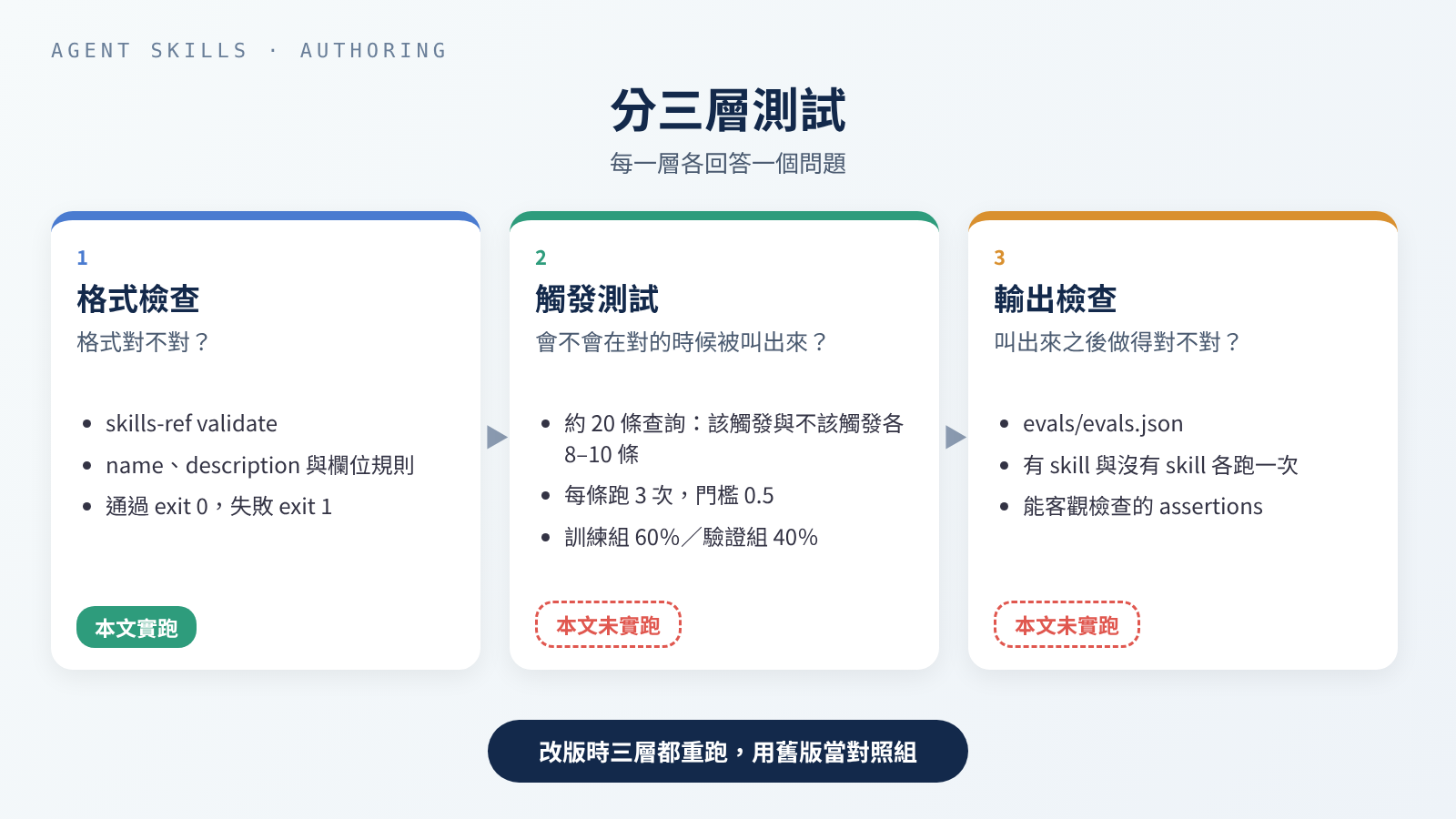 三層各測一件事:格式對不對、會不會被叫出來、叫出來之後做得對不對。
格式檢查
規範推薦用 skills-ref 驗證 frontmatter。要先說清楚:它的 README 寫明 intended for demonstration purposes only, not meant to be used in production,只是示範用的參考實作,不是正式的產品。
我用固定的 commit 安裝:
1
2
3
4
$ git clone -q https://github.com/agentskills/agentskills.git && cd agentskills && git checkout -q 69ef37e9424c0a7ea9dd2293b559e43ec8176379 && git log -1 --format='%h %cs'
69ef37e 2026-08-09
$ python3 -m venv .venv && .venv/bin/pip install -q -e skills-ref && .venv/bin/skills-ref --version
skills-ref, version 0.1.0
第一次驗證 A 就失敗了。當時 description 還沒加引號:
1
2
3
4
5
6
$ skills-ref validate writing-commit-messages
Validation failed for writing-commit-messages:
  - Invalid YAML in frontmatter: mapping values are not allowed here
  in "<unicode string>", line 3, column 119:
     ... onal Commits format (type(scope): summary, optional body and foo ...
                                         ^ (line: 3)
問題出在 description 裡的 type(scope): summary。YAML 把「冒號加空白」當成「名稱: 值」的分隔,同一行出現第二個,整份 front matter 就解析失敗。修法是把整段值用雙引號包起來,原本句子裡的雙引號改成單引號。B 的 description 沒有「冒號加空白」,所以不加引號也能通過。
這個錯在 Claude Code 裡不會有人提醒你:前面說過,它在 YAML 解析失敗時仍會載入 skill,只是所有欄位都是空的。我的推論是,description 變成空的,skill 就很難被自動叫出來;這一點我沒有實測。
加上引號後,兩個都通過,各只有一行,exit code 都是 0:
1
2
3
4
$ skills-ref validate writing-commit-messages
Valid skill: writing-commit-messages
$ skills-ref validate meeting-notes-to-todos
Valid skill: meeting-notes-to-todos
接著拿 A 故意做三個錯誤的版本:名稱有連續的 --、資料夾名稱和 name 對不上、多加一個 Claude Code 專屬的欄位 when_to_use。三個各跑一次,exit code 都是 1:
1
2
3
4
5
6
7
8
9
$ skills-ref validate bad--name
Validation failed for bad--name:
  - Skill name cannot contain consecutive hyphens
$ skills-ref validate commit-messages
Validation failed for commit-messages:
  - Directory name 'commit-messages' must match skill name 'writing-commit-messages'
$ skills-ref validate writing-commit-messages
Validation failed for writing-commit-messages:
  - Unexpected fields in frontmatter: when_to_use. Only ['allowed-tools', 'compatibility', 'description', 'license', 'metadata', 'name'] are allowed.
最後這個最值得注意:同一個欄位,在 Claude Code 裡完全合法,到了 skills-ref 就是錯誤。這就是前面說「只用六個欄位」的原因。
Claude Code 另外提供 claude plugin validate <skills 目錄>,可以找出 frontmatter 解析失敗的 SKILL.md,需要 v2.1.233 以上。我的機器上沒有 Claude Code,所以沒有跑。
觸發測試
格式對了,不代表它會在對的時候被叫出來。agentskills.io 的最佳化指南建議這樣測:
- 準備約 20 條查詢,8–10 條應該觸發,8–10 條不應該觸發。
- 不該觸發的,要用「近似但其實不同」的查詢。像「寫一個費氏數列函式」這種完全無關的題目,什麼也測不出來。
- 每條跑 3 次,算觸發率,門檻預設 0.5。
- 把題目分成訓練組(約 60%)和驗證組(約 40%)。只看訓練組的失敗來改 description,驗證組只用來確認改善有沒有類推到新題目,避免 description 過度貼合這幾題。
- 大約 5 輪就夠;如果一直沒進步,問題可能出在題目本身。
Claude Code 的文件用的是同一個思路:同一組查詢,在開著 skill 和關掉 skill 的新 session 裡各跑一次,互相比較。一定要開新 session,因為寫 skill 時留下的對話內容,會遮住文字裡沒寫清楚的地方。
我替 A 寫了 20 條查詢,10 條該觸發、10 條不該觸發,訓練組 12 條、驗證組 8 條,兩組裡該觸發和不該觸發的各佔一半。split 是我自己加的欄位,用來把分組固定下來,指南的範例格式只有 query 和 should_trigger。完整的 JSON 在附錄,這裡挑幾條:
| 查詢 | 該觸發嗎 | 為什麼挑它 |
|---|---|---|
| 「這次改動要怎麼描述比較好?我要提交了」 | 該 | 沒提到 commit 訊息這幾個字 |
| 「fix the typo in the last commit message, it’s already pushed to main」 | 不該 | 一樣是 commit 訊息,但要改的是已經推上去的 commit |
| 「幫我把這個月的 commit 整理成 release notes」 | 不該 | 一樣在講 commit,要的卻是 release notes |
| 「幫我寫一個 commit-msg hook,用 Node 檢查訊息格式」 | 不該 | 連「檢查訊息格式」都一樣,但要的是寫程式 |
本文未實跑觸發率。 觸發測試要在真的 agent 裡跑,看它有沒有去讀
SKILL.md。我跑範例的機器上沒有claude、codex、cursor-agent、gemini、copilot這些 CLI(實際用command -v檢查過),所以這裡只有題目和方法,沒有任何觸發率數字。A 的 JSON 和 B 的那張對照表,都可以拿到自己的 agent 裡照指南的方法跑。
輸出檢查
被叫出來之後,還要做得對。agentskills.io 的輸出評測指南建議把測試題放在 evals/evals.json,每題有使用者會怎麼問(prompt)、成功的樣子(expected_output)、需要的檔案(files),看過第一輪結果後再補上可以客觀檢查的 assertions。指南建議先從 2–3 題開始。A 的三題(完整內容在附錄):
| 題目 | 想確認的事 |
|---|---|
1. 暫存區是 empty-password.diff,請它寫訊息但先不要 commit | 類型是 fix、訊息通過腳本檢查、沒有編出 issue 編號、沒有執行 git commit |
2. 暫存區是 mixed-changes.diff,裡面混了 README 文字和新的登出功能 | 建議拆成兩個 commit,兩則訊息都通過檢查 |
| 3. 使用者說「我應該都加進暫存區了」,其實暫存區是空的 | 說明暫存區是空的,不自己執行 git add |
兩個 .diff 檔都是從前面那個暫時 repo 實際用 git show 和 git diff --cached 匯出的,不是手寫的。
每題要跑兩次:一次有 skill,一次沒有(改版時則用舊版當對照),每次都要從乾淨的 context 開始。assertion 要能客觀判斷,像「輸出是合法的 JSON」就比「輸出很好」有用。指南也提到,機械性的檢查用腳本做,比讓 LLM 判斷可靠。以 A 來說,「訊息通過檢查」直接用 A 自己的腳本判斷;「沒有執行 git commit」比對前後的 git log -1 就知道,不必請 AI 打分數。
Anthropic 的撰寫指南還多提醒一點:skill 的效果和搭配的模型有關,要用你打算搭配的所有模型都測一次。
本文未實跑輸出評測。 原因和觸發測試一樣:沒有可用的 agent,所以沒有「有 skill」和「沒有 skill」的對照結果。附錄的
evals.json只是寫好的題目。B 沒有寫evals.json,前面那份手寫的預期結果可以當它第一題的expected_output。
換一個 Agent 還能用嗎
Agent Skills 是一個開放標準。有官方文件說明支援的,包括 Claude Code、Codex、Cursor 和 GitHub Copilot;agentskills.io 的 Client Showcase 還列了更多產品。四家各自會到這些地方找 skill:
| 工具 | 專案內 | 個人 |
|---|---|---|
| Claude Code(文件) | .claude/skills/<name>/SKILL.md | ~/.claude/skills/<name>/SKILL.md |
| Codex(文件) | 從目前工作目錄往上,到 repo 根目錄為止,每一層的 .agents/skills | $HOME/.agents/skills;另有管理者層級(ADMIN)的 /etc/codex/skills |
| Cursor(文件) | .agents/skills/、.cursor/skills/;為了相容,也讀 .claude/skills/、.codex/skills/ | ~/.agents/skills/、~/.cursor/skills/;為了相容,也讀 ~/.claude/skills/、~/.codex/skills/ |
| GitHub Copilot(文件) | .github/skills、.claude/skills、.agents/skills | ~/.copilot/skills、~/.agents/skills |
從這張表可以推論出一件事(這是推論,不是哪份文件寫的):依 2026 年 10 月 17 日的文件,.agents/skills/ 同時出現在 Codex、Cursor、Copilot 的清單裡,但 Claude Code 的文件沒有列這個路徑;反過來,.claude/skills/ 有 Claude Code、Cursor、Copilot,卻沒有 Codex。也就是說,沒有一個路徑能同時被四家讀到。
範例做了哪些靜態檢查
兩個 skill 我都沒有在任何一個 agent 裡實際跑過,所以不能說「已在 X 上測過」。能做的是靜態可攜性檢查,也就是不用執行 agent,只看檔案本身:
| 檢查 | 結果 |
|---|---|
| frontmatter 只用規範的六個欄位 | 是。A:name、description、compatibility、metadata;B:name、description、metadata。兩個都通過 skills-ref validate |
有寫 name,而且和資料夾同名 | 是。Codex 文件寫明 SKILL.md 必須有 name 和 description;Cursor 也要求 name 和資料夾同名 |
| 沒用任何工具專屬的本文語法 | 是。沒有用 Claude Code 的 !`指令` 動態注入,也沒用 ${CLAUDE_SKILL_DIR};A 的腳本路徑都是相對於 skill 根目錄的寫法,這是腳本指南的建議 |
最後一點要特別說明。Claude Code 的 !`指令` 會在 Claude 看到 skill 之前先執行指令,把輸出塞進本文;${CLAUDE_SKILL_DIR} 則會換成 skill 所在的資料夾。Claude Code 的文件以動態注入為例寫明,這類只屬於 Claude Code 的本文功能,在 claude.ai 和 API 上不會生效。其他工具我找不到文件說明,所以只能說:不能假設它們會生效。
版本與維護
規範裡和版本有關的,只有 metadata 可以放一個 version: "1.0",但它沒有定義版本號代表什麼。用 git tag 或 CHANGELOG 管版本是慣例,不是規範;我的建議是每次改 description 或腳本的行為,都打一個 tag,寫一行變更說明。例如團隊決定多一種類型,就要同時改參考檔的表格和腳本裡的 TYPES,這就是一次該記下來的改版。
改版的流程,輸出評測指南給了一個很實用的做法:改之前先把舊版複製一份,用舊版當對照組(放在 old_skill/),對同一組題目重跑。這樣才知道新版是真的變好,還是只是換了一種錯法。
另外三個維護習慣:
- 不要寫會過期的資訊。 Anthropic 的撰寫指南建議,已經不用的做法收進一個「old patterns」區塊,不要混在主要步驟裡。
- 每次糾正 AI,就補一條 Gotcha。 agentskills.io 說,這是改善 skill 最直接的方法之一。
- 定期清掉沒在用的 skill。 每個 skill 都會佔用前面說的清單預算,不管有沒有用到。Claude Code 的
/skill-doctor可以列出每個 skill 的成本和使用次數,需要 v2.1.252 以上。
作者該替使用者做的安全準備
裝別人的 skill 有哪些風險、使用者該怎麼檢查,這篇供應鏈安全的文章已經整理過了。這裡只談寫 skill 的人能先做好的事:
- 不要讓 skill 抓外部網址的內容當指示。 Anthropic 的文件寫明,會抓外部資料的 skill 風險特別高,抓回來的內容可能藏著惡意指令;就算是可信的 skill,外部依賴一變也可能被汙染。
allowed-tools給到最小。 這個欄位在 Claude Code 裡,會讓 skill 在被叫用的那一輪不經詢問就使用列出的工具。文件特別寫明,workspace trust 擋不住這個欄位:repo 裡的 skill 可以替自己開權限,連在沒信任過的資料夾裡用-p執行也會套用。兩個範例都沒有用這個欄位。- 腳本裡不放任何秘密資訊。 這是我的做法,不是哪份文件的規定:金鑰、權杖一律從環境變數讀,不寫進 skill 的任何檔案,因為整個資料夾都會被分享、被提交到 repo。
- 依賴要鎖版本。 腳本指南要求一次性指令寫明版本,這樣同一個指令隔一段時間再跑,結果也會一樣。
- 會改東西的操作要提供
--dry-run。 腳本指南建議,破壞性或會改變狀態的操作,讓 agent 能先預覽會發生什麼。A 的腳本只讀 git 的狀態、從不寫檔;真正會改東西的git commit不在腳本裡,而是留到使用者要求時才執行,所以腳本不需要這個參數。
使用者會把你的 skill 當成軟體來審查,那你能做的,就是讓它好審:檔案少、每個腳本做什麼一看就懂、沒有連到外面的東西。
我的判斷
以下是我的觀點,不是哪份文件的結論。
最值得花時間的是 description 和 Gotchas。 資料夾結構、欄位規則這些,照規範做一次就好,skills-ref 也會幫你抓錯,像 A 那個少了引號的 description 就是它抓到的。真正決定 skill 好不好用的,是它會不會在對的時候被叫出來,以及叫出來之後會不會踩到你早就知道的坑。
能寫成腳本的規則就寫成腳本,要判斷的事就留給文字。 A 的格式規則交給腳本,每次結果都一樣;「這次算 fix 還是 feat」交給 AI 讀 diff。B 整件事都要讀懂句子,硬寫腳本只會更不可靠,給它一份範本就夠了。
為了跨 agent,寧可放棄一些方便的欄位。 when_to_use、disable-model-invocation 在 Claude Code 裡都很好用,但一寫進 SKILL.md,就過不了 skills-ref 和 claude.ai 上傳。如果這個 skill 只給自己在 Claude Code 裡用,那就沒關係;要給團隊、跨工具用,我會只用六個欄位。
沒跑過觸發測試的 description,只是一個猜測。 這篇的兩個範例也一樣。我寫了題目,但在真的跑過之前,我不知道有人問「這次改動要怎麼描述」的時候,A 會不會被叫出來。
延伸閱讀
規範與方法(agentskills.io):
- Specification:目錄結構、六個欄位、漸進式揭露
- Best practices for skill creators:範圍、Gotchas、驗證迴圈
- Optimizing skill descriptions:description 寫法與觸發測試
- Evaluating skill output quality:
evals.json與有無 skill 的對照 - Using scripts in skills:腳本介面設計
- Client Showcase:支援 Agent Skills 的產品
- skills-ref:驗證工具(示範用)
各家文件:
- Anthropic:Agent Skills overview、Skill authoring best practices
- Claude Code:Extend Claude with skills
- Codex:Build skills
- Cursor:Agent Skills
- GitHub Copilot:About agent skills
範例 A 用到的 commit 訊息規則:
- Conventional Commits 1.0.0:訊息結構、
feat/fix、BREAKING CHANGE - commitlint config-conventional:常用的 11 種類型
- git commit 文件:
-a的行為、標題長度建議
本站相關文章:
- mattpocock/skills 系列導讀:想先用現成的 skill
- 系列第 6 篇:
writing-for-agents的寫作原則 - 系列第 4 篇:只能手動啟動的 skill 實例
- 裝了第三方 skill 和 MCP 之後,你的 Coding Agent 多了哪些破口?:使用者端的風險與檢查清單
附錄:範例 A 的完整檔案
references/conventional-commits.md
1
2
3
4
5
6
7
8
9
10
11
12
13
14
15
16
17
18
19
20
21
22
23
24
25
26
27
28
29
30
31
32
33
34
35
36
37
38
39
40
41
42
43
44
45
46
47
48
49
50
51
# Conventional Commits: Rules Used by This Skill

Based on Conventional Commits 1.0.0 (https://www.conventionalcommits.org/en/v1.0.0/).
Rows marked "skill choice" are this skill's own rules, not the spec's.

## Message shape

```
type(scope)!: summary

body (optional, after one blank line)

footers (optional, after one blank line), e.g. Refs: #123
```

## Types

| Type | Use it for |
| --- | --- |
| `feat` | A new feature for users (spec: MUST be used for new features) |
| `fix` | A bug fix (spec: MUST be used for bug fixes) |
| `docs` | Documentation only |
| `style` | Formatting, white space; no change in behavior |
| `refactor` | Code change that neither fixes a bug nor adds a feature |
| `perf` | Performance improvement |
| `test` | Adding or fixing tests |
| `build` | Build system or dependencies |
| `ci` | CI configuration and scripts |
| `chore` | Other changes that don't touch source or test files |
| `revert` | Reverts an earlier commit |

The spec only defines `feat` and `fix`; the other nine are the list used by
@commitlint/config-conventional.

## Rules the checker enforces

| rule | Requirement | Source |
| --- | --- | --- |
| `header` | First line is `type(scope)!: summary`; scope and `!` are optional; a colon and one space before the summary | spec |
| `type` | One of the types above, in lowercase | list: commitlint; lowercase: skill choice |
| `length` | Header is at most 72 characters | skill choice (git docs suggest 50 or fewer for the title; commitlint allows 100) |
| `full-stop` | Summary does not end with `.` | commitlint |
| `blank-line` | Line 2 is empty when there is a body | spec |
| `breaking` | A breaking-change footer is written `BREAKING CHANGE:` or `BREAKING-CHANGE:` in uppercase | spec |
| `empty` | The message is not empty | — |

## Breaking changes

Mark a change that breaks existing users with `!` before the colon
(`feat(api)!: drop the v1 endpoint`), or with a footer
`BREAKING CHANGE: <what breaks>`, or both.
scripts/check_commit_msg.py
1
2
3
4
5
6
7
8
9
10
11
12
13
14
15
16
17
18
19
20
21
22
23
24
25
26
27
28
29
30
31
32
33
34
35
36
37
38
39
40
41
42
43
44
45
46
47
48
49
50
51
52
53
54
55
56
57
58
59
60
61
62
63
64
65
66
67
68
69
70
71
72
73
74
75
76
77
78
79
80
81
82
83
84
85
86
87
88
89
90
91
92
93
94
95
96
97
98
99
100
101
102
103
104
105
106
107
108
109
110
111
112
113
114
115
116
117
118
119
120
121
122
123
124
125
126
127
128
129
130
131
132
133
134
135
136
137
138
139
#!/usr/bin/env python3
"""Check a commit message against Conventional Commits, or list staged files.

Usage:
  python3 scripts/check_commit_msg.py [--max-header N] FILE
  python3 scripts/check_commit_msg.py --staged [--repo PATH]

FILE is a text file holding the commit message; use - to read stdin.

Options:
  --staged          List the files staged in git instead of checking a message
  --repo PATH       Repository for --staged (default: current directory)
  --max-header N    Longest allowed header line (default: 72)
  -h, --help        Show this help and exit

Output: one JSON object on stdout; errors go to stderr.
Exit codes:
  0  message is valid / at least one file is staged
  1  message has problems / nothing is staged
  2  usage error (bad option, file not found, not a git repository)

Examples:
  python3 scripts/check_commit_msg.py /tmp/msg.txt
  python3 scripts/check_commit_msg.py --staged --repo ~/code/my-app
"""
import argparse
import json
import re
import subprocess
import sys
from pathlib import Path

TYPES = ("build", "chore", "ci", "docs", "feat", "fix", "perf",
         "refactor", "revert", "style", "test")
HEADER_RE = re.compile(r"^(?P<type>[A-Za-z]+)(?:\((?P<scope>[^()\s]+)\))?"
                       r"(?P<bang>!)?: (?P<summary>\S.*)$")
BREAKING_RE = re.compile(r"^breaking[ -]change:", re.IGNORECASE)


class UsageError(Exception):
    pass


def check_message(text, max_header):
    lines = text.rstrip().splitlines()
    if not lines or not lines[0].strip():
        return "", [("empty", "the message is empty or starts with a blank line")]
    header, probs = lines[0], []
    m = HEADER_RE.match(header)
    if not m:
        probs.append(("header", "first line must look like 'type(scope): summary', "
                      "e.g. 'fix(login): handle empty password'"))
    else:
        t = m["type"]
        if t.lower() not in TYPES:
            probs.append(("type", f"'{t}' is not an allowed type; use one of: "
                          + ", ".join(TYPES)))
        elif t != t.lower():
            probs.append(("type", f"write the type in lowercase: '{t.lower()}'"))
        if m["summary"].rstrip().endswith("."):
            probs.append(("full-stop", "do not end the summary with '.'"))
    if len(header) > max_header:
        probs.append(("length", f"header is {len(header)} characters, "
                      f"limit is {max_header}"))
    if len(lines) > 1 and lines[1].strip():
        probs.append(("blank-line", "line 2 must be empty; put the body after a blank line"))
    for n, line in enumerate(lines[1:], start=2):
        if BREAKING_RE.match(line) and not line.startswith(
                ("BREAKING CHANGE:", "BREAKING-CHANGE:")):
            probs.append(("breaking", f"line {n}: write 'BREAKING CHANGE:' in uppercase"))
    return header, probs


def git(repo, *args):
    try:
        out = subprocess.run(["git", "-C", repo, *args], capture_output=True,
                             text=True, check=True)
    except FileNotFoundError:
        raise UsageError("git is not installed or not on PATH")
    except subprocess.CalledProcessError as e:
        raise UsageError(f"git failed in {repo}: {e.stderr.strip()}")
    return out.stdout


def staged(repo):
    """Return the staged files with their status and line counts."""
    git(repo, "rev-parse", "--git-dir")  # fails with exit 2 outside a repo
    counts = {}
    for line in git(repo, "diff", "--cached", "--numstat", "--no-renames").splitlines():
        added, deleted, path = line.split("\t", 2)
        counts[path] = (added, deleted)
    files = []
    for line in git(repo, "diff", "--cached", "--name-status", "--no-renames").splitlines():
        status, path = line.split("\t", 1)
        added, deleted = counts.get(path, ("-", "-"))
        files.append({"status": status, "path": path,  # "-" = binary file
                      "added": int(added) if added.isdigit() else None,
                      "deleted": int(deleted) if deleted.isdigit() else None})
    return files


def main(argv):
    ap = argparse.ArgumentParser(add_help=False)  # bad options exit with 2
    ap.add_argument("-h", "--help", action="store_true")
    ap.add_argument("--staged", action="store_true")
    ap.add_argument("--repo", default=".")
    ap.add_argument("--max-header", type=int, default=72)
    ap.add_argument("file", nargs="?")
    args = ap.parse_args(argv)
    if args.help:
        print(__doc__.strip())
        return 0
    if args.staged:
        files = staged(args.repo)
        if not files:
            print("nothing is staged; ask the user what to stage", file=sys.stderr)
        print(json.dumps({"staged": len(files), "files": files}, ensure_ascii=False, indent=2))
        return 0 if files else 1
    if not args.file:
        raise UsageError("give a message file (or - for stdin), or use --staged")
    if args.file == "-":
        text = sys.stdin.read()
    elif Path(args.file).is_file():
        text = Path(args.file).read_text(encoding="utf-8")
    else:
        raise UsageError(f"file not found: {args.file}")
    header, probs = check_message(text, args.max_header)
    print(json.dumps({"ok": not probs, "header": header,
                      "problems": [{"rule": r, "message": m} for r, m in probs]},
                     ensure_ascii=False, indent=2))
    return 1 if probs else 0


if __name__ == "__main__":
    try:
        sys.exit(main(sys.argv[1:]))
    except UsageError as e:
        print(f"Error: {e}", file=sys.stderr)
        sys.exit(2)
evals/evals.json
1
2
3
4
5
6
7
8
9
10
11
12
13
14
15
16
17
18
19
20
21
22
23
24
25
26
27
28
29
30
31
32
33
34
35
36
37
38
39
{
  "skill_name": "writing-commit-messages",
  "evals": [
    {
      "id": 1,
      "prompt": "This is what I have staged right now (see evals/files/empty-password.diff). Write me a commit message for it, but don't commit yet.",
      "expected_output": "One Conventional Commits message, e.g. a fix(login) header about rejecting empty passwords, that the checker accepts, and no commit is made.",
      "files": ["evals/files/empty-password.diff"],
      "assertions": [
        "scripts/check_commit_msg.py exits 0 on the proposed message",
        "The type is fix",
        "The message does not mention issue numbers or Closes/Refs footers",
        "No git commit was run"
      ]
    },
    {
      "id": 2,
      "prompt": "幫我把暫存區的東西寫成 commit 訊息,內容在 evals/files/mixed-changes.diff",
      "expected_output": "指出暫存區混了兩件無關的事(README 文字、新增 logout),建議拆成兩個 commit,並各給一則符合格式的訊息。",
      "files": ["evals/files/mixed-changes.diff"],
      "assertions": [
        "The response suggests splitting the changes into two commits",
        "Each proposed message passes scripts/check_commit_msg.py",
        "No git add or git commit was run"
      ]
    },
    {
      "id": 3,
      "prompt": "commit message please, I think I staged everything",
      "expected_output": "The skill finds that nothing is staged, says so, and does not stage files itself.",
      "files": [],
      "assertions": [
        "The response says nothing is staged",
        "git add was not run",
        "No commit message is presented as ready to use"
      ]
    }
  ]
}
evals/trigger-queries.json
1
2
3
4
5
6
7
8
9
10
11
12
13
14
15
16
17
18
19
20
21
22
[
  { "query": "幫我寫這次的 commit 訊息,改動我已經 git add 了", "should_trigger": true, "split": "train" },
  { "query": "write a commit message for what I staged", "should_trigger": true, "split": "train" },
  { "query": "I fixed the login crash and staged it, commit it for me", "should_trigger": true, "split": "train" },
  { "query": "這次改動要怎麼描述比較好?我要提交了", "should_trigger": true, "split": "train" },
  { "query": "is 'Fixed stuff' an ok commit message for my staged changes? suggest a better one", "should_trigger": true, "split": "train" },
  { "query": "幫我看暫存區改了什麼,然後給我一行 commit 標題", "should_trigger": true, "split": "train" },
  { "query": "staged the README update, need a message in our feat/fix format", "should_trigger": true, "split": "validation" },
  { "query": "我加了登出功能也加進暫存區了,幫我提交", "should_trigger": true, "split": "validation" },
  { "query": "what should the commit say for these staged changes? keep it short", "should_trigger": true, "split": "validation" },
  { "query": "幫我寫 commit,這次是把 API 的 v1 拿掉,會影響舊的呼叫端", "should_trigger": true, "split": "validation" },
  { "query": "git rebase 和 git merge 差在哪?", "should_trigger": false, "split": "train" },
  { "query": "fix the typo in the last commit message, it's already pushed to main", "should_trigger": false, "split": "train" },
  { "query": "幫我把這個月的 commit 整理成 release notes", "should_trigger": false, "split": "train" },
  { "query": "how do I unstage a file I added by mistake?", "should_trigger": false, "split": "train" },
  { "query": "幫我寫一個 commit-msg hook,用 Node 檢查訊息格式", "should_trigger": false, "split": "train" },
  { "query": "write the PR description for this branch", "should_trigger": false, "split": "train" },
  { "query": "Conventional Commits 的 feat 跟 fix 會怎麼影響版本號?解釋就好", "should_trigger": false, "split": "validation" },
  { "query": "squash my last three commits into one", "should_trigger": false, "split": "validation" },
  { "query": "幫我回覆同事在 PR 上的 review 留言", "should_trigger": false, "split": "validation" },
  { "query": "generate a CHANGELOG.md from the git history", "should_trigger": false, "split": "validation" }
]